---
title: "How to Add a Database Target"
url: "https://dm0bkdes5q7a2ls.productfruits.help/en/article/data-assets-and-targets-database-target"
language: "en"
last_updated: "2026-09-28T15:15:59.208Z"
---
# How to Add a Database Target
Use the information in this topic to add a database Target such as SQL, Oracle, mongoDB, Snowflake, etc. in Spirion Sensitive Data Platform.
## Prerequisites
Before you add a database Target in Spirion Sensitive Data Platform, you must test to verify the database connection string is valid using the Spirion Agent GUI (also called the "Spirion Client").
- See the article [How to Test and Configure Database Connection Strings](https://dm0bkdes5q7a2ls.productfruits.help/en/article/configure-database-connection-strings).
## How to Add a Database Target
Use the following steps to add a new database Target in Spirion Sensitive Data Platform:
1. From the left side navigation menu select Data Asset Inventory > Data Assets and Targets.
2. The "Data Assets and Targets" page opens.
3. Select the TARGETS tab at the top of the page.
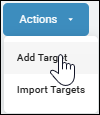
4. In the upper right corner of the page, click the blue **Actions** button and select "Add Target" from the sub-menu that appears.
5. The "Add New Target" pop-up window opens.
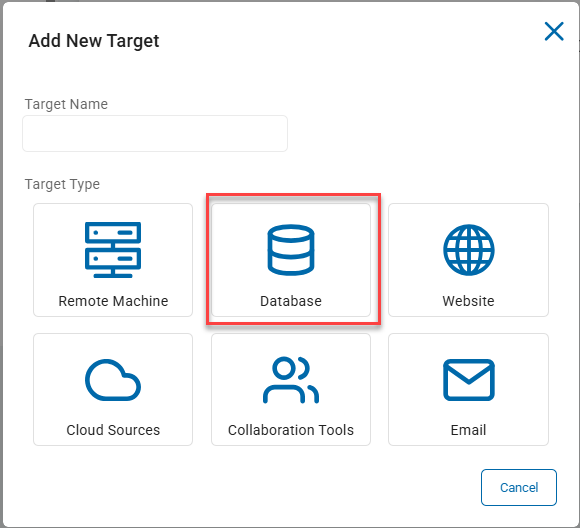
6. 1. **Target Name**: Enter the name of the database Target. Make the name descriptive by including identifiers such as the database name, database type, location, department, status, and/or date.
2. Under "Target Type" click the **Database** tile to proceed or the **Cancel** button to discard.
7. The **Select a Database to Configure** pop-up window appears
8. 1. Select the tile of the database you wish to add as a Target:
2. - Oracle
- SQLServer
- SYBASE
- IBM DB2
- Informix
- InterBase
- SQLBase
- SAP SQL Anywhere
- MySQL
- SQLite
- PostgreSQL
- ODBC
- OLEDB
- mongoDB
- Snowflake
3. Click the **Back** button to return to the previous screen or the **Cancel** button to discard.
4. When you select a SQL database, the **Add New SQL Database Target** window enables you to select the option *Active Directory Authentication (optional)*.
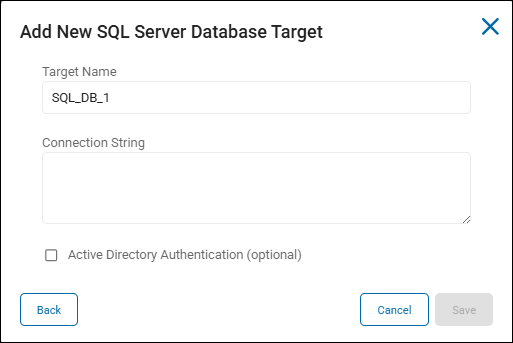
5. This option enables you to connect an Agent to a remote SQL database server.
6. Otherwise, continue with these steps.
7. 1. In the **Connection String** field enter the connection string to your type of database.
2. Examples are provided below.
8. Click the **Save** button to save, **Cancel** button to discard, or **Back** button to return to the previous screen.
9. Your database Target is now successfully added to Spirion Sensitive Data Platform.
## Database Connector Table
| **Database Connector** | **Agent / connection-string "DB Type"** |
| --- | --- |
| Oracle | 2 |
| SQL Server | 3 |
| Sybase | 8 |
| IBM DB2 | 6 |
| Informix | 7 |
| InterBase | 4 |
| SQLBase | 5 |
| SQL Anywhere | 12 |
| MySQL | 9 |
| SQLite | 11 |
| PostgreSQL | 10 |
| ODBC | 1 |
| OLEDB | \-- |
| MongoDB | MongoDB |
| Snowflake | 13 |
## Sample Connection Strings
### DB2 Connection String
```
Provider=DB2SQLAPI;DB Name=database_name;Username=user_name;Password=password;DB Type=6;
```
### Informix Connection String
```
Provider=InformixSQLAPI;DB Name=database_name;Username=user_name;Password=password;DB Type=7;
```
### Informix Connection ODBC Driver DSN-less Connection
```sql
Driver={IBM INFORMIX ODBC DRIVER}; Server=INFORMIX_SERVERNAME; Host=DB_SERVER_HOSTNAME_OR_IP; Service=PORT_NUMBER;
Database=DATABASE_NAME; Protocol=onsoctcp; UID=DB_USERNAME; PWD=DB_PASSWORD;
```
### Informix Connection ODBC DSN-Based Connection
```
DSN=InformixProdDSN; UID=DB_USERNAME; PWD=DB_PASSWORD; Example: DSN=InformixProdDSN; UID=spirion_svc; PWD=AnotherStr0ngPass;
```
### InterBase Connection String
```
Provider=InterBaseSQLAPI;DB Name=database_name;Username=user_name;Password=password;DB Type=4;
```
### MongoDB Connection String
```xml
```
### MS SQL Connection Strings
#### SQL Server Authentication
```
Provider=MSSqlSQLAPI;DB Name=database_name;Server=server_name;Username=user_name;Password=password;DB Type=3;
```
#### Windows/AD Authentication
```
Provider=MSSqlSQLAPI;DB Name=database_name;Server=server_name;Trusted_Connection=yes
```
### MySQL Connection String
```sql
Provider=MySQLSQLAPI;DB Name=database_name;Server=server_name;Port=port;Username=user_name;Password=password;DB Type=9;
```
### ODBC (generic) Connection String
```xml
Provider=ODBCSQLAPI;DB Name=database_name;Username=user_name;Password=password;DB Type=1;
```
### OLEDB (Microsoft OLE DB)
```xml
Provider=OLEDBAPI;DB Name=;Server=;Username=;Password=;APPNAME=SDP;
```
### Oracle Connection String
```
Provider=OracleSQLAPI;DB Name=instance_name;Host=host_name;Port=port;Service=service_name;Username=user_name;Password=password;DB Type=2;APPNAME=SDP;
```
### PostgreSQL Connection String
```sql
Provider=PostgreSQLAPI;DB Name=database_name;Server=server_name;Port=port;Username=user_name;Password=password;DB Type=10;APPNAME=SDP;
```
### Snowflake Connection String
```
DRIVER={SnowflakeDSIIDriver};Server=HOSTNAME;Database=DBNAME;Warehouse=WAREHOUSENAME;UID=USER;PWD=PASSWORD;DB Type=13
```
### SQLBase Connection String
```sql
Provider=SQLBaseSQLAPI;DB Name=database_name;Username=user_name;Password=password;DB Type=5;
```
### SQL Anywhere Connection String
```sql
Provider=SQLAnywhereSQLAPI;DB Name=database_name;Server=server_name;Host=host_name;Username=user_name;Password=password;DB Type=12;
```
### SQLite Connection String
```sql
Provider=SQLiteSQLAPI;DB Name=database_path;DB Type=11;
```
### Sybase Connection String
```
Provider=SybaseSQLAPI;DB Name=database_name;Server=server_name;Username=user_name;Password=password;DB Type=8;APPNAME=SDP;
```