How to Create a Policy Using the Wizard - Local Logging - Advanced Options
After completing the Local Logging page of the Create Policy wizard, click Next to proceed to the Local Logging - Advanced Options page to input more detailed options.
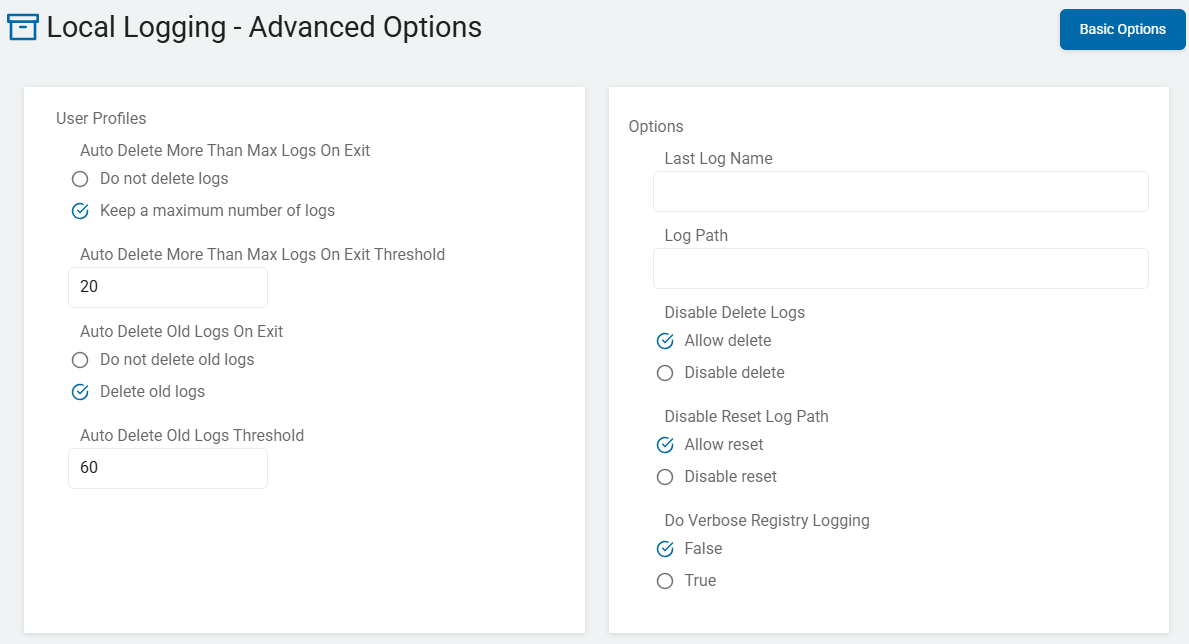
Use the information below to help you fill in the Local Logging - Advanced Options page.
These settings control advanced logging options such as: how many endpoint service logs to keep, when to automatically delete endpoint service logs, how long to retain logs, the path for saved log files, whether a new log must be created, controls for deleting existing logs, and logging for registry search.
Auto Delete More Than Max Logs on Exit
In the Spirion Sensitive Data Platform, the "Auto Delete More Than Max Logs On Exit Threshold" setting is a self-cleaning mechanism for the agent. It ensures that the local machine doesn't become cluttered with old log files after a scan is finished.
While other settings control how large a single log can get, this setting controls how many log files are allowed to exist in the folder.
How It Works
Spirion Agents typically create a new log file (often with a timestamp in the name, like "Search_20231027_1015.eps") every time a new search task begins.
- The Trigger: This setting only kicks in when the agent exits (finishes its task and shuts down).
- The Action: The agent looks at the log directory, counts the files, and if the count is higher than your "Threshold," it deletes the oldest ones until it reaches the limit.
What it Does
- Enforces a "Rolling Window": If you set the threshold to 5, and the Agent just finished its 6th scan, it automatically deletes the 1st (oldest) log file. You always have the 5 most recent logs available for review.
- Prevents "Disk Creep": Over months of daily scans, an agent can generate hundreds of small log files. Even if they are small, thousands of files can impact file system performance. This setting "caps" that growth.
- Prioritizes Recent Data: It ensures that if a scan fails today, the log for that failure isn't buried under a mountain of successful logs from three months ago.
Why You Would Use It
- Production Standard: Most administrators set this to a low number (like 3 to 5). This provides enough history to troubleshoot a recent failure without wasting disk space.
- High-Frequency Scans: If you run "Differential" scans every hour, your log folder fills up very fast. This setting is mandatory in those environments to prevent the log folder from growing to thousands of files.
- Compliance/Privacy: Some organizations have "Data Minimization" policies. Deleting old logs ensures that metadata about past scans isn't stored indefinitely on an end-user's laptop.
Available Options
Keep only a specified number of endpoint service logs
- Do not delete logs - By default, all endpoint service logs are retained until they are manually deleted.
- To have the endpoint service keep a maximum number of logs and delete the oldest logs above that number, set this to Keep a maximum number of logs
- To customize the number of logs to retain, use the setting Auto Delete More Than Max Logs On Exit Threshold, below.
- If the number of logs retained exceeds the specified threshold number, the oldest logs are deleted when the endpoint service shuts down (or restarts).
Troubleshooting Tip: The "Missing Log" Mystery
If you are working with Spirion Support and you notice that a log file from "yesterday" has vanished, check this setting in your policy.
- Scenario: If the threshold is set to 1, and the Agent runs a quick "Status Check" scan after a main "Deep Scan," the log from the Deep Scan is deleted immediately upon exit because the threshold of 1 was met by the newer, smaller log.
- Recommendation: Set this to at least 3 during troubleshooting to ensure you don't lose the "big" logs you actually need to see.
Summary
Auto Delete More Than Max Logs On Exit Threshold is the Agent's "Trash Collector." It keeps the log folder lean by deleting the oldest files once a specific count is reached, but it only does its cleaning once the agent finishes its current job.
Auto Delete More Than Max Logs On Exit Threshold
This setting is a "self-cleaning" mechanism for the Spirion Agent. It controls how many historical log files are stored on an endpoint's hard drive after a scan finishes.
While other settings control how large a single log can get, this setting controls the quantity of old log files (the .eps files) stored in the logs directory.
How it Works
Every time a Spirion search starts, it creates a new log file with a unique timestamp (for example, "Search_20240501_0900.eps"). Over time, if an Agent runs a scan every day, these log files accumulate and occupy more and more space on your local hard drive.
- The "Exit" Trigger: The Agent only performs this cleanup when it finishes its current task and exits. It does not delete logs while a scan is actively running.
- The Action: Upon exiting, the agent counts all the log files in its local folder. If the number of files exceeds the Threshold you defined in the policy, it automatically deletes the oldest files until the count matches your limit.
What it Does
- Enforces a "Rolling Window": If you set the threshold to 5, the Agent keeps the 5 most recent logs. When the 6th scan finishes, the 1st (oldest) log is deleted.
- Prevents "Disk Creep": On servers or workstations that run frequent scans (like "Differential" scans every few hours), the log folder can quickly grow to hundreds or thousands of files. This setting "caps" that growth to save disk space and keep the file system clean.
- Maintains Relevant History: It ensures that you have a short history of recent scans available for troubleshooting without keeping "stale" data from months ago.
Why You Should Use It
- Production Standard: Most Spirion administrators set this to a low number, typically between 3 and 10. This provides enough history to troubleshoot a failure from "yesterday" without wasting storage.
- VDI and Low-Disk Environments: In environments with "Thin Provisioned" disks or limited storage, keeping 50 old logs is a waste of resources. Setting this to 3 is a best practice for virtual desktops.
- Compliance/Privacy: Deleting old logs ensures that metadata about what was scanned weeks or months ago isn't stored indefinitely on an end-user's machine.
⚠️ Important Note: The "Missing Log" Mystery
If you are troubleshooting an issue and notice that a specific log file you were looking for has suddenly vanished, check this setting:
- The Risk: If the threshold is set too low (for example, 1), and the Agent runs a quick "Check-in" or "Policy Update" task right after a long "Deep Scan," the Deep Scan log is immediately deleted when the smaller task finishes because the threshold of 1 was met by the newer file.
- Recommendation: During active troubleshooting, set this threshold to 10 to ensure your evidence isn't accidentally deleted by the Agent's own cleanup routine.
Summary
- Auto Delete More Than Max Logs On Exit Threshold is the agent's "Trash Collector." It keeps the local log folder lean by deleting the oldest files once a specific count is reached, ensuring the Agent doesn't "clutter" the host system over time.
Available Options
The number of endpoint logs to retain.
By default, all endpoint logs are retained until either the "Delete all logs" button is clicked (which deletes all endpoint logs) or the logs are manually deleted outside of the application.
- Default value: 20
- To set the endpoint to retain the maximum number of logs and delete any logs exceeding that number (starting with the oldest), set Auto Delete More Than Max Logs On Exit to "Keep a maximum number of logs" and set the number of logs to keep in this setting.
- For example, if the value of this setting is '20,' when the endpoint service shuts down (or restarts), the 20 most recent logs are retained and any remaining logs are deleted, starting with the oldest.
Auto Delete Old Logs On Exit
The setting "Auto Delete Old Logs On Exit" is a time-based cleanup mechanism for the Spirion Agent. While the "Threshold" setting limits the number of log files, this setting limits how old those files are allowed to be.
It ensures that the agent's local log directory does not store "stale" data from scans that happened weeks or months ago.
How It Works
When this setting is enabled in a policy, you typically provide a value in days (for example, 7 days).
- The "Exit" Trigger: Similar to the threshold setting, the agent does not delete files while a scan is active. It performs this cleanup only when the current search task finishes and the agent process exits.
- The Action: The Agent looks at the "Date Modified" or "Date Created" timestamp of every
.epslog file in its local directory. Any file older than your specified number of days is permanently deleted.
What It Does
- Enforces a "Retention Window": If you set this to 14 days, the Agent automatically purges any log file that was created more than 2 weeks ago. You always have exactly 14 days of history on the endpoint.
- Prevents "Hidden" Disk Growth: Even if you only scan once a week, over a year, those logs files can add up. This setting ensures that even if you haven't reached your "Max Logs Threshold," the files won't sit on the hard disk indefinitely.
- Aligns with Data Retention Policies: Many organizations have strict rules about how long "System Metadata" or "Audit Logs" can be stored on end-user workstations. This setting automates compliance with those internal security policies.
Why You Would Use It
- Privacy and Security: Log files can contain metadata about file paths, database names, and user activity. Deleting old logs reduces the "forensic footprint" left on a machine if it were ever compromised.
- Storage Management: On servers with very active file systems, logs can become quite large. Deleting them after 7 days ensures that disk space is consistently reclaimed.
- VDI/Ephemeral Environments: For virtual desktops that are "re-imaged" or "reset" frequently, setting a short retention window (like 3 days) prevents the "User Profile" from growing too large and slowing down login times.
⚠️ SME Warning: Troubleshooting "Missing" History
If a customer reports that they had a failed scan "last month" and they want you to look at the logs, this setting is often the reason the logs are gone.
- The Risk: If you set this to 7 days, and a critical error happened 8 days ago, the agent has already deleted the evidence.
- Recommendation: For production environments, a retention window of 14 to 30 days is usually the "sweet spot." It provides enough time for a user to report an issue and for an administrator to collect the logs before they are purged.
Summary
Auto Delete Old Logs On Exit is a time-based janitor. It ensures that no matter how many (or how few) logs you have, they are never older than the "Expiration Date" you defined in your policy.
Available Options
Automatically delete endpoint service logs older than a specified number of days.
- Do not delete old logs - By default, all endpoint service logs are retained until they are manually deleted.
- Delete old logs - To have the endpoint service automatically delete logs older than a specified number of days, set this to "Delete old logs."
- To customize the number of days to keep logs for, use the setting Auto Delete Old Logs Threshold.
- Any logs older than the specified number of days are deleted when the endpoint service shuts down (or restarts).
Auto Delete Old Logs Threshold
The setting "Auto Delete Old Logs Threshold" (sometimes labeled as "Auto Delete Old Logs" followed by a numerical value) is the time-based expiration timer for the Spirion Agent's local activity logs.
While other settings limit the number of files, this setting defines exactly how many days a log file is allowed to exist on the hard drive before it is considered "stale" and deleted.
How It Works
In the Agent Policy, you provide a numerical value (usually representing Days).
- The "Exit" Trigger: The Agent does not delete logs while a scan is actively running. It performs this cleanup only when the current search task finishes and the agent process exits.
- The Calculation: Upon exiting, the Agent looks at the "Date Modified" or "Date Created" timestamp of every
.epslog file in its local directory. It compares that date to the current system time. - The Action: Any log file older than your specified Threshold (in days) is permanently deleted from the endpoint.
What it Does
- Enforces a "Retention Window": If you set the threshold to 14, the agent ensures that no log older than two weeks remains on the machine. You always have a 14-day "look-back" window for troubleshooting.
- Automates Data Minimization: Many security frameworks (like SOC2 or GDPR) require that system metadata and audit logs be purged once they are no longer needed. This setting automates that compliance at the endpoint level.
- Prevents "Hidden" Disk Growth: Even if you only scan once a week, over a year, those logs can add up. This setting ensures that even if you haven't reached your "Max Quantity" limit, the files won't sit on the disk indefinitely.
Why You Would Use It
- Privacy and Security: Log files contain metadata about file paths, database names, and user activity. Deleting old logs reduces the "forensic footprint" left on a machine if it were ever compromised.
- Storage Management: On servers with very active file systems, logs can be large. Deleting them after 7 to 14 days ensures that disk space is consistently reclaimed.
- Troubleshooting Baseline: It keeps the logs folder "clean" so that when an administrator remote-connects to a machine to grab a log, they aren't sifting through years of irrelevant data.
⚠️ Note Recommended Values
If a customer reports a scan failure that happened "last month" and you cannot find the logs, this setting is usually the cause.
- The Risk: If you set this to 7 days, and a critical error happened 8 days ago, the agent has already deleted the evidence.
- Recommendation: For most production environments, a retention window of 14 to 30 days is the "Goldilocks" zone—it provides enough time for a user to report an issue and for an administrator to collect the logs before they are purged.
Available Options
The number of days to retain endpoint service logs.
- By default, all endpoint service logs are retained until they are manually deleted.
- To have the endpoint service automatically delete logs older than a specified number of days, set the setting Auto Delete Old Logs On Exit to "Delete old logs" and specify the number of days in this setting.
- Any logs older than the specified number of days are deleted when the endpoint service shuts down (or restarts).
- Default value: 60 (days)
Last Log Name
In the Spirion Sensitive Data Platform and Windows Agent, the "Last Log Name" setting is a diagnostic field that serves as a pointer to the most recently generated .eps log file.
What it Does
Specifically, this setting identifies the filename of the log generated by the last completed or currently active task. The setting is used by the Agent and the console for the following purposes:
- Administrative Retrieval: When an administrator uses the "Get Logs" or "Gather Data" command from the console, the Agent uses the "Last Log Name" to identify exactly which file in the directory
C:\ProgramData\Identity Finder\Logs\EPScontains the most relevant recent activity to upload. - Sequential Tracking: Since Spirion generates unique log names for every scan (typically using a timestamp/GUID format like
Search_20240501_0900.eps), this setting acts as a "bookmark" so the system knows which file is the "current" one without having to parse the entire directory. - Troubleshooting Continuity: If an agent crashes or the machine reboots mid-scan, the "Last Log Name" helps Support Engineers identify the specific log file that was being written to at the moment of failure.
Where it Lives (Technical Detail)
For Windows agents, this value is typically stored in the local registry.
- The log file or the related logging configuration can be found at the following path:
HKEY_LOCAL_MACHINE\SOFTWARE\WOW6432Node\Clients\Identity Finder\Endpoint Service
Why it Matters
- Log Management: It works in conjunction with the "Auto Delete" settings.
- By knowing which log is the "Last" one, the agent can correctly identify which older logs are safe to purge according to your retention thresholds.
- Verification: If you are manually looking for logs on a machine and see dozens of files, check the "Last Log Name" in the Agent's local settings (or registry) to determine exactly which file corresponds to the scan you just ran.
Summary
The Last Log Name is essentially a metadata tag. It doesn't change how the Agent logs, but it tells the Spirion platform: "This is the specific file where I recorded my most recent work."
Available Options
- Specify the name of the previous log file.
- This value is used to determine if a new log must be created (when current log name is different than last log name).
Log Path
In the Spirion Sensitive Data Platform, the "Log Path" (also referred to as "Log Location") is a configuration setting that tells the Agent exactly where on the local hard drive it should store its activity logs (.eps files).
Default Behavior
By default, Spirion Windows Agents store their logs in a protected system folder:
- Path:
C:\ProgramData\Identity Finder\Logs\EPS - Note: The
ProgramDatafolder is hidden by default in Windows File Explorer.
What the Setting Does
- Redirects Storage: It enables an administrator to move the log files to a different drive or directory.
- This is useful if the
C:drive is nearly full or if you have a dedicated "Log" partition on a server.
- This is useful if the
- Centralizes Local Admin Access: Some organizations prefer to point all security tool logs to a specific folder (e.g.,
C:\Logs\Spirion\) to make it easier for local IT staff to find and monitor them without navigating deep system paths. - Permissions Management: By changing the path, you can apply specific Windows NTFS permissions to the folder to ensure only authorized users or system accounts can read the logs.
Why You Would Change It
- Disk Space Management: If you are performing extremely verbose logging (like Trace or Debug mode), the logs can grow very quickly.
- Redirecting the Log Path to a secondary data drive prevents the system from crashing if the
C:drive runs out of space.
- Redirecting the Log Path to a secondary data drive prevents the system from crashing if the
- Troubleshooting Custom Permissions: If the Agent is having trouble writing to the default
ProgramDatafolder due to aggressive third-party security software (such as an EDR or Anti-virus), moving the Log Path can sometimes resolve the conflict. - Non-Standard OS Builds: On specialized server builds where the
C:drive is locked down or read-only, you must set the Log Path to a persistent, writable location.
⚠️ Warning: Registry vs. Policy
The Log Location can be set in multiple places, which can lead to confusion:
- Installation Config: Set during the initial MSI deployment.
- Agent Configuration File: Found in
AgentEndpoint.exe.config. - Agent Policy: Set via the Spirion Sensitive Data Platform Console.
Important: If the Log Path is set in the Agent Policy, it typically overrides the local configuration once the Agent checks in. If you change this setting and can't find your logs, check the Agent's local registry under HKEY_LOCAL_MACHINE\SOFTWARE\WOW6432Node\Identity Finder\Endpoint Service to see where it currently thinks the path is.
Summary
The Log Path is the "mailing address" for the Agent's brain. It tells the Agent: "No matter what happens during the scan, write the record of it in THIS specific folder."
Available Options
- Specify the path in which to save log files.
- Default: The default value is the user profile folder \Identity Finder\logs
Disable Delete Logs
Disable delete logs (often found in the registry or advanced policy settings) is a safety override that stops the agent from performing any automatic cleanup of its own activity logs.
When this setting is enabled, it effectively "paralyzes" the Agent's internal janitor.
What it Does
- Overrides All Cleanup Rules: This setting completely ignores other settings like "Auto Delete More Than Max Logs On Exit Threshold" or "Auto Delete Old Logs Threshold."
- Prevents Purging: Even if you have a policy that says "Only keep 5 logs," the Agent continues to save the 6th, 7th, 8th, and 100th log without deleting the oldest ones.
- Locks Historical Data: It ensures that every single
.epslog file ever created by that Agent remains on the hard drive until an administrator manually deletes them.
Why You Would Use It
- Forensic Investigations: If you are investigating a security incident and need a 100% complete, uninterrupted history of every scan the agent has performed over the last several months, you enable this to ensure the agent doesn't "clean up" the evidence.
- Critical Troubleshooting: When Spirion Support is tracking an intermittent bug that only happens once every few weeks, they may ask you to "Disable delete logs" so that the specific log from the failure isn't accidentally deleted by a subsequent successful scan.
- Compliance Preservation: If your organization is under a "Legal Hold" or a strict audit where all system logs must be preserved for a specific window of time, this setting prevents the agent's automated routines from violating that hold.
⚠️ Caution: Disk Space
The biggest danger of enabling "Disable delete logs" is that it removes the safety net for your hard drive.
- Disk Exhaustion: If the Agent is running frequent scans or verbose logging (Debug/Trace), the log folder grows indefinitely.
- System Crashes: If the log folder fills the
C:drive to 100% capacity, the Windows operating system may become unstable, or the Spirion Agent itself crashes because it can no longer write to its own log.
Recommendations
- Use Temporarily: This should almost never be a permanent setting in a production policy.
- Manual Cleanup Required: If you enable this, you must have a plan to manually delete those logs or turn the setting back off once your investigation is complete.
- Monitor Disk Space: If you push a policy with this setting enabled, keep a close eye on the free disk space of those endpoints via your RMM or monitoring tools.
Summary
Disable delete logs tells the Agent: "Stop being a janitor. I don't care how many logs I have or how old they are—do not delete anything." It is a powerful tool for data preservation but a significant risk for disk space management.
Available Options
- Disable delete - Disable the "Clear Logs" buttons that are used to delete existing logs
- Allow delete - Default. Enable the "Clear Logs" buttons to delete existing logs
Disable Reset Log Path
The setting “Disable reset log path” is an advanced configuration used to lock the Agent's log directory and prevent it from being changed or reverted by automated system processes.
What it Does
This setting serves as a "sticky" override for the Log Path.
- Prevents Policy Overwrites: Normally, when an Agent pulls down a new policy from the console, it might update the local log path to match the console’s definition.
- If this setting is enabled, the Agent ignores any attempts from the policy to change its current local log directory.
- Stops "Default" Reversion: In some versions of the Agent, certain events (like a major upgrade or a policy removal) can trigger the agent to revert its log path back to the default
C:\ProgramData\Identity Finder\Logs\EPS. - Enabling this setting ensures that if you have manually pointed the logs to a secondary drive (for example,
D:\SpirionLogs\), the Agent stays there regardless of system changes.
- Enabling this setting ensures that if you have manually pointed the logs to a secondary drive (for example,
- Ensures Log Continuity: By locking the path, it prevents a situation where half of a troubleshooting log is in one folder and the other half is in a different folder because a policy update happened mid-scan.
Why You Would Use It
- Custom Server Architectures: On servers where the
C:drive is strictly for the OS and application logs must reside on a separate data volume, this setting ensures that no console administrator accidentally moves the logs back to theC:drive via a policy change. - Persistent Troubleshooting: If Spirion Support has asked you to manually set a specific log path to bypass a permissions issue, they may ask you to enable "Disable reset log path" to make sure the agent doesn't "break itself" by trying to move the logs back to the original restricted folder.
- Installation Continuity: During an MSI upgrade or repair, Windows installers can sometimes reset application registry keys to their "factory" values.
- This setting helps protect your custom log location during those maintenance windows.
Where it Lives (Technical Detail)
This is typically a registry-level setting used by the Endpoint Service (EPS). On a Windows machine, it is usually found near the other logging keys:HKEY_LOCAL_MACHINE\SOFTWARE\WOW6432Node\Identity Finder\Endpoint Service
It is a DWORD value where 1 means the path is locked (Disabled reset) and 0 means the path can be changed by policies.
Summary
Disable reset log path tells the Agent: "The folder I am currently using for logs is final. Do not let the Console, a new policy, or a system upgrade move it back to the default location."
Available Options
- Allow reset - Enable the "Use Default" button to reset the log path
- Disable reset - To disable the "Use Default" button to reset the log path, set this value to "Disable reset".
Do Verbose Registry Logging
In the Spirion Sensitive Data Platform, "Do Verbose Registry Logging" is a specialized diagnostic setting used to troubleshoot the Agent's interaction with the Windows Registry.
While standard "Debug" or "Trace" logging focuses on the search engine's overall progress, this specific toggle forces the Agent to record every low-level interaction it has with the system's registry hives.
What it Does
When enabled, the Agent's local .eps log includes granular details about the following:
- Key Access: Every registry key the Agent attempts to open, read, or query (for example,
HKEY_LOCAL_MACHINE\SOFTWARE\...). - Permission Checks: It logs whether the Agent successfully accessed a key or was denied by Windows "Access Denied" errors.
- Policy Delivery: It records the exact moment the Agent writes new policy settings from the Console into the local registry.
- Value Comparison: It logs when the agent compares a setting in the registry against what it expects to find, which is helpful for identifying "mismatched" or "ignored" settings.
Why You Would Use It
You should only enable this setting if you are troubleshooting one of the following scenarios:
- Policy Refusal: The Console shows a policy as "Received," but the Agent is not actually changing its behavior.
- Verbose Registry Logging reveals if the Agent is failing to write those changes to the local machine.
- Registry Search Issues: If you are running a "Registry Search" to find sensitive data in the registry and it is failing or returning zero results, this log shows exactly which keys the Agent is skipping.
- Permissions Debugging: When the Agent is running under a specific Service Account and you suspect that account doesn't have the rights to see certain registry hives.
⚠️ Performance Impact
While not as heavy as "Trace" logging, this setting still creates a significant amount of log "noise."
- Log Bloat: Because the Windows Agent checks its own registry settings constantly during a scan, this setting generates thousands of lines of text very quickly.
- Readability: It makes the logs much harder for a human to read because the actual search results (files found) are buried between thousands of "Registry Query" entries.
Best Practices
- Isolate the Task: Only enable this for a short "Policy Update" or a targeted "Registry Search" task.
- Combine with Support Mode: This is often used in conjunction with Support Mode (where an engineer provides an XML file) to capture a clean "snapshot" of a specific registry failure.
- Turn it Off: Always ensure this is disabled in your standard production policies to keep your log files at a manageable size.
Summary
- Do Verbose Registry Logging is a "microscope" for the Agent's relationship with the Windows Registry.
- It tells you exactly what the Agent is reading from and writing to the system's configuration database.
Available Options
Specify additional logging for the registry search.
- False - Default. Disable additional registry logging
- True - Enable additional registry logging
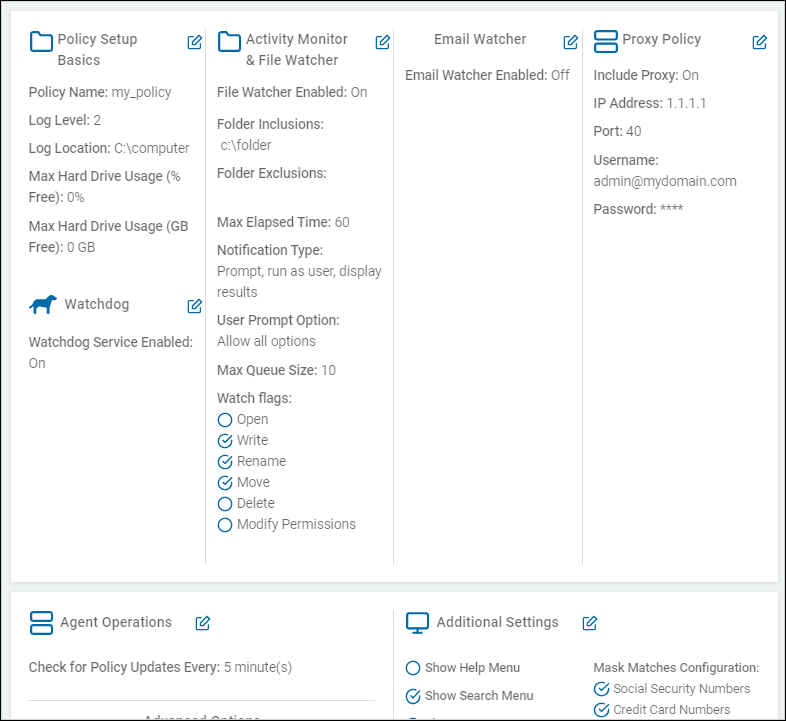
How to Review Your Agent's Policy
Procedure:
- Click Next to proceed, Previous to return to the previous screen, or Exit Without Saving
to discard. - On the first Review Policy screen you can review policy settings for the below sections.
- Click the pencil icon to edit any of the sections:
- Policy Setup Basics
- Activity Monitor & File Watcher
- Email Watcher
- Proxy Policy
- Agent Operations
- Additional Settings
- Advanced Options
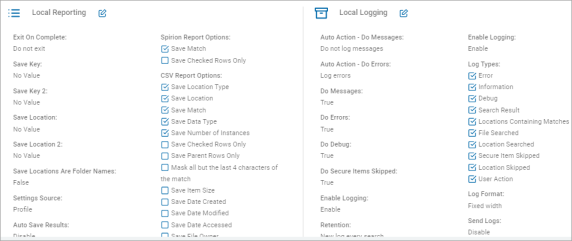
- Click Next to proceed, Previous to return to the previous screen, or Exit Without Saving
to discard. - On the second Review Policy screen, you can review policy settings for the below sections.
- Click the pencil icon to edit any of the sections:
- Policy Setup Basics
- Agent Operations
- Additional Settings
- Local Reporting
- Local Logging
- Click Finish & Save to save the policy, Previous to return to the previous screen, or Exit Without Saving to discard.