
Glossary of Terms
Australian Business Number (ABN)
The Australian Business Number is a unique identifier for Australian businesses. This data type is not provided with Spirion Sensitive Data Platform out-of-the-box. This data type must be created as a custom data type.
- ABNs can be created as a custom Agent. See What is an Agent?
- Also see ABN
Agent
- See What is an Agent?
- For speed and efficiency, Agents are typically deployed in a collection, called a Discovery Team. See Discovery Team, below.
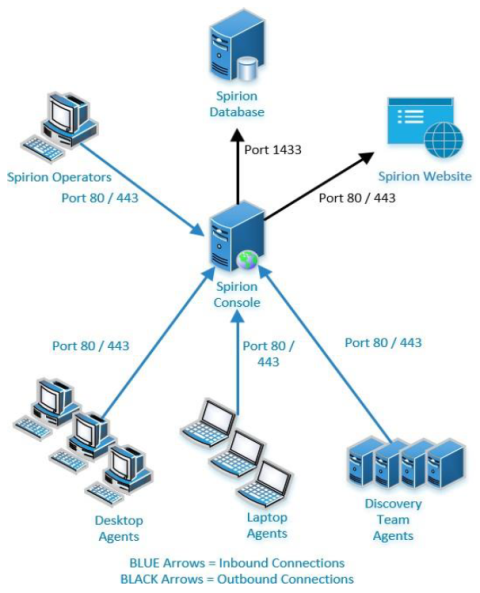
Agent GUI
See Spirion Agent GUI, below.
Agent Policy
An Agent Policy is the primary set of operational rules and configuration settings that dictate how a Spirion Agent behaves on an endpoint. While a Scan or Playbook tells the Agent what to look for, the Agent Policy tells the Agent how to run.
- An Agent Policy is a set of rules for the Agent to follow. Agent Policies are defined on the Agents > Policies page.
What it does
An Agent Policy acts as the "operating instructions" for the Agent software. It controls the Agent's footprint on the host system, its communication with the console, and its general performance characteristics.
Key functions include:
- Resource Management: Sets limits on CPU priority and hard drive space usage (e.g., "Max Hard Drive Usage % Free") to ensure the Agent doesn't negatively impact the end-user's experience.
- Logging and Debugging: Defines where the Agent stores its local logs and the "Log Level" (for example, Info, Verbose, Debug) used for troubleshooting.
- Communication & Networking: Configures how the Agent talks back to the Spirion Console, including proxy settings and heartbeat intervals.
- Operational Constraints: Controls features like the Endpoint Watcher (which detects when USB drives are plugged in) and how the Agent handles local user notifications.
- Watchdog Settings: Configures the "Watchdog" process, which monitors the health of the Agent and ensures it restarts if it encounters a failure.
Key Components of a Policy
When creating or editing an Agent Policy in the Console, you typically configure the following areas:
- Policy Setup Basics: Name, log locations, and log levels.
- Watchdog & Proxy: How the Agent remains resilient and navigates the network.
- File and Folder Settings: Global rules for how the Agent interacts with the local file system (for example, skipping certain system directories).
- Agent Operations: Settings for UI visibility and user interaction on the endpoint.
Why it matters
- Consistency: You can apply the same policy to thousands of Agents simultaneously, ensuring every machine in a specific department (like "Finance") follows the same performance and logging standards.
- Environmental Tuning: You might have a "Server Policy" that allows for high CPU usage during off-hours, and a "Workstation Policy" that is much more restrictive so it doesn't slow down a laptop while a user is working.
- Troubleshooting: If an Agent isn't reporting results, the Policy is often the first place an engineer looks to see if the log level needs to be increased or if proxy settings are misconfigured.
Summary
If a Scan Playbook is the Search Warrant (identifying the evidence to find), the Agent Policy is the Code of Conduct (defining how the Agent must behave while it is on the property).
AnyScan
In the Spirion Sensitive Data Platform (SDP), AnyScan Connectors (also referred to as CData Connectors) are specialized ODBC-based drivers that allow Spirion to scan a vast library of third-party data sources that are not natively built into the core product.
By partnering with CData, Spirion can offer connectivity to over 200 different SaaS platforms, business applications, and databases.
What they do
AnyScan connectors act as a "translator" between the Spirion Agent and a specific data source. They enable the Spirion Agent to treat a remote service (like Salesforce or Confluence) as if it were a standard database, enabling the agent to search for sensitive data within those platforms.
Common examples of targets accessible via AnyScan include:
- Business Systems: Salesforce, HubSpot, NetSuite, SAP.
- Collaboration Tools: Confluence, Slack, Microsoft Teams.
- SaaS Infrastructure: Jira, Airtable, Snowflake.
- Human Resources: ADP, Workday (via specialized drivers).
Key Features and Workflow
- Deployment: The AnyScan driver is an executable file that must be installed on the Windows machine hosting the Spirion Agent.
- ODBC Connectivity: The Agent uses the standard ODBC (Open Database Connectivity) protocol to communicate with the driver, which then uses the target system's native API to retrieve data.
- Authentication: These connectors typically use API keys, OAuth tokens, or Service Account credentials to authenticate to the remote platform.
- Discovery: Once connected, the Agent can enumerate tables or records within the SaaS platform and scan them for sensitive data types (like SSNs, Credit Card numbers, etc.) just as it would for a local SQL database.
Current Limitations
While AnyScan greatly expands Spirion's reach, there are some important architectural differences compared to native connectors:
- Platform Restriction: AnyScan connectors are currently only supported on Windows-based Agents.
- No Automated Remediation: Unlike native file system or database scans, AnyScan connectors generally do not support automated remediation actions (like Shred or Quarantine) through Playbooks.
- Single Agent Only: They do not currently support distributed scanning (Agent Discovery Teams) or work distribution via the
job_queue. - Classification: Classification is typically limited to the database level; the connectors generally cannot apply native file-level classification tags (like those used in NTFS).
Summary
AnyScan Connectors are the "universal adapter" for Spirion. They enable organizations to extend their data discovery footprint into the diverse ecosystem of SaaS and business tools they use every day, ensuring that sensitive data is found wherever it "hides" in the cloud.
Asset
An Asset or Data Asset is a location, local, or remote (such as cloud-based), that contains Targets (a Target is any data location inside an Asset that Sensitive Data Platform can scan).
- For example, an SQL server (Asset) with multiple SQL Databases hosted on it (Targets)
A location can be both an Asset and a Target.
- For example, a workstation (Asset and single Target)
CachedDashboardCharts
CachedDashboardCharts is a database table within the Spirion PostgreSQL environment.
What does CachedDashboardCharts do?
CachedDashboardCharts acts as a storage layer for pre-calculated dashboard data.
- Instead of the Spirion console running complex and resource-heavy queries against millions of scan results every time you load a page, the console reads from CachedDashboardCharts to provide a fast, responsive experience.
Key Details
- Performance Optimization: CachedDashboardCharts stores the "snapshots" of your scan data that populate the visual charts on the SPIglass and Scans dashboards.
- Refresh Mechanism: CachedDashboardCharts is updated by the backend services (specifically the results-processing services) after a scan job completes.
- Manual Refresh: If CachedDashboardCharts gets "stuck" or out of sync, administrators can use a specific API call (/api/Maintenance/RefreshChartCache) to force it to recalculate.
Classification
The action of applying a label to a location via the file system, directly within the file metadata, or within the Spirion Sensitive Data Platform database.
ClientSettings.reg
The 32-bit Windows registration file.
- This file is the 32-bit variant registry file downloaded from the Windows Spirion Sensitive Data Platform Agent Registration page.
ClientSettings.regis the 32-bit counterpart toClientSettings_x64.reg— it serves the same fundamental purpose but targets the 32-bit registry path on Windows systems.- See "ClientSettings_x64.reg" below for proximate description and definition.
ClientSettings_x64.reg
The ClientSettings_x64.reg file is a Windows registry file that configures the Spirion Endpoint Service on 64-bit Windows systems to communicate with the Spirion Sensitive Data Platform (SDP) console and its backend services.
- It is the 64-bit variant registry file downloaded from the Windows Spirion Sensitive Data Platform Agent Registration page.
Purpose
This registry file contains critical configuration settings that enable the Windows endpoint Agent to do the following:
- Authenticate and register with the Spirion Console Services
- Connect to the Spirion Sensitive Data Platform Translator service (the intermediary between Agents and core services)
- Decrypt encrypted communications using embedded encryption keys
- Locate the console server via the service URL
File Characteristics
Naming Variants:
- ClientSettings_x64.reg — For 64-bit Windows systems
- ClientSettings.reg — For 32-bit Windows systems
Download Location:
- From the Spirion Sensitive Data Platform Console Registration page
- Navigate to: Agents → Registration → "Spirion for Windows (64 bit Settings)"
- Or from SDM Console at: http://<ConsoleServerIP>/Services/
Key Contents
The ClientSettings_x64.reg file primarily contains:
- Encryption Key — Used to encrypt/decrypt communications between the agent and console services
- serverUrl — The URI of the SDP Translator service (the gateway between endpoint agents and core services)
- Registry Path Target — Typically installs to: HKEY_LOCAL_MACHINE\SOFTWARE\WOW6432Node\Identity Finder\Client\Console
Example Registry Key Structure
[HKEY_LOCAL_MACHINE\SOFTWARE\WOW6432Node\Clients\Identity Finder\Client\Console]
"serverUrl"="https://console-server-url/services"
"encKey"="encrypted-key-value"
Installation Method
- Download the ClientSettings_x64.reg file from the Console Services registration page
- Double-click the file
- Windows Registry Editor will prompt for confirmation
- Click "Yes" to apply the registry settings
- The values are immediately written to the Windows registry
When to Use / Edit
Standard deployment:
- Download the file and apply it as-is for production/standard environments
Development/Testing scenarios:
- Edit the serverUrl value to point to a local or test SDM Translator instance:
- Local IIS Express: http://localhost:49752/ (port varies)
- Local IIS: http://localhost:5000/ or http://your-local-ip:5000/
- Remote test environment: https://test-console-url/services
Editing the file:
# IIS Express scenario (local development)
"serverUrl"="http://localhost/sdmtranslator"

# IIS scenario (local development with custom port)
"serverUrl"="http://192.168.1.100:5000/"

# Production/Cloud environment
"serverUrl"="https://spirion-console-web.region-spirion.com/services"
Related Files
In a complete Windows agent installation, three files are typically downloaded and used:
- ClientSettings_x64.reg — Registry configuration (this file)
- SpirionSetup.msi — The agent software installer
- identityfinder.lic — The license file
Technical Notes
- WOW6432Node — This registry path indicates 32-bit application compatibility mode in 64-bit Windows. Even though the file is named _x64, it writes to this compatibility path for the 32-bit runtime layer.
- Encryption — The encryption key embedded in this file enables secure communication. Do not share or expose this file publicly.
- Registry persistence — Once applied, the registry settings persist across reboots and agent updates (unless explicitly updated with a new registry file).
- Modification — To point the agent to a different console, simply download and apply a new ClientSettings_x64.reg file from the target console's registration page.
Troubleshooting
If the registry file won't apply:
- Ensure you are running the registry editor with Administrator privileges
- Check that no other registry operations are in progress
- Verify the file hasn't been corrupted during download
If the Agent can't connect after applying:
- Verify the serverUrl value in the registry matches the actual console server URL
- Check that the encryption key wasn't corrupted during file transfer
- Confirm network connectivity to the console server address
- Restart the Identity Finder Endpoint Service after applying a new registry file
com.identityfinder.macedition.xml
The com.identityfinder.macedition.xml file is the macOS-specific settings and configuration file for Spirion Identity Finder Endpoint Service on Apple computers.
- It is the macOS equivalent of the identityfindersettings.xml file used on Linux and Windows platforms.
Purpose
This XML configuration file defines how the macOS Endpoint Service behaves and communicates with the Spirion Console, including:
- Console connectivity (server URL, encryption keys, polling intervals)
- Endpoint Service logging levels for diagnostics and troubleshooting
- Platform-specific settings for macOS systems
- Daemon execution policies and operational parameters
File Location
/Library/Preferences/com.identityfinder.macedition.xmlThis location follows macOS conventions for system-level preferences (in /Library/Preferences rather than user-specific ~/Library/Preferences).
File Structure
The file uses the same hierarchical XML policy structure as other Spirion configuration files:
<Policy Schema="1.1">
  <Container Type="LocalFile">
    <Category Name="Console">
      <Setting Multi="false" Name="pollingInterval" Type="Integer">
        <Value>10</Value>
        <Platforms>
          <SettingPlatform Type="Mac"></SettingPlatform>
        </Platforms>
      </Setting>
      <Setting Multi="false" Name="serverUrl" Type="String">
        <Value>https://console-server/services</Value>
      </Setting>
      <Setting Multi="false" Name="encKey" Type="String">
        <Value>encryption-key-value</Value>
      </Setting>
    </Category>
    <Category Name="Endpoint Service">
      <Setting Multi="false" Name="logLevel" Type="Integer">
        <Value>4</Value>
        <Platforms>
          <SettingPlatform Type="Mac"></SettingPlatform>
        </Platforms>
      </Setting>
    </Category>
  </Container>
</Policy>
Key XML elements
- Policy — Root container with schema version
- Container — Type="LocalFile" wraps all settings
- Category — Logical grouping (e.g., "Console", "Endpoint Service")
- Setting — Individual configuration with name, type, and multi-value support
- Platforms — Optional element specifying which OS this setting applies to
- Value — The actual configuration value
Key Settings
Console Category:
- pollingInterval — How often the agent polls the console (in seconds)
- serverUrl — URL of the Spirion Console Services server
- encKey — Encryption key for secure console communication
- enable — Whether console communication is enabled
Endpoint Service Category:
- logLevel — Controls diagnostic logging verbosity (values 1–4, where 4 = debug detail)
How It's Used
- Download from the Spirion Console: Download this file from the Spirion Sensitive Data Platform Registration page during macOS Agent registration:
- https://console-web.<env>-spirion.com/agents/registration
- Select "Spirion for Mac" → "Client version 7.1 and newer"
- The file com.identityfinder.macedition.xml downloads to your local machine
- Installation:
- Placed in
/Library/Preferences/before or after Agent installation - Can be pre-staged before running the macOS installer package
- Can be manually edited post-installation for troubleshooting
- Placed in
- Modification: Administrators and developers typically edit this file to:
- Enable debug logging for troubleshooting (change logLevel from 1 to 4)
- Override console server URLs for testing environments
- Configure polling intervals for Agent responsiveness
- Related macOS Files:
- identityfinder.lic — License file (located in
~/Library/Application Support/Identity Finder/) - com.identityfinder.launchdaemon.plist — Daemon execution policy
- com.identityfinder.epwdaemon.plist — Endpoint Watcher daemon policy
- identityfinder.lic — License file (located in
Common Files
For both macOS and Windows, see Select Files by Extension.
Compensating Controls
Compensating Controls are actions applied to sensitive data discovered in your environment.
- These actions include: restricted access, script execution, quarantine, ignore, and Playbook user actions.
In the SPIglass™ Dashboard, Compensating Controls represents the total cost of all sensitive data matches with compensating controls in place. All costs are taken from the dollar value assigned to each data type in the global data types settings.
In the Organizational Data Risk semi-circle chart, Compensating Controls are shown against Inherent and Residual data. For more information, see SPIglass™ Dashboard.
Custom Data Types
Spirion-provided data types are called AnyFinds. Custom data types are defined by you, the user. Custom data types are defined data structures that represent custom (user-defined) types of sensitive data, such as CUI, IMEI numbers or ABNs (Australian Business Numbers).
Custom data types can also be a combination of Spirion data types (AnyFinds).
For example, a single custom data type called "PII" (personally identifiable information) can be composed of the following Spirion data types:
- Social Security Number, Credit Card number, Personal Address, Driver's License number, Date of Birth, Telephone number, Health Information, etc.
- Any sensitive data in your environment that matches one of those Spirion data types can be classified as PII.
CUI
Controlled Unclassified Information. See CUI.
Data Loss Prevention (DLP)
The DLP software solutions detect and prevent data breaches, exfiltration, and unwanted destruction of sensitive data. Spirion Sensitive Data Platform's ability to scan, detect, and classify at-risk sensitive data in your environment means it aligns perfectly with the next phases of data loss prevention, included below.
DLP technologies perform the following basic automated functions:
Classifies data
Monitors and controls
Monitors the flow of data as it is accessed and shared by end users to identify any policy violations in a wide variety of locations, filters data streams on corporate networks, and monitors data in the cloud to protect data-at-rest, in-motion, and in-use, and to provide visibility into data and system access of:- Emails and texts
- Servers
- Endpoints
- Cloud stasdorage
- Shared applications
- Mobile devices
- Websites
- Social media
- PrintersIdentifies violations of policies
Defined by organizations or within a predefined policy pack, systems identify data leaks that are anomalous or suspicious.Enforces remediation
Takes pre-defined actions to prevent end users from accidentally or maliciously sharing data, such as: - Alerting users and admins
- Quarantining suspicious files
- Encrypting data
- Blocking traffic outright
- Filtering data streams to restrict suspicious or unidentified activityCreates reports
Provides logging and reports for compliance, auditing, forensics, and incident response purposes that identify areas of weakness and anomalies.
Types of DLP Software
There are three main types of DLP solutions from which organizations can choose based on their needs:
- Network DLP
- Endpoint DLP
- Storage DLP
Popular DLP Tools
There are many DLP solutions available in the marketplace. These are some of the most popular options:
Symantec DLP
This scalable software suite gives organizations the ability to see how and where information is kept across their enterprise. It monitors mobile, cloud, and endpoints, and is especially effective when employees are offline.
McAfee DLP
This software solution monitors data on premises, in the cloud, or at endpoints, where it protects intellectual property and supports compliance by protecting all sensitive information.
Check Point DLP
This technology educates businesses and individuals so that they can act efficiently and quickly to prevent data loss. It includes a central management console, and easy implementation using preconfigured rules.
Digital Guardian DLP
This software, available as a cloud-based or on-premise system, is compatible with Mac, Windows, and Linux endpoints, and can manage a large number of workstations.
More information: For more on Data Loss Prevention, see the Data Loss Prevention guide.
Data Types
Defined data structures that represent different types of sensitive data, such as a credit card number, password, or social security number. See Global Data Types.
Delimiters
When using scan playbooks, including adding a new scan playbook, you add or edit data types. During this process you are prompted with the option to specify additional valid delimiters when searching.
In this box enter any additional valid delimiters Sensitive Data Platform may encounter when scanning for the specified data type in your environment.
- A delimiter is a character or sequence of characters that marks the boundary between different parts of data, like a comma in CSV files, a tab, or a space.
- Delimiters help separate individual items or fields in text or data streams, enabling applications such as Spirion Sensitive Data Platform to parse and understand the data's structure.
Dictionary
An end-user provided list of terms the Spirion Sensitive Data Engine (SDE) can use to look for.
Note: Dictionary files must be in the following format and saved with a file extension of type .dic.
[Header]
Name="Dictionary_Name"
[Words]
Word_1
Word_2
Word_3
Word_4
For example:
[Header]
Name="My New Dictionary"
[Words]
Black
Blue
Canary
Indigo
Magenta
Orange
Red
Discovery (Metadata Scan)
Metadata, or Discovery scans are performed on a file system (cloud-based such as Gmail or OneDrive, or local, such as a file server or database, etc.) to find files and folders OR databases/blob stores. The scans identify only the locations (files or emails) which contains sensitive data. These scans DO NOT scan the sensitive data itself.
Discovery scans can be found in Spirion Sensitive Data Platform under Scans > All Scans, on the DISCOVERY SCANS tab at the top of the page.

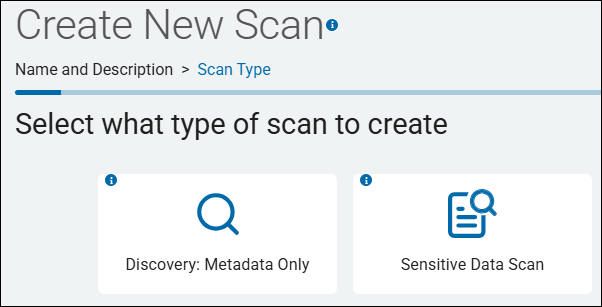
Creating a Discovery scan is done via the scan wizard by selecting "Discovery: Metadata only" on the second step of the wizard.
Discovery Team (Dynamic Agent Team)
Discovery Teams are a collection Spirion Agents, installed on physical and/or virtual machines (local or remote), which are used to scan servers, cloud sources (SharePoint, box, Google Workspaces, etc.) for sensitive data. 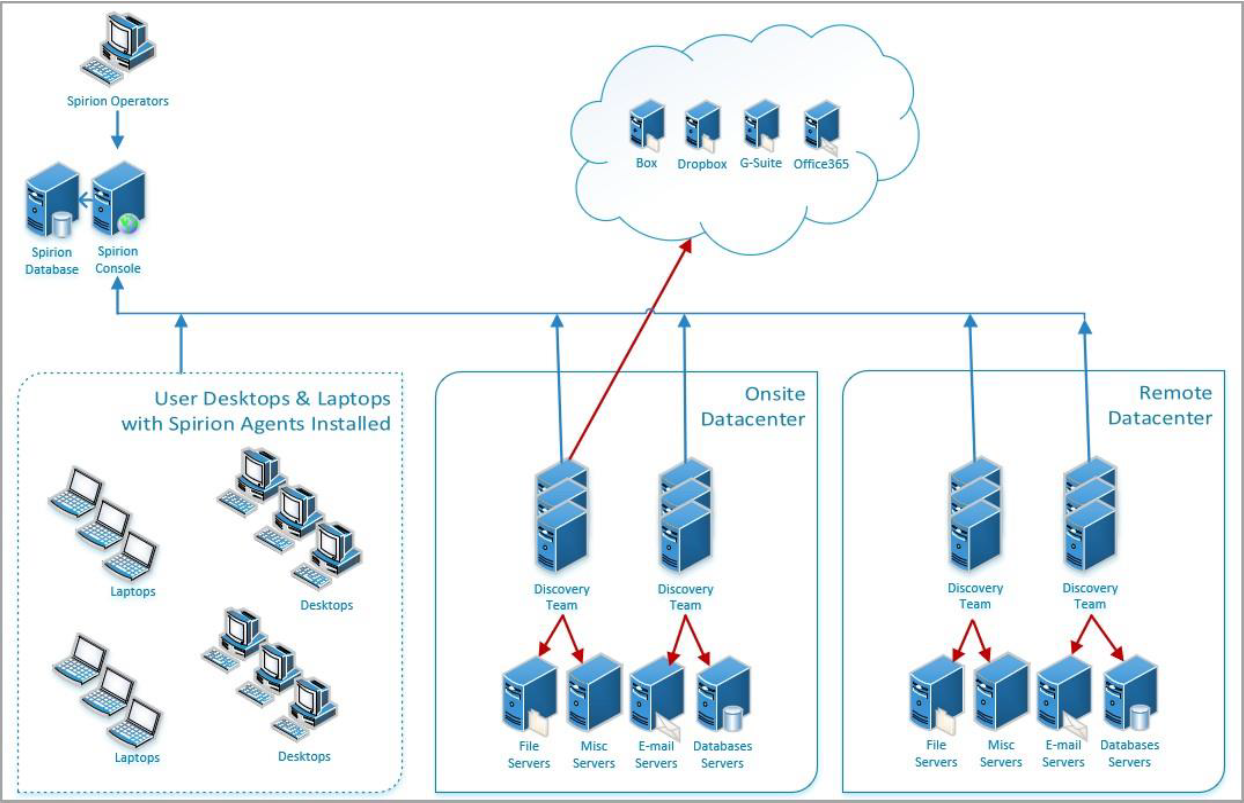
Instead of assigning a single Agent to handle an entire large-scale search, you assign a Discovery Team to the scan. This enables the workload to be automatically split and shared among all available members of that team.
What Discovery Teams Do
- Workload Distribution: They enable the console to divide a large scan target (like a massive SQL database, a multi-terabyte file share, or a cloud repository) into smaller "work items."
- Parallel Processing: Each Agent in the team acts as a "Search Agent." They check the central job_queue (in the Postgres database) and pull available work items. This means multiple Agents are scanning the same Target simultaneously, drastically reducing the total time to complete the scan.
- Automatic Load Balancing: If one Agent in the team is busy with a local task or goes offline, the other team members continue to pull work from the queue. This ensures the scan progresses as long as at least one team member is active.
- Target Flexibility: Discovery Teams can be used to scan "Unmanaged" targets—systems where no Spirion Agent is installed—by having the team members reach out over the network to perform the search.
How They Work (The "Discovery vs. Search" Model)
When a scan is assigned to a Discovery Team, the platform roles are split:
- The Discovery Agent (1 Agent): One member of the team is elected to be the "planner." It crawls the Target (for example, looks at all the files in a folder or all the tables in a DB) and creates the "to-do list" in the console's database.
- The Search Agents (All Other Team Members): These Agents act as the "workers." They pick up the items from the to-do list and perform the actual content inspection (looking for SSNs, Credit Cards, etc.).
Key Use Cases
- Scanning Large File Shares: A single Agent might take days to scan 10 TB of data. A Discovery Team of 5 Agents can theoretically finish it in 1/5th the time.
- Massive Database Searches: Splitting a database with thousands of tables across a Discovery Team prevents any single Agent from being overwhelmed.
- Network Optimization: You can create "Regional" Discovery Teams.
- For example, a team of Agents located in a London data center can be assigned to scan London-based file shares, keeping the heavy scan traffic off the trans-Atlantic WAN links.
Where to Configure Them
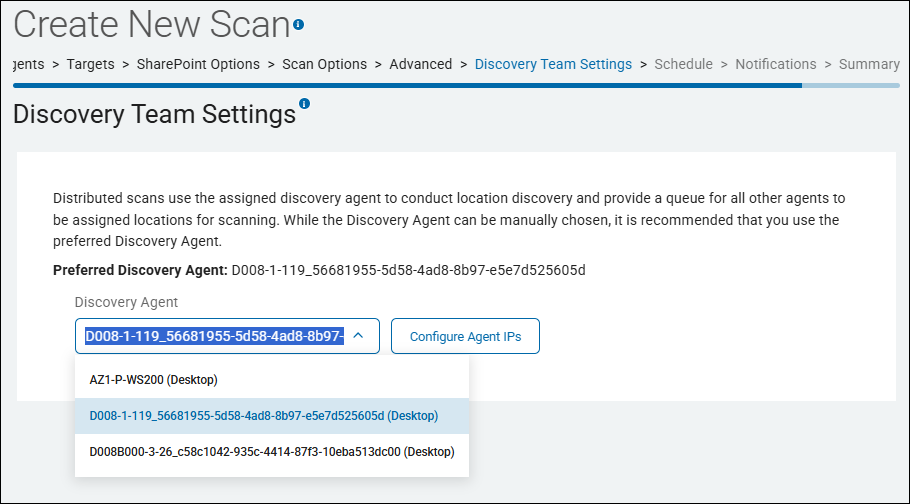
In the Spirion Sensitive Data Platform console, you manage your Discovery Team settings for a given scan on the Discovery Team Settings page in the "Create New Scan" wizard (or "Edit Scan" wizard). The The Discovery Team Settings page is approximately the 11th page in the wizard after the pages "Scan Options" and "Advanced."
- On this page you can select your Discovery Agent.
- Although a Discovery Agent can be manually chosen, it is recommended to use the Preferred Discovery Agent. This is the default Agent displayed in the "Discovery Agent" field. Static discovery Agents are used only in special cases.
Summary
- Think of a Discovery Team as a "Scanning Cluster."
- It transforms a collection of individual Agents into a high-performance distributed engine.
- For any large-scale enterprise discovery project in v13.6, using Discovery Teams is the best way to achieve speed, scalability, and resilience.
Distributed Scanning
A group of Agents configured to scan Targets and collectively work to complete these scans. This is done to improve efficiency and reduce scanning time. See
Dynamic Agent Team (Discovery Team)
See Discovery Team, above.
Endpoint
Previous term used for Target.
An Agent can also act as an endpoint.
ePHI
See ePHI.
FERPA
The Family Educational Rights and Privacy Act (FERPA) is a federal law originally enacted in 1974 to protect the privacy of student educational records, such as grades, transcripts, and discipline files. The law covers any form the record may take, including, but not limited to, written information, recorded audio and video, and digital records.
This law gives parents or other legal guardians the right to access their children’s records, seek amendments to the records, and provides some control over the disclosure of information contained in the records. Once the student reaches the age of 18 or enters a postsecondary institution, these rights transfer to the student.
Who must comply with FERPA?
All public and private schools that receive federal funding from programs administered by the U.S. Department of Education are required to comply with FERPA guidelines. This includes elementary schools, secondary schools, and post-secondary institutions. Additionally, all state and local education agencies must also comply with FERPA.
What information is protected by FERPA?
FERPA protects the privacy of records directly related to a student that are controlled by an educational institution or by a party acting on behalf of the institution. While these records may be extensive, there are also records exempted from FERPA, including certain law enforcement records, health records, and attendance records.
What information can be shared without authorization under FERPA?
Some information can be shared without authorization in compliance with FERPA guidelines. Permitted disclosures include:
- School officials with a legitimate educational interest
- Outside educational institutions to which a student is transferring
- Individuals performing specified audits or evaluations
- Parties involved in connecting students with financial aid
- Organizations conducting studies for or on behalf of the institution
- Accrediting institutions
- Compliance with a judicial order or subpoena
- Health and safety officials in the event of an emergency
- State and local authorities within the juvenile justice system in accordance with state laws
Gather Data
The Gather Data function gathers the following information from the machine the Agent is running on:
- Logs and system information:
- EPS log files
- Error reports
- FCI log files
- IFS log files
- System search log files
- Processes actively running
- Permissions
- Registry values
For more information, see Gather Agent Data
Global Ignore List
Scans performed by Spirion Agents capture sensitive data matches, but ignore those specified in the Global Ignore List or those which match a pattern specified in the Global Ignore List. See How to Use Global Ignore Lists.
Global Ignore List: Pattern-Based
For users of Spirion Sensitive Data Platform who want to exclude specific results from one or more searches, the Pattern-Based Global Ignore List was introduced in version 13.6. This feature broadly excludes exact matches or regex patterns. This feature is accessible via the UI and does not require a separate SDD or Search API.
GPDR
The General Data Protection Regulation (GDPR) is the European Union's comprehensive data privacy law, effective May 25, 2018, that sets strict standards for processing personal data of EU residents. It gives individuals greater control over their data and mandates transparency, security, and accountability for organizations, regardless of where they are based.
- For lessons about GPDR usage see "GDPR Lessons Learned From 200 Companies Who Got It Wrong"
Key Principles
The GDPR is founded on principles including Lawfulness, Fairness & Transparency, Purpose Limitation (using data only for specific, intended purposes), and Data Minimization (only collecting what is necessary).
- Violators face heavy fines, up to €20 million or 4% of global annual revenue.
Key Aspects and Usage Examples
- Consent: Organizations must obtain clear, explicit consent before collecting personal data, such as a checkbox on a website for marketing newsletters.
- Right to Access: Individuals can request a copy of their personal data from a company.
- Right to be Forgotten: Individuals can request that their data be deleted.
- Data Breach Notification: Companies must report serious data breaches within 72 hours.
- Privacy by Design: Data security must be built into systems from the outset, not added later.
Synonyms and Related Terms
- EU Data Protection Law
- EU GDPR
- Regulation (EU) 2016/679
- Data Privacy Regulation
- General Data Protection Regulation (UK GDPR) (for the UK's version)
GUID
When Spirion Sensitive Data Platform Classifications (Secret, Top Secret, Reg, Proc, etc.) are applied, via scan playbooks, to files which contain sensitive data, a label which provides a GUID is applied to the file. Data Loss Prevention (DLP) software uses GUIDs to take appropriate actions to safeguard sensitive data.
HIPPA
The Health Insurance Portability and Accountability Act of 1996 (HIPAA) is a U.S. federal law that establishes national standards to protect sensitive patient health information from being disclosed without consent. It mandates the secure handling of Protected Health Information (PHI) by healthcare providers, insurers, and their business associates.
Key Aspects of HIPAA
- Purpose: Protects patient privacy, secures health records (physical and electronic), and improves efficiency in healthcare administration.
- Key Rules: The Privacy Rule restricts PHI disclosure, while the Security Rule sets standards for protecting electronic PHI (ePHI).
- What is Protected (PHI): Any individually identifiable information, including names, addresses, social security numbers, medical diagnoses, and test results.
- Entities Bound by Law: "Covered Entities" (doctors, hospitals, clinics) and "Business Associates" (billing companies, IT consultants, transcriptionists).
- Usage Examples
- Limiting patient information shared with insurers to only what is necessary.
- Restricting access to medical files to authorized personnel only.
- Requiring patient authorization before using records for marketing.
- Following security measures for storing or sending medical data, such as encrypted emails, according to the HIPAA Security Rule on HHS.gov.
- Synonyms/Related Terms: HIPAA Privacy Rule, HIPAA Security Rule, Health Information Privacy, Patient Confidentiality Standards, HIPAA Compliance.
HIPAA Violations
HIPAA violation consequences include severe civil monetary penalties (up to million+ annually for willful neglect), criminal penalties involving jail time (up to 10 years), professional licensure loss, and significant reputational damage. Penalties are tiered based on intent, ranging from simple mistakes to willful neglect.
Average HIPAA violation fines can be high. Compliancy Group cites a typical average fine of $1.5 million. Fines, which are often settled with the Office for Civil Rights (OCR), depend on the level of negligence, with maximum annual penalties potentially exceeding $1.9 million for violations in 2024. Updated for 2026.
- Penalty Tiers (2024/2025): Fines range from approximately $100 to over $71,000 per violation (adjusted for inflation), with a maximum of nearly $2 million per year for identical violations.
- Settlement Amounts: According to, AccountableHQ settlements often depend on organizational size and scope, ranging from five figures for small providers to multi-million-dollar payments for large breaches.
- Willful Neglect: Violations resulting from willful neglect that are not corrected incur the highest penalties, starting at $50,000 per violation.
- Common Penalties: Fines can arise from "Right of Access" violations (failing to provide patient records), which often cost between $15,000 and $150,000, or due to lack of encryption and risk analysis.
Civil Penalties (HHS Office for Civil Rights)
Fines are based on the level of negligence, with annual maximums for repeated violations:
- Unknowing Violation: per violation.
- Reasonable Cause: per violation.
- Willful Neglect (Corrected): per violation.
- Willful Neglect (Not Corrected): million+ per violation.
Criminal Penalties (Department of Justice)
Criminal violations occur when Protected Health Information (PHI) is knowingly misused:
- Tier 1: Wrongful Disclosure: Up to 1 year in jail and fine.
- Tier 2: False Pretenses: Up to 5 years in jail and fine.
- Tier 3: Personal Gain/Malicious Harm: Up to 10 years in jail and fine.
Additional Consequences
- Reputational Damage: Loss of patient trust and business.
- Licensure/Employment Loss: Staff may face termination, while doctors/nurses may lose professional licenses.
- State Attorney General Action: Additional fines can be imposed at the state level.
- Corrective Action Plan (CAP): A long-term, expensive, mandatory monitoring plan imposed by federal regulators.
IBAN
International Bank Account Number (IBAN) is a standardized, alphanumeric code of up to 34 characters identifying a specific bank account, primarily used for cross-border transactions in Europe, the Middle East, and the Caribbean to ensure accuracy. It comprises a country code, check digits, and bank/branch details, speeding up international payments.
It is not commonly used in the United States, which operates on a different routing system.
Key Aspects of IBANs:
- Purpose: Standardizes account identification to facilitate faster, more secure international payments and reduce errors.
- Structure: Includes a 2-character country code, 2-digit check digits, and a country-specific bank/branch identifier.
- Usage:
Required for transactions in over 80+ countries, particularly within the SEPA (Single Euro Payments Area) region. - Where to Find: Located on bank statements, via online banking, or in mobile apps.
- Validation: Uses MOD 97 (ISO 7064) to verify accuracy, preventing payments from being returned.
- Complementary Code: Often paired with a BIC (Bank Identifier Code) for swift processing.
identityfindersettings.xml
The identityfindersettings.xml file is an endpoint Agent configuration file used by Spirion Identity Finder (Endpoint Service) to store system-level settings and policies.
- It is a cross-platform file used on Windows, Linux, and macOS Agents.
Purpose
This XML configuration file defines the behavior and operational parameters of the Endpoint service, including the following:
- Logging levels for diagnostic and troubleshooting
- Console connectivity settings (server URL, encryption keys)
- Agent behavior and operational parameters
- Platform-specific overrides for different operating systems
This file is essential in Spirion deployments for the following:
- Agent provisioning
- Console integration
- Operational diagnostics
How it is Used in Practice
- The file is loaded at Agent startup to initialize the scan engine with the correct policy and configuration
- In enterprise deployments, it can be centrally distributed to endpoints so all Agents run with a consistent policy — similar to how the Log Sleuth playbook references staging and distributing config files across agents
- When troubleshooting scan behavior (wrong data types being flagged, scans not running, missing results), this file is often the first place to check for misconfiguration
- It can be pushed/synced from the Spirion management console to ensure Agents stay in policy
In short, it's the "brain settings" of the Spirion Agent — without it (or with a corrupted/misconfigured version), the Agent won't know what to scan for, where to look, or how to report results.
File Structure
The file uses a hierarchical XML structure:
<Policy Schema="1.1">
  <Container Type="LocalFile">
    <Category Name="Console">
      <Setting Multi="false" Name="pollingInterval" Type="Integer">
        <Value>10</Value>
      </Setting>
      <Setting Multi="false" Name="serverUrl" Type="String">
        <Value>https://console-server/services</Value>
      </Setting>
      <Setting Multi="false" Name="encKey" Type="String">
        <Value>encryption-key-here</Value>
      </Setting>
    </Category>
    <Category Name="Endpoint Service">
      <Setting Multi="false" Name="logLevel" Type="Integer">
        <Value>4</Value>
      </Setting>
    </Category>
  </Container>
</Policy>
Key XML elements
- Container: Wraps all settings (typically Type="LocalFile")
- Category: Logical grouping of related settings (e.g., "Console", "Endpoint Service")
- Setting: Individual configuration parameter with attributes for name, type, and whether it allows multiple values
- Value: The actual configuration value
Key Settings
Console Category:
serverUrl— The console server URL for agent registration and pollingencKey— Encryption key for secure communication with the consolepollingInterval— How frequently the agent polls the console (in seconds)enable— Whether console communication is enabled
Endpoint Service Category:
logLevel— Controls diagnostic logging verbosity (common values: 1–4, where 4 = maximum debug detail)
How It's Used
- Download from Console: Downloaded from the Spirion Console Services page during Agent registration:
- https://console-web.<env>-spirion.com/agents/registration
- Platform-Specific Locations:
- Linux: /var/lib/identityfinder/identityfindersettings.xml
- Windows: Registry entries (or can be downloaded as XML and imported)
- macOS: /Library/Preferences/com.identityfinder.macedition.xml
- Modification: Administrators can manually edit the file to:
- Adjust logging levels for troubleshooting
- Override console settings (if allowed by policy)
- Configure agent-specific behavior before deployment
- CLI Integration: The
--configurationfileCLI parameter enables passing a settings file to override system-level configurations during searches.
ITAR
ITAR stands for the International Traffic in Arms Regulations, a set of U.S. government rules administered by the Department of State's Directorate of Defense Trade Controls (DDTC). It controls the export and import of defense-related articles, services, and technical data to safeguard U.S. national security and foreign policy interests.
What is Controlled
ITAR applies to anything found on the United States Munitions List (USML). This includes:
- Defense Articles: Weapons, ammunition, spacecraft, satellites, and military-grade electronics.
- Technical Data: Blueprints, software, or manuals related to USML items.
- Defense Services: Training or assistance provided to foreign persons regarding these items.
Key Compliance Rules
If a business manufactures, exports, or brokers defense items, it must strictly follow these ITAR rules:
- Mandatory Registration: Businesses handling ITAR-controlled items must register with the DDTC.
- Access Restrictions: Non-U.S. citizens generally cannot have physical or logical access to ITAR-controlled data or hardware. Access is strictly limited to "U.S. Persons" (U.S. citizens, lawful permanent residents, and certain protected individuals).
- Licensing: Exporters must obtain specific licenses or approvals from the DDTC before shipping controlled items or sharing technical data overseas.
Penalties for Violations
Violating ITAR rules threatens U.S. national security and can result in severe consequences. Penalties include the following:
- Civil Fines: Substantial monetary penalties per violation.
- Criminal Prosecution: Fines and potential imprisonment for individuals involved.
- Debarment: Loss of the privilege to export or manufacture defense goods altogether.
Keyword
A simple data type that is an exact case-sensitive match.
Last Heartbeat
The amount of time elapsed since the Agent last sent a signal indicating it was active/ready.
Locally Logged On User
An end-user who is directly logged into a given computer (that is, "At the keyboard" and not through Remote Desktop/RDP).
Location
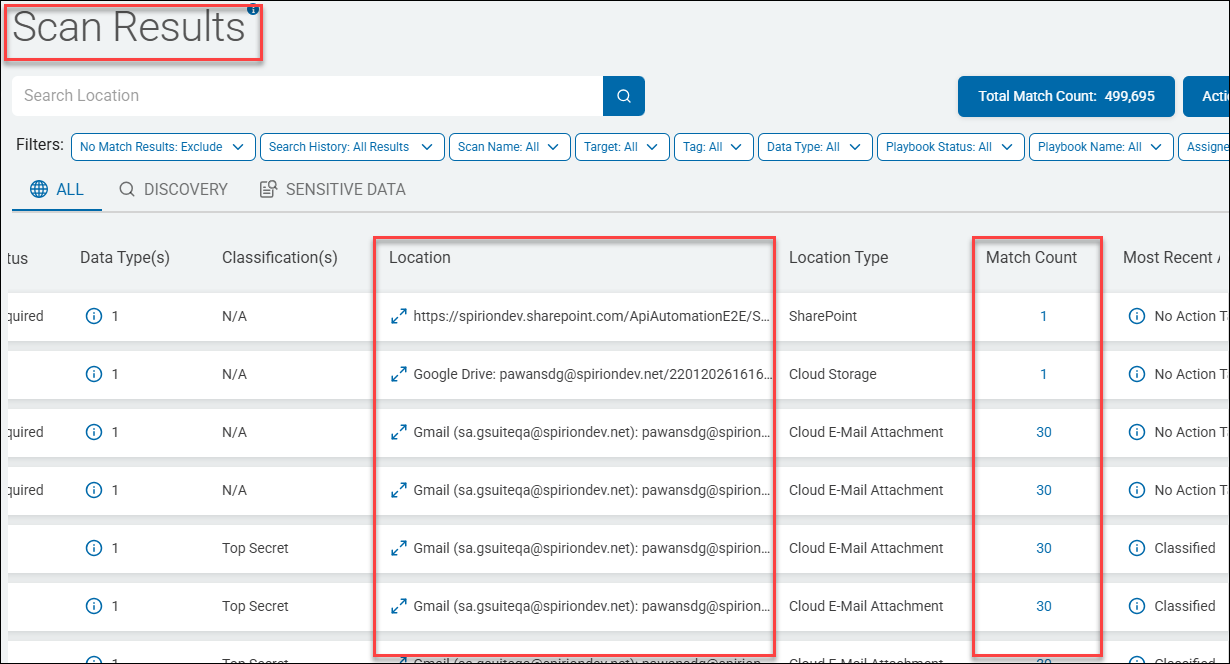
A Location is a file (or email) which contains at least one sensitive data match (such as a single social security number). Locations are discovered, collected, and analyzed by Spirion sensitive data scans.
- The Location name includes the full path to the file or email, such as "c:\temp\chat.docx".
- A Location contains one or more sensitive data matches (also simply referred to as "matches").
- Many tables in various parts of the Spirion Sensitive Data Platform application, such as the Scan Results page, below, contain details about scanned Locations.
- Examine each Location to learn about the sensitive data matches it contains
- You can apply specific actions (such as Redact) to one or both Location files (c:\Passwords\Pwd.txt) and sensitive data Matches ("MyEmailPassword123" within the file Pwd.txt). For more information see How to Perform Location and Match Actions on Scan Results
Loopback URL (address)
A loopback URL (or address) is a reserved IP address, typically 127.0.0.1 (IPv4) or ::1 (IPv6), used by a computer to send network traffic back to itself. Known as localhost, this mechanism skips external network hardware, enabling developers to test applications locally and administrators to diagnose networking issues.
Key Aspects of Loopback Addresses
- Purpose: Enables software on the same machine to communicate (e.g., a web browser connecting to a local server).
- Common Addresses:
127.0.0.1is the default for IPv4, while::1is the IPv6 equivalent. - Locality: Traffic directed to this address never leaves the machine or reaches the internet.
- Functionality: It acts as a virtual network interface, ensuring that applications can work with network protocols even without a physical network connection.
- Range: The entire
127.0.0.0/8range is reserved for loopback, spanning from127.0.0.0to127.255.255.255.
Common Use Cases
- Testing & Development: Web developers use
http://localhost:portorhttp://127.0.0.1:portto test sites before deploying them to a public server. - Networking Diagnostics: Use the
ping 127.0.0.1command to verify the TCP/IP stack is working correctly. - Internal Service Communication: Many local services and database applications connect via loopback to interact with the system.
Loopback Addresses used in Spirion Sensitive Data Platform
- In Spirion Sensitive Data Platform, loopback addresses (specifically 127.0.0.1 and localhost) are primarily used for internal service-to-service communication within a single node or containerized environment..
- Inter-Process Communication (IPC): Services like the Results Processing API use loopback to receive internal signals to trigger maintenance tasks, such as refreshing the CachedDashboardCharts table.
- Postgres Database: The
svc-resultsprocessingand other backend services often connect to the Postgres database using a loopback address if the database is co-located on the same host. - Typically, a loopback address is used when you configure authentication to a Spirion Sensitive Data Platform target such as a Microsoft Exchange Online target.
Troubleshooting Loopback Issues
If you see errors in your logs (like the svc-resultsprocessing log) indicating a "Connection Refused" to 127.0.0.1 or localhost, it typically means a required backend service (like the Postgres database or a specific microservice) has crashed or is not listening on that port.
Managed Data
Managed data in Spirion Sensitive Data Platform is sensitive data (such as a Social Security number or Credit Card number) that has been acted upon in the following ways to lessen or eliminate the risk to your organization:
- Quarantined
- Redacted
- Shredded
- IgnoreLocation
- Classified
- Script (executed against the data)
- Permissions (Access restricted)
Additionally, data that has received the following actions is considered Managed data:
- Ignored
- GloballyIgnored
- UserAction taken on data
- MipLabel applied to data
Also see What is Managed Data?
Match
Note: A Match is also referred to as a "sensitive data match."
A Match is an instance of sensitive data, such as a single Credit Card number or Social Security number, searched for by a Sensitive Data scan and discovered in files or emails within your environment.
- Sensitive Data Matches are located within files or emails which are referred to as "Locations" (see "Location" above).
- Each individual sensitive data match is treated as unique by Spirion Sensitive Data Platform.
- The Scans dashboard and SPIglass dashboard contain charts and graphs which measure the amount of sensitive data matches in your environment, categorized and displayed in a number of different ways.
- Actions such as classification, quarantine, ignore, redact, etc. are applied to sensitive data matches to reduce or eliminate the risk they pose to your oganization.
ODBC
Open Database Connectivity (ODBC) is a standard, vendor-neutral API used to connect applications to database management systems (DBMS). It enables programs, such as Microsoft Access or Tableau, to access data from diverse sources (SQL, Excel, text files) using SQL.
- ODBC provides high interoperability, enabling a single application to work with different databases without rewriting code.
- ODBC is widely used, with drivers available for SQL Server, Oracle, MySQL, and PostgreSQL.
Key Aspects of ODBC
- How it Works: An application calls the ODBC interface, which uses an ODBC Driver Manager and specific drivers to translate requests for the DBMS.
ODBC Drivers used by Spirion Database Targets
Spirion uses ODBC drivers for several types of database targets. These generally fall into two categories: Native/Legacy Database Support and AnyScan (CData) Connectors.
Native & Legacy Database Targets
These databases can be scanned using standard ODBC drivers installed on the Spirion Agent endpoint:
- PostgreSQL: Can be scanned as a "Native Postgres" target or via the PostgreSQL Unicode ODBC Driver.
- Informix: Requires the IBM Informix ODBC Driver to be configured as a System DSN on the Windows machine running the agent.
- Teradata: Currently utilizes a Teradata ODBC driver for connectivity (though internal notes suggest this is a workaround while deeper integration is developed).
- Snowflake: While there is a native tile, it can also be configured as an ODBC scan using
SnowflakeDSIIDriver.
AnyScan (CData) Connectors
Spirion expands its reach to many non-traditional and SaaS databases using licensed CData ODBC drivers. These are often referred to as "AnyScan Connectors" and include:
- Snowflake (via CData ODBC Driver for Snowflake)
- Salesforce
- Confluence
- MongoDB (can be validated/tested in a similar capacity to ODBC connections)
- Other SaaS platforms (though some are excluded if native support exists, such as Box or Dropbox).
Important Implementation Notes
- ODBC Credentials: When using these targets, the authentication pattern typically relies on "ODBC credentials" configured within the location settings.
- Agent Requirement: For any ODBC-based scan, the specific driver must be installed on the Agent endpoint (the machine performing the scan), even if a DSN is not explicitly required for all types.
OLE DB
Object Linking and Embedding Database (OLE DB) is a high-performance, COM-based API designed by Microsoft to provide uniform access to diverse data sources, from SQL databases to flat files.
- ODE DB enables applications to query and manipulate heterogeneous data, offering advantages in complex integration scenarios and specialized data access over traditional methods like ODBC.
Benefits of OLE DB
- Unified Access: Provides a consistent interface (OLE/COM) to connect to, access, and manage disparate data sources.
- High Performance: Optimized for fast data retrieval and complex data manipulation.
- Broad Compatibility: Connects not only to relational databases but also to non-relational or structured data sources.
- Advanced Features: Supports modern security, such as Microsoft Entra ID authentication and TLS 1.3 in newer drivers.
ODBC Drivers used by Spirion Database Targets
In the Spirion Sensitive Data Platform, OLE DB (Object Linking and Embedding, Database) drivers are primarily used for legacy and specific Microsoft-based database targets.
Primary OLE DB Targets
- Microsoft SQL Server: While modern versions of Spirion's Sensitive Data Platform (SDP) have moved toward more native connectivity, OLE DB remains a common method for connecting to older SQL Server instances or when specific legacy authentication is required.
- Microsoft Access: Scanning .mdb or .accdb files typically utilizes the "Microsoft Office 12.0 Access Database Engine OLE DB Provider"
- Legacy Databases: Certain older enterprise databases that do not have modern ODBC or native drivers may still rely on OLE DB providers installed on the Windows agent.
Key Implementation Details
- Windows Agent Requirement: Because OLE DB is a Microsoft-proprietary technology, these scans must be performed by a Windows-based Spirion Agent.
- Driver Installation: The specific OLE DB provider (for example,
SQLNCLI11for SQL Server or the Access Database Engine) must be manually installed on the machine hosting the Spirion Agent. - Credentials: In the Spirion Console, these are typically configured using "Database Credentials" where the provider string is specified.
Why this matters for troubleshooting
If your OLE DB scans are failing to start or are stuck in the queue, the issue often relates to the Agent's ability to initialize the driver or a mismatch in the job_queue configuration.
Password
Spirion’s password syntax rules are as follows:
The password must be at least 10 characters long, and a minimum of:
- 1 alpha character
- 1 uppercase
- 1 lowercase
- 1 number
- 1 special character
Use only passwords which conform to these rules.
PCI
Payment Cardholder data, which includes information like credit card numbers, expiration dates, and cardholder names, protected by the Payment Card Industry Data Security Standard (PCI DSS).
- This standard is a set of security rules created by major credit card brands to ensure that any entity processing, transmitting, or storing this sensitive data maintains a secure environment.
- Businesses must be PCI compliant to protect this data, prevent fraud, and avoid penalties from payment processors and card networks.
PHI
PHI stands for Protected Health Information. Under HIPAA regulations, it refers to any identifiable, individually identifiable health information (including demographic data) created, received, or maintained by a covered entity regarding a patient's physical/mental health, care provision, or payment.
Key Details About PHI
- Purpose: Protects patient privacy and ensures security of medical records.
- 18 Identifiers: Examples include names, address/dates (except year), phone/fax numbers, email, Social Security numbers, medical record numbers, photos, and IP addresses.
- Forms: Includes electronic (ePHI), paper, and oral communication.
- Scope: Covers information used in diagnosis, treatment, and billing, such as hospital records, insurance details, and lab results.
Examples of PHI
- Name
- Address (including subdivisions smaller than state such as street address, city, county, or zip code)
- Any dates (except years) that are directly related to an individual, including birthday, date of admission or discharge, date of death, or the exact age of individuals older than 89
- Telephone number
- Fax number
- Email address
- Social Security number
- Medical record number
- Health plan beneficiary number
- Account number
- Certificate/license number
- Vehicle identifiers, serial numbers, or license plate numbers
- Device identifiers or serial numbers
- Web URLs
- IP address
- Biometric identifiers such as fingerprints or voice prints
- Full-face photos
- Any other unique identifying numbers, characteristics, or codes
Consequences of a PHI Compromise
Compromising Protected Health Information (PHI) leads to severe consequences, including massive financial penalties, legal action (fines/jail time), and irreparable reputational damage. Organizations face mandatory breach notifications, corrective action plans (CAPs), and operational downtime. Patients face identity theft, fraud, and loss of privacy, while internal sanctions may occur.
- Financial Penalties and Fines: HIPAA violations can result in significant fines ranging from $100 to over $50,000 per violation, with annual caps reaching up to $1.5 million or more.
- Legal and Criminal Penalties: Criminal violations, handled by the DOJ, can lead to imprisonment.
- Negligent handling: Up to 1 year in jail.
- False pretenses: Up to 5 years in jail and $100,000 fine.
- Malicious harm/personal gain: Up to 10 years in jail and $250,000 fine.
- Mandatory Notification and "Wall of Shame": Covered entities must notify affected individuals, the HHS Secretary, and sometimes the media within 60 days. Breaches affecting over 500 people are listed on the federal "Wall of Shame".
- Operational and Reputational Damage: Organizations may experience severe operational disruption, including downtime, increased auditing, required retraining, and loss of patient trust.
- Corrective Action Plans (CAPs): The Office for Civil Rights (OCR) can impose lengthy, costly, and restrictive monitoring agreements (1-3 years) to enforce compliance.
- Patient Consequences: Patients face high risks of fraud, medical identity theft, and personal distress.
PII
Personally Identifiable Information (PII) is any data that can distinguish, trace, or locate an individual's identity, such as names, Social Security numbers, biometric records, credit card number, date of birth, address, etc..
PII includes sensitive data (for example, medical, financial) and non-sensitive data (phone numbers, IP addresses).
- PII is protected via regulations such as the Privacy Act of 1974, requiring secure, limited, and authorized processing
- Examples include: Name, address, social security number, telephone number, email address, gender, race, birth date, medical, educational, financial and employment information
- The most commonly stolen and misused personally identifiable information (PII) includes Social Security numbers (SSNs), credit/debit card numbers, and full names combined with bank account details.
- These are frequently targeted in data breaches to commit financial fraud, open new credit lines, or file fraudulent tax returns.
Mismanaged PII can lead to:
- Identity Theft: Attackers use PII to open accounts or commit fraud.
- For example, if it is intercepted, an IMEI number can be used for malicious purposes, including cloning the device or fraudulent network activity
- Data Breaches: Unauthorized access to large datasets can be costly in addition to severely damaging an organization's reputation.
Most Valuable PII
The most valuable personally identifiable information (PII) is personal medical information, which can be worth more than ten times the value of credit card data on the black market. This, along with Social Security numbers (SSNs), is considered high-risk, as it enables long-term identity theft and financial fraud.
Top High-Value PII Targets
The following PII is considered the highest value:
- Medical Records (PHI): Highly prized because they are difficult to change, often go unnoticed when stolen, and include comprehensive data (names, birth dates, diagnoses, and insurance details).
- Social Security Number (SSN): Considered the "keys to the kingdom" for financial theft, employment fraud, and opening new accounts.
- Biometric Records: Fingerprints, DNA, and facial recognition data are invaluable because, unlike a password, they cannot be changed once compromised.
- Financial Information: Bank account and credit card numbers provide immediate access to funds.
Why This Data is Most Valuable
Criminals prioritize this data because it allows for "full-house" identity theft, where they can impersonate a victim for years, rather than just conducting a single fraudulent transaction.
- Just three pieces of information - gender, ZIP code, and date of birth - can uniquely identify 87% of the U.S. population.
Consequences of PII Compromise
Violating Personally Identifiable Information (PII) regulations results in severe consequences, including massive regulatory fines (e.g., GDPR, CCPA), costly lawsuits, significant reputational damage, and loss of consumer trust. Organizations may face operational downtime and expensive forensics, while individuals responsible can face termination or criminal charges.
- Financial Penalties and Legal Liability: Organizations may pay massive fines, such as up to €20 million or 4% of global turnover under GDPR, or – per violation under CCPA. Class-action lawsuits and damages to affected individuals are common.
- Reputational Damage and Loss of Trust: A breach can cause long-term damage to brand reputation, resulting in loss of customers, reduced sales, and difficulty regaining market position.
- Operational Disruption and Costs: Remediation involves expensive forensic investigations, legal fees, notifying affected parties, and paying for credit monitoring services. Businesses may experience downtime or data loss.
- Individual and Personnel Consequences: Employees who mishandle PII may face disciplinary actions, including job termination.
- Criminal Charges: In some cases, willful neglect or illegal sale of PII can lead to criminal prosecution, fines, and imprisonment.
- Identity Theft Victims: Compromised PII directly enables identity theft, financial fraud, and emotional distress for the individuals affected.
Common Causes of Violations
- Unauthorized Access/Sharing: Sharing PII without permission.
- Failure to Report: Neglecting to report a breach within legal timeframes.
- Improper Disposal: Failing to securely destroy physical or digital records.
- Negligent Security: Lack of encryption or poor security practices.
Playbook (Scan Playbook)
A sequential set of rules which define the action(s) to be taken on the SPI or PII discovered when performing a sensitive data scan.
- For example, when a scan discovers sensitive data matches, the scan playbook instructs Spirion Sensitive Data Platform to take the action of referring those specific matches to a specific department for review and remediation.
Playbook Builder
The administrative view for creating and defining a playbook. See
Playbook Executor
The end user view for investigation and remediation of matches. See Playbook Executor.
Policy
Settings that determine how a Spirion Agent operates at its base state. See Playbook Builder.
PostgreSQL
PostgreSQL, or Postgres, is a powerful, free, and open-source object-relational database management system (RDBMS) known for its reliability, feature robustness, and extensibility. It uses the SQL language for querying and transactions. PostgreSQL supports a wide range of data types, complex queries, and transactional integrity (ACID-compliant), making it a popular choice for enterprise-level applications, web services, and data analytics.
- Spirion Agents version 13.6 and later use PostgreSQL
- Spirion Agents parse all known files and generate a list of locations with sensitive data which is put into the PostgreSQL database.
- Additional Spirion agents consume the list provided by the PostgreSQL queue and send their results back to PostgreSQL.
- Those results are bashed and sent back to the Spirion console.
Protected Matches
Protected matches are sensitive data matches that have received one or more of the following scan playbook actions:
- Quarantine
- Redact
- Shred
- Permissions/Restrict Access
*Sensitive data matches labeled "MIP" and/or "Classified" do not qualify as Protected matches.
Quarantine
To quarantine is to isolate vulnerable or sensitive data by moving the data to a secure location.
For example, sensitive data, such as credit card numbers, are discovered on a user's laptop and moved to a secure local Windows File Server.
RabbitMQ (RMQ)
RabbitMQ is a widely used, open-source message broker (message-oriented middleware) that enables applications to communicate asynchronously by sending messages through queues.
- RabbitMQ is used by Spirion Agents versions 13 to 13.5.
- Spirion Agents version 13.6 and later use PostgreSQL.
Note: Spirion Sensitive Data Manager (SDM), Spirion Mac Agents, and Spirion Linux Agents do not use RabbitMQ.
Note: RabbitMQ requires the Erlang programming language.
Redaction
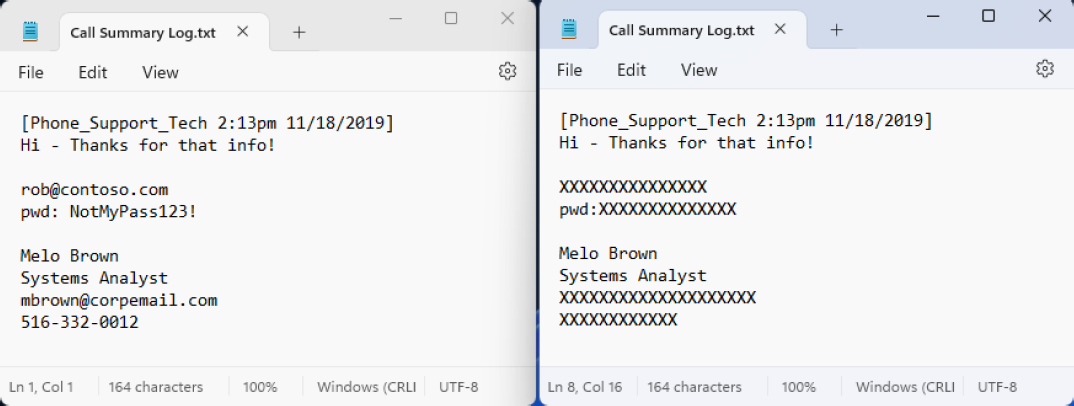
Data redaction permanently removes or obscures sensitive information within documents or records, which prevents unauthorized individuals from viewing or recovering it.
For example, sensitive data, such as passwords or social security numbers are discovered in a text file and are replaced with characters such as 'X' or '#'.
RegEx - Regular Expression
A common method of finding patterns within blocks of text. RegEx is used in Spirion Sensitive Data Platform to create custom search criteria for locating specific patterns in data. This includes identifying sensitive information such as personal data, financial details, and other confidential information by defining patterns that match various formats of data.
- RegEx enables precise and flexible searching, which is essential for data discovery and compliance with privacy regulations.
- Regular expressions can be run directly from the Spirion Client interface or via a Console policy.
- Additionally, you can test regular expressions using online RegEx testers like regex101.com, ensuring that they align with the Spirion implementation.
Remediation
Remediation is a proactive approach to addressing vulnerabilities and ensuring data is accurate, complete, and consistent, thereby mitigating risks and adhering to regulations.
- Quarantine, redaction, and deletion of vulnerable data are all examples of remediation actions.
Scans
Scans are the searches that agents perform on endpoints (targets) to find either the file locations (Discovery Scan) or find specific data types (Sensitive Data Scan) within the files and folders.
Scan - Discovery
The action of scanning a file system to find files and folders OR databases / blob stores to identify data locations.
Scan - Sensitive Data Scan
See Sensitive Data Scan below.
Scan Configuration
Settings that determine what is scanned, where scans occur, which agents perform the scan, and what configuration options are used during that scan.
For sensitive data scans this includes a Playbook.
SDM Translator
Also known as SDM-Translator. See What is the SDM Translator Service.
Search
The action of scanning within a file, folder, database, or blob stores for specific data type matches.
SearchDLL
A SearchDLL (often called a SearchAPI) is a plug-in detector module that Spirion’s scanning engine can load to find sensitive data beyond the built-in detectors.
In plain English: it’s a custom “sensor” you can bolt onto the scanner so it can recognize a specific pattern (often with extra validation, like checksums or context rules), then report matches back to Spirion with details like match type and confidence.
Security Measures Vulnerability Scores
The score (numerical value) given to a security measure, such as an anti-virus application, to measure how much it reduces the vulnerability of an asset.
- Encryption, multi-factor authentication, password rotation and other similar security measures contain vulnerability scores.
- See Data Asset Inventory Settings.
Sensitive Data Match
See Match, above.
Sensitive Data Scan
This type of scan enables you to search for sensitive data, such as a credit card number, password, or social security number, within defined Targets and take actions on them based on the playbook rules defined for them.
Sensitive Data Definition (SDD)
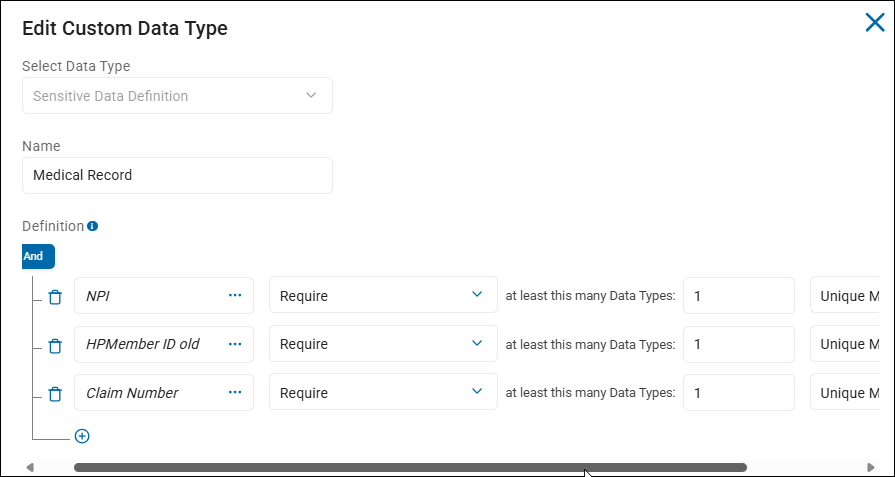
Created by end users, Sensitive Data Definitions are a combination of sensitive data types, AnyFind definitions (native data types such as Social Security numbers, credit card number, personal address, etc.), and filter logic to create powerful recognizers for the purpose of discovering sensitive information.
- Sensitive Data Definitions are a kind of custom data type.
- These custom data types NOT provided out-of-the-box.
- Located under Settings > Global Data Types > CUSTOM DATA TYPES tab.
- Simple examples include single data types such as IMEI numbers, or ABN (Australian Business Numbers)
- Complex examples such as Medical Record include multiple data types, such as NPI, HPMember ID, and Claim Number.
Sensitive Data Engine (SDE)
Search engine used for classification comprised of various modules (for example, RegEx, Dictionary, Keyword, and so on).
Sensitive Personal Information (SPI)
Sensitive Personal Information (SPI) is data that if exposed, could lead to significant harm like identity theft, fraud, or discrimination.
The following are examples of SPI:
- Government IDs: Social Security Number, driver's license, passport number, state ID
- Financial Data: Account numbers, login credentials, credit/debit card numbers with security codes
- Biometric & Health Data: Fingerprints, genetic data, health records, mental/physical health details
- Demographic/Beliefs: Racial/ethnic origin, religious beliefs, union membership, sexual orientation
- Location: Precise geolocation
- Communications: Contents of mail, email, or text messages (unless you're the intended recipient)
- Child's Data: Personal data from known children (under 13 in some states)
SPI is a subset of Personally Identifiable Information (PII) that carries a higher risk. Its compromise can lead to severe consequences, making it a critical focus in data privacy laws (like CPRA, GDPR) that often require explicit consent for processing, unlike standard PII.
Social Insurance Number (SIN)
Spirion AnyFinds data type.
A Social Insurance Number (SIN) is Canada's unique 9-digit identifier used for working, accessing government programs, and filing income tax returns.
It is confidential and must be protected to prevent fraud.
Canadians are required to provide their SIN to their employer and other financial institutions for income-related matters. See SIN.
Spirion Agent GUI
Also called the "Spirion app," or "Spirion Client."
The Spirion Agent GUI is the name used for the Spirion application installed separately from Spirion Sensitive Data Platform.
- The Spirion Agent GUI is installed on an endpoint such as a local laptop or workstation.
- Windows and Mac operating systems are supported. Linux OS is not supported.
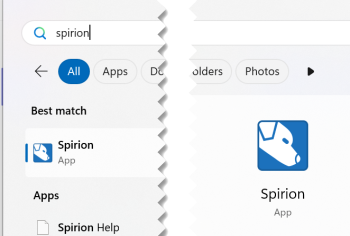
- From the Windows Start menu enter the word "Spirion" to locate and launch the application.
The Spirion Agent GUI provides a user-friendly interface for testing, configuring scans, viewing scan results, and managing sensitive data policies.
For example, the Spirion Agent GUI can be used to test the connection string to a database such as PostgreSQL or MSSQL.
- See How to Configure and Test a Database for Searching.
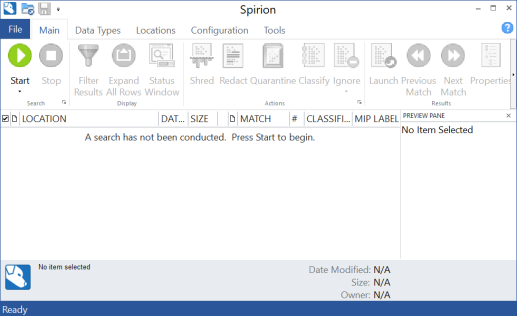
- Note: The Spirion Agent GUI is required to configure database scanning.
- The Spirion Agent GUI offers faster responses and a better view of how scans are actually progressing.
- The Spirion Agent GUI does not enable you to do the following:
- Leverage playbooks in Spirion Sensitive Data Platform.
- Configure certain Targets (Amazon S3, Exchange Online, others)
Spirion-Defined Policy
Settings that are required but not configurable by the user.
Spirion-Defined Defaults
The default settings used by Spirion Sensitive Data Platform unless or until changed by a user.
svc-resultsprocessing Log
The svc-resultsprocessing log is the output generated by the Results Processing Microservice. This service is a critical part of the Spirion backend pipeline responsible for taking raw scan data and making it "useful" for the user interface.
What does the svc-resultsprocessing log do?
- Data Transformation: It processes scan results arriving from the Ingress and Kafka layers and prepares them for storage in the main SQL database.
- Dashboard Updates: It triggers the
ChartDataSchedulerjob, which populates theCachedDashboardChartstable. When you see a "Results Processing API error" on your dashboard, this is usually the service responsible. - Maintenance: It hosts the Swagger API endpoints (for example,
/api/Maintenance/RefreshChartCache) used to manually force dashboard refreshes.
Why the log is important for troubleshooting
- Hanging Conditions: If the log stops after the line
Process 23 exited with status = 9, the service has hung and requires a restart. - Chart Failures: If your dashboards show "Not Found" or "Server Error," the
svc-resultsprocessinglog contains the specific error details. - Job Verification: When a manual refresh is triggered, the log confirms that the
ChartDataSchedulerjob has started.
Tags
A Tag is a kind of container.
- A Tag is a manual or dynamic group of Targets, such as: Marketing Laptops or HR Databases, or MAC Agents, or Linux Agents, or SQL databases, etc.
- Recall, an Agent (Windows, or Mac, Linux, or Legacy (pre-version 13.0)) can act as a Target
Three are three types of Tags:
- IP Range
- Manual
- Conditional
You can select the Targets for your Tag manually, or you can define the conditions that determine which Targets are placed into your Tag.
- See Tag Management
Target
A Target is any data location within an Asset that Spirion Sensitive Data Platform can scan.
Targets can be in a “physical” box that can be scanned or they can be in a cloud asset.
- Examples:
- Targets in Local Assets: SQL Databases on a local SQL server
- Targets in Cloud Assets:
- Databases on Amazon S3, Azure Blob, Bitbucket, Google Drive
- File Directories in SharePoint
- Targets in Email:
- Exchange On-Prem email which is housed on a local server
- Exchange Online email which is housed in the cloud
- Targets in Virtual Machines:
- Databases on an Oracle VM, Amazon EC2, etc.
- Agents can act as Targets
User-Level Remediation (ULR)
User-Level remediation is when an end user uses Spirion Sensitive Data Platform to take actions to lessen or eliminate the risk of sensitive data which is typically stored on their own workstation or laptop.
ULR:
- Empowers the end user to address sensitive data policy violations, issues or risks and resolve them. See
- For example, a physical machine such as a users's laptop or workstation contains passwords and exposed financial information such as bank records.
- The user can take action on the sensitive data discovered on their machine from the Location details window available from the "Scan Results" page. See How to Perform Location and Match Actions on Scan Results.
Unmanaged data
Unmanaged data in Spirion Sensitive Data Platform is sensitive data that has been not acted upon (No action) or else has been acted upon in the following ways:
- Assigned (to a specific user to take appropriate action including No action)
- Notified (a notification is emailed to a specific user to alert them)
Unprotected Matches
Unprotected matches are sensitive data matches that have received one or more of the following scan playbook actions:
- No Action Taken
- MIP
- Classified
*Sensitive data matches labeled "MIP" and/or "Classified" do not qualify as Protected matches.
Work Item
Job for the agent to do (for example, Discovery, Classification, Remediation).
Workflow Rule
The logic and actions to be performed automatically when matches are validated.