
What is a Target?
This article describes what a Target is, where, when and how it is used in Spirion Sensitive Data Platform.
In Spirion Sensitive Data Platform (SDP), a Target (also referred to at the API and implementation layer as an EndpointType or stored endpoint) represents any system, host, repository, cloud tenant, database, or application where sensitive data resides and that Spirion can authenticate to, enumerate, and scan.
Assets are detailed below.
Target Examples
- Targets in Local Assets: SQL Databases on a local SQL server
- Targets in Cloud Assets:
- Databases on Amazon S3, Azure Blob, Bitbucket, Google Drive
- File Directories in SharePoint
- Targets in Email:
- Exchange On-Prem email which is housed on a local server
- Exchange Online email which is housed in the cloud
- Targets in Virtual Machines: Databases on an Oracle VM, Amazon EC2, etc.
Purpose and Function
The Data Assets and Targets screen is where you can view and manage Assets and Targets.
- Assets
- Locations, physical or cloud, that contain one or more Targets.
- Examples:
- A SQL Server hosted on-premise at your business
- A Dropbox account you maintain.
- Asset and Target Examples:
- An SQL server (Asset) with multiple SQL Databases hosted on it (Targets)
- A SharePoint Online instance (Asset) with multiple sites (Targets)
- A Workstation (Asset and single Target), or a Azure Data lake (Asset that can’t be scanned)
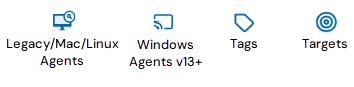
Target Icon
The following icons are used in Spirion Sensitive Data Platform to indicate what the object is that is being displayed on the page, table, or wizard.
Where Targets Are Used
1. Console Pages & UI Areas (Mission Control)
- Scans / Jobs Page (Scans / Jobs Zone): Where administrators configure, schedule, launch, and monitor scans. Target definitions are selected here to establish the scope of “where to look.”
- Endpoints / Target Management Area (Organization Endpoints): Where persistent target endpoints are registered, authenticated, inventoried, and maintained via endpoint management APIs.
- Findings & Search Results Pages: Where discovered sensitive items, match snippets, and classification tags are displayed and mapped directly back to their originating target and location path.
- Reporting & Dashboards Pages: Used to break down coverage, posture, and risk metrics by repository or target type (for example, File Shares vs. Endpoints vs. M365 vs. Databases).
- Global Application Settings Page: Where tenant-wide default configurations and target-dependent operational settings are managed (for example, preset Quarantine directory paths for file systems and cloud storage providers).
2. Wizards
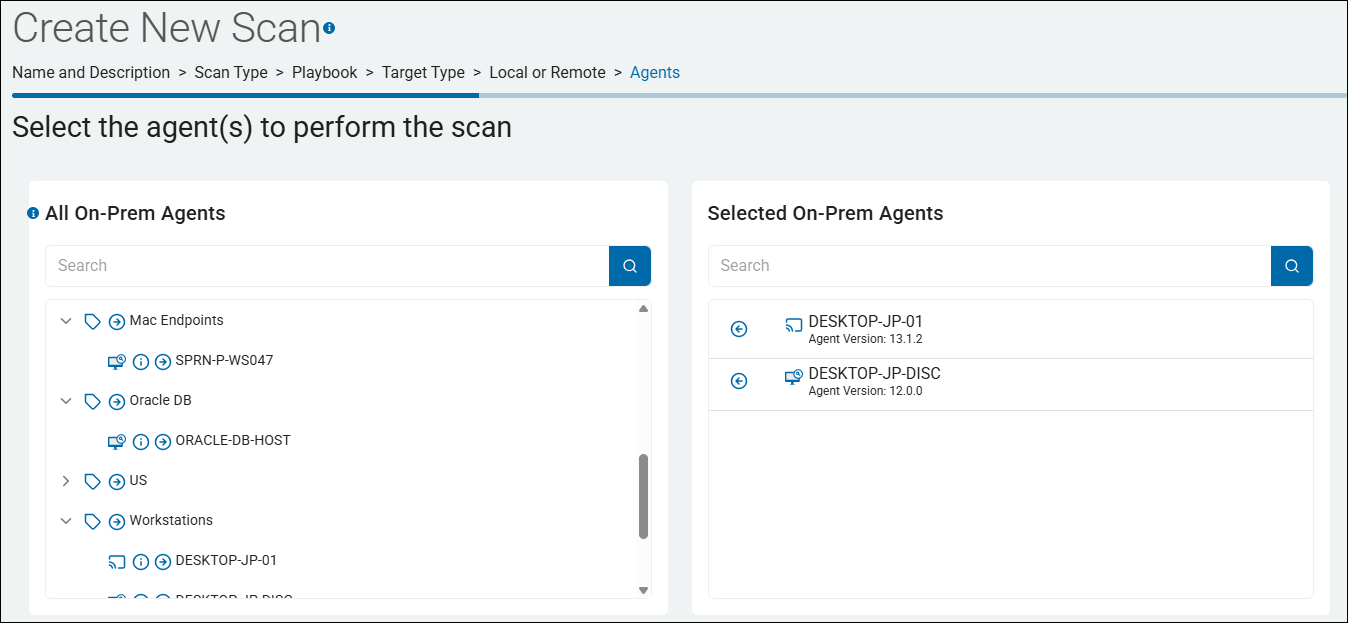
- Scan Creation / Configuration Wizard: The progressive workflow for defining scan execution:
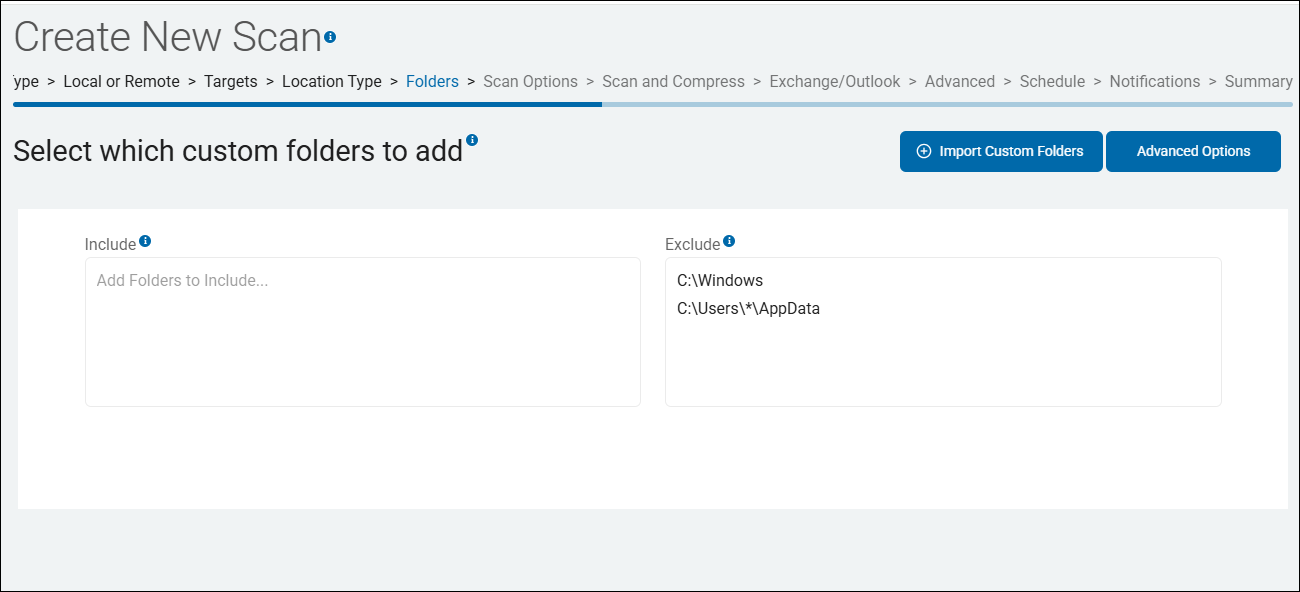
- Target Selection & Scoping Step: Selecting target families and specifying concrete target identifiers (paths, UNC shares, mailboxes, or cloud user accounts).
- Authentication Step: Attaching or selecting stored target endpoint credentials or OAuth tokens.
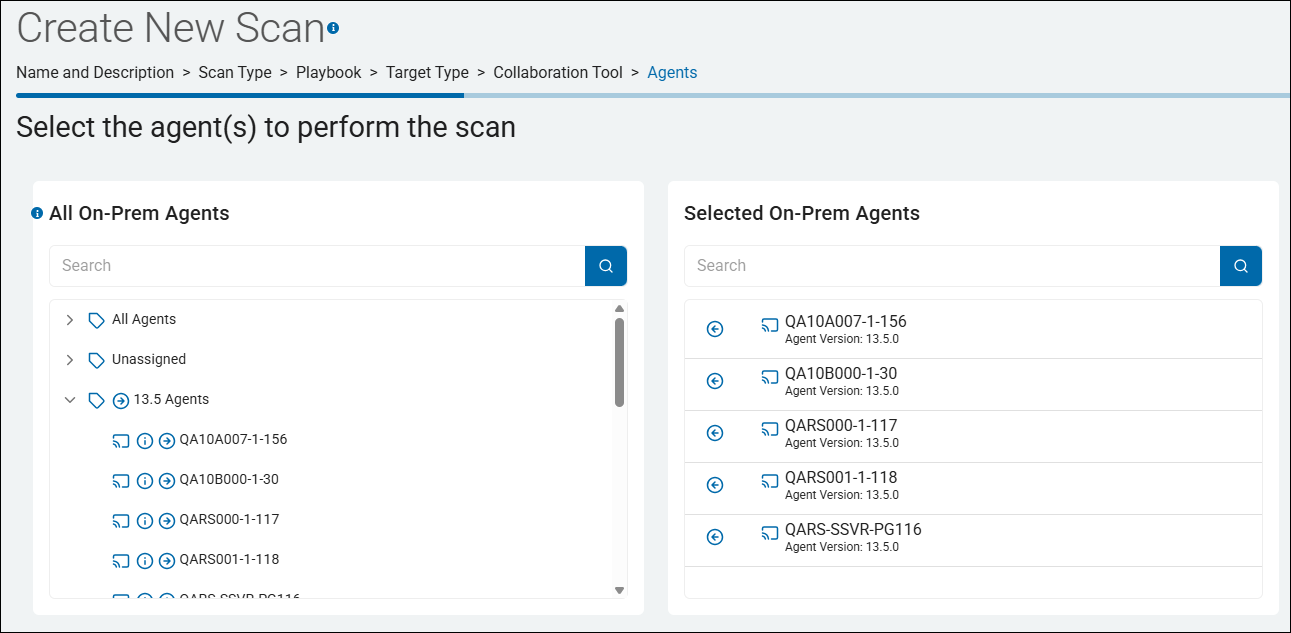
- Agent Assignment Step: Assigning capable worker agents based on the target type (for example, assigning local Agents for on-host scans, or allocating a Discovery Agent and Search Agents for distributed network targets).
- Endpoint / Target Registration Modals & Wizards: Specialized setup dialogs for registering new targets into the platform:
- Remote Computer / File Share Wizard: Captures host IP/UNC address and administrative credentials.
- Cloud Storage & M365 OAuth Wizards: Handles OAuth consent and app-token exchange for OneDrive, Google Drive, Box, and Dropbox.
- Database Configuration Wizard: Captures provider drivers, server/host details, ports, and connection strings.
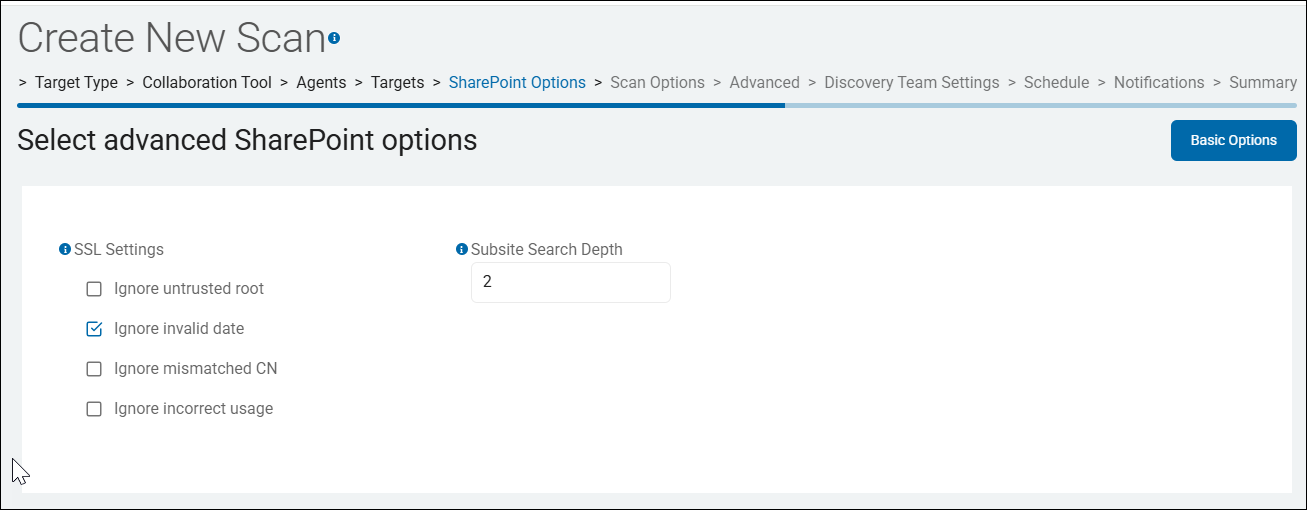
- SharePoint Site Wizard: Configures site URLs, authentication modes (User/Password, Client Secret, or Certificate/ADFS), and crawl options.
- Website Target Wizard: Sets starting crawl URLs, crawl depths, and external link options.
Part 2: How Targets Are Used
1. Driving Scan Domain and Payload Construction
The selected target type determines which location collections are populated in the scan:
- Environment Families:
- Email / Mailbox
- Gmail
- Office365
- Exchange / Exchange On-Premise
- Database:
- Connection driven via the endpoint connection string (
Provider=...SQLAPI);subEnvironmentTypeindicates the database provider (Oracle=0, SQL Server/Azure=1, DB2=3, MySQL=8, SQLite=9, PostgreSQL=10, ODBC=11, OLEDB=12, MongoDB=13, Snowflake=14).
- Connection driven via the endpoint connection string (
- File System
- Collaboration & Repositories
- SharePoint (Online/On-Prem/ADFS)
- Bitbucket
- Cloud Storage
- Box, Dropbox, GDrive, OneDrive: Populate cloudStorageUserList.
- Amazon S3 & Azure Blob: Drive scope via bucket/container configurations on the endpoint (no user list).
- Web Crawl
2. Authentication and Trust Boundaries
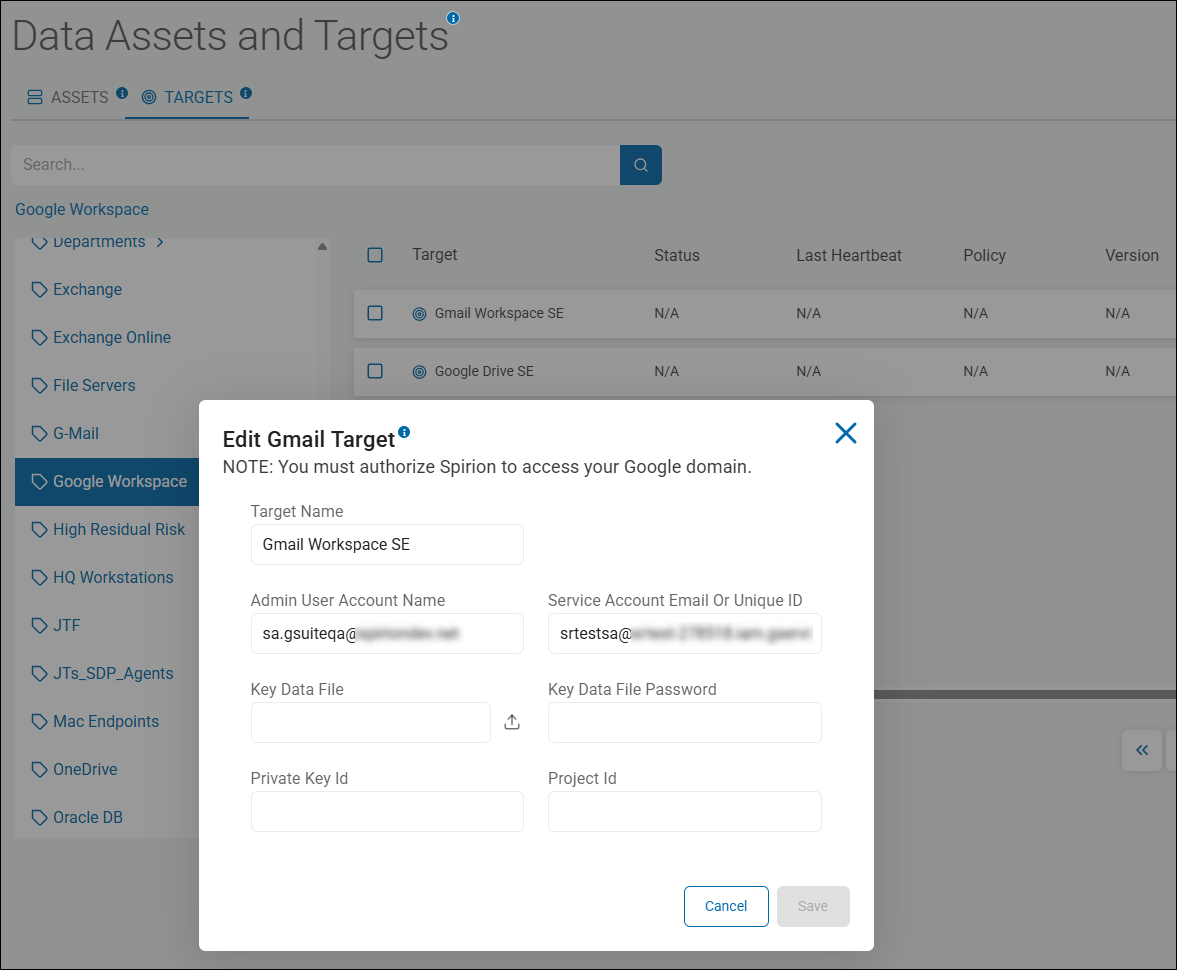
- Authentication Patterns: Targets enforce specific credential flows:
- Stored Credentials / Service Accounts: Workstations, remote file shares, and on-premises systems.
- OAuth App Registrations & Scoped Tokens: Microsoft 365, Google Drive, Box, and Dropbox.
- Connection Strings / Drivers: Native DB drivers, ODBC, and OLEDB.
- Customer-Side Trust Boundary: The Target's source data (files, mail, database records) never leaves the customer environment. Compute agents run close to the target; only findings metadata, execution progress, and optionally pre-redacted snippets are shipped over encrypted transport to the SaaS console.
3. Agent Workload Orchestration
Targets determine how Spirion Agent resources are allocated and distributed:
- Local Scans: The scan runs on-host. If multiple Agents are assigned, each Agent executes the scan concurrently on its own host, generating independent endpoint results.
- Non-Local / Remote Targets: Workload is split into two roles:
- Discovery Agent (1 Agent): Authenticates to the target repository and enumerates contents into work units in a durable job queue.
- Search Agents (1 or more Agents): Pull work units concurrently from the queue to inspect content and classify sensitive data.
4. Blast Radius Control and Scan Settings Resolution
- Blast Radius Control: Targets enable administrators to bound scans by defining scopes
- For example, targeting specific sub-folders, site collections, or mailbox batches rather than triggering unconstrained enterprise scans that risk Target-side throttling (for example, M365 API throttling).
- For example, targeting specific sub-folders, site collections, or mailbox batches rather than triggering unconstrained enterprise scans that risk Target-side throttling (for example, M365 API throttling).
- Settings Precedence: Target-specific options (such as database table limits, row counts, web crawl depths, or SharePoint subsite search depths) are resolved through a strict 5-tier order:
- Explicit User Input
- Learned Setting Policy (named settings group / playbook intent)
- Target-Type Defaults
- Environment Defaults
- User Clarification
5. Attribution, Playbooks, and Remediation
- Attribution: When findings are shipped to the console, they are tied to the Target endpoint, enabling operators to audit what repository was scanned and when
- Remediation Compatibility: Scan Playbooks and workflows evaluate findings against the target context. Target capabilities dictate available remediation actions:
- File systems support NTFS Alternate Data Streams (ADS) classification tagging, file redaction, quarantine, or shredding.
- M365 Targets support Microsoft Information Protection (MIP) labels and in-content document classification.
- Cloud storage targets support preset cloud quarantine paths or sharing exposure reduction.
6. Lifecycle Management & Teardown Independence
- Decoupled Lifecycle: Stored Targets can be defined once and reused across multiple scans and schedules
- Teardown Hierarchy: Deleting a target endpoint via
DELETE /OrganizationEndpoints/DeleteEndpointis not blocked by existing scans. - However, deleting a playbook referenced by an active scan yields a
409 Conflict. - To maintain integrity, the platform follows a safe teardown order: Scan → Playbook → Target.
- However, deleting a playbook referenced by an active scan yields a