
How to Use Scans Settings - Data Retention Section
To use Data Retention settings, fill in the following fields:
NOTE: Some of these fields apply only to Spirion Sensitive Data Watcher (SDW) and do not appear unless you have an active SDW license.
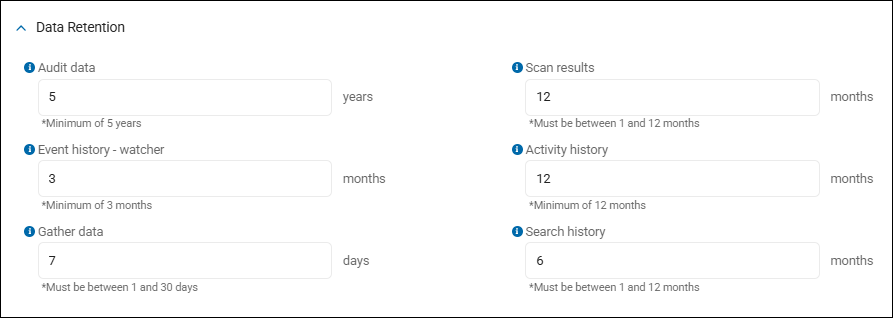
Audit data
What it controls: This field sets how long Spirion Sensitive Data Platform retains audit event records (the compliance/regulatory audit trail — things like who did what, when, and where within the platform). These audit events are stored in raw format and are critical for demonstrating due diligence during regulatory inquiries.
- Set the number of years to retain data.
- A minimum of 5 years is required.
Why 5 years minimum?
- CPRA/CCPA's 5-year statute of limitations — Organizations must retain audit trail data to prove due diligence during regulatory inquiries.
- GDPR — GDPR regulations do not specify a fixed period.
How old data is removed
Spirion Sensitive Data Platform uses nightly tasks to purge data that has exceeded its retention window.
Event History - watcher
What it controls: How long Spirion Sensitive Data Platform retains Activity Watcher event history — the raw event logs generated by the Activity Watcher Agent (file access, deletion, copy events, etc.) that feed into Watcher incidents.
These are stored via ServiceTaskTypes.PurgeEventHistory (taskType = 38).
- Set the number months to retain Watcher Event history, if applicable.
Important: Watcher SKU dependency — this field (along with "Activity history") is only visible when the customer is subscribed to Watcher. If the Watcher SKU is not licensed, both fields are hidden from the Data Retention panel.
How old data is removed
A nightly task (ServiceTask type 38 — PurgeEventHistory) purges Watcher event history older than the configured retention period.
Gather data
What it controls: How long Spirion Sensitive Data Platform retains Gather Data files — the diagnostic bundles uploaded from agent endpoints (logs, config snapshots, system info) used for troubleshooting and support. These are stored in MinIO (object storage) and referenced in the database.
- Set the number of days to gather data.
- This number must be between 1 and 30 days.
Key distinction from the other Data Retention fields
Unlike the other four fields (Audit data, Scan results, Event history - watcher, Activity history) which are backed by ServiceTask purge jobs, Gather data is a Global Setting — stored as Import.DaysToKeepClientsGatherData in the GlobalSettings table.
This means:
- It does not have a ServiceTask type (no taskType number like the others)
- It is saved via a separate API (
UpdateImportExportHistoryGlobalSettings) rather than the purge task API - The value only writes to the DB when it differs from the default (7 days); if set back to 7, the DB row is removed
How old data is removed
- The purge runs on a nightly schedule and hard-deletes both the database record and the corresponding file from MinIO when the upload timestamp is older than
DaysToKeepClientsGatherData. - Unlike the service task-backed fields, this purge cannot be disabled by toggling a
ServiceTasks.Enabledflag — it runs as long as the value is set.
Scan results
What it controls: How long Spirion Sensitive Data Platform retains scan result data — the match records (locations where sensitive data was found) stored in the Matches, MatchLocations, and MatchLocationSearchHistory tables.
This includes both discovery scan results and Watcher file/email results (they're mingled in the same tables). Records older than the configured period are hard-deleted based on MatchDataHistory.TimeStamp (the "last seen/last modified" date).
- Set the number of months of scan results to retain.
- This number must be between 1 and 12 months.
Import contention
Purge can periodically interrupt import, plus the configurable MaxRunTime so purge doesn't hold up imports.
Architecture
- ServiceTask type:
10(ServiceTaskTypes.PurgeResults) - API: Saved via
ManageDataRetentionSetting(same as Audit data, Event history, Activity history) - Database query:
Select * from ServiceTasks Where Type=10 - Schedule: Runs nightly via TaskScheduler (starting from 1am local time)
- Configurable internals (set per-environment via SQL, not the UI):
BatchSize(default: 10,000)OuterBatchSize(default: 1,000,000)Timeout(default: 10,800 seconds = 3 hours)MaxRunTime(default: 2 hours — to avoid blocking imports indefinitely)
Activity history
This setting is only visible if you are subscribed to Spirion Sensitive Data Watcher.
What it controls: How long Spirion Sensitive Data Platform retains Watcher incident history records — the lifecycle data about Activity Watcher incidents (file/email activity violations).
When an incident is purged, its associated event records are also hard-deleted.
These are managed by the svc-IncidentManagement service via the DeleteIncidentHistoryByIds method.
- Set the number of months of Incident history to retain.
- A minimum of 12 months is required.
Architecture
- ServiceTask type:
37(ServiceTaskTypes.PurgeIncidentHistory) - API: Saved via
ManageDataRetentionSetting(same as Audit data, Scan results, and Event history – watcher) - Database query:
Select * from ServiceTasks Where Type=37 - Schedule: Runs nightly via TaskScheduler
- Purge logic: Hard-deletes incident records AND any remaining event records associated to those incidents when the incident timestamp is older than the configured period
Search history
What it controls: How long Spirion Sensitive Data Platform retains search history records — the location hash data stored in the Search History database that tracks which file locations have already been scanned with which scan fingerprint.
This is the optimization cache that powers differential scanning (skipping unchanged files on subsequent scans).
When a search history record's LastUpdated timestamp is older than the configured period (meaning the location hasn't been reported in any scan for that long), it is purged.
- Set the number of months of scanned location history to retain when using Differential Scanning.
- This number must be between 1 and 12 months.
How Search History Works (context)
A location (file or email) doesn't need to be scanned again if the following is true:
- The location string is the same
- The Target is the same
- The search fingerprint is the same (SHA256 of playbook ID + playbook definition + custom types + identity types policies)
- The file's size or last-modified timestamp hasn't changed (captured in a
MetadataHash)
LastUpdated
- The
LastUpdatedcolumn is refreshed each time a scan reports the location (whether searched or skipped). - If a location stops appearing in scans (Target removed, file deleted, etc.),
LastUpdatedstales out and the purge removes it after the configured period.
Architecture
- Type: Global Setting (NOT a service task — same architecture as "Gather data")
- Global Setting key:
History.PurgeLastAccessedMoreThanXMonthsAgo - Purge frequency key:
History.HistoryPurgeFlushFrequencyInMinutes(default: 5 minutes) - Database:
[org00002].[SearchHistory]table - Purge service:
Svc-SearchHistoryruns the purge routine every N minutes (default 5) - Purge SQL:
DECLARE @Timestamp DATETIME = DATEADD(MONTH, @OlderThanXMonths*-1, GETUTCDATE())
DELETE FROM [SearchHistory] WHERE [IsDeleted] = 1 OR (@Timestamp > LastUpdated) - API: Saved via
UpdateImportExportHistoryGlobalSettings(the global settings API, separate from theManageDataRetentionSettingAPI used by the service-task-backed fields) - Database behavior: The value only writes to the
GlobalSettingstable when it differs from the default (6 months). If set back to 6, the row is removed. - Verification query:
SELECT [Name], CONVERT(VARCHAR(MAX), [Value]) AS Val FROM GlobalSettings
WHERE [Name] IN ('Import.DaysToKeepClientsGatherData', 'History.PurgeLastAccessedMoreThanXMonthsAgo')
Key distinction from other Data Retention fields
This field is fundamentally different from Audit data, Scan results, Event history, and Activity history:
- It's NOT about retaining customer data or audit trails — it's about retaining the scan optimization cache.
- If search history is purged too aggressively, previously-scanned-but-unchanged files will simply be re-scanned on the next scan, making scans slower but not losing any actual customer findings or audit records.
- Conversely, if it's retained too long, the Search History DB grows unbounded and consumes storage.