
CUI Regular Expressions (RegEx) and Recommendations
CUI Data Type Overview
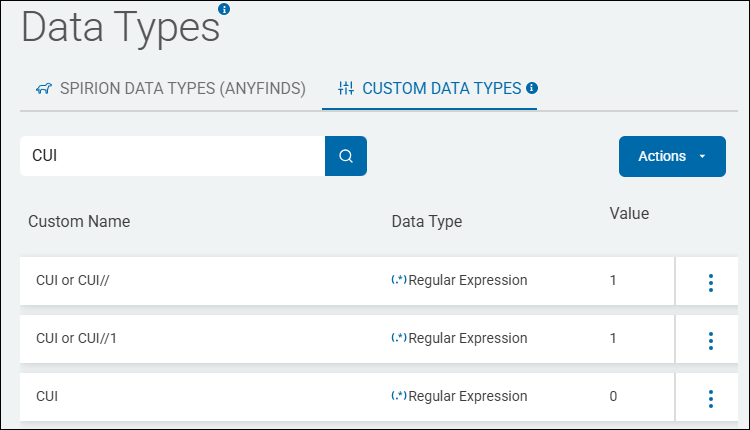
- Sample CUI custom data types are listed on the Spirion Sensitive Data Platform Data Types page under the CUSTOM DATA TYPES tab.
- "CUI" is a user-created custom data type, it is not provided out-of-the-box.
- Note: Only users with administrator permissions can create custom data types
- See the sample screenshot below
- There are multiple ways to capture controlled unclassified information (CUI) using regular expressions.
- While the examples below provide examples of how controlled unclassified information regular expressions can be formed, contact your archTIS representative for specific details of how best to tailor CUI regular expressions for your environment.
Example: Basic CUI RegEx
- This example basic CUI regular expression is named "CUI or CUI//"
(?-i)\bCUI\b(?!//)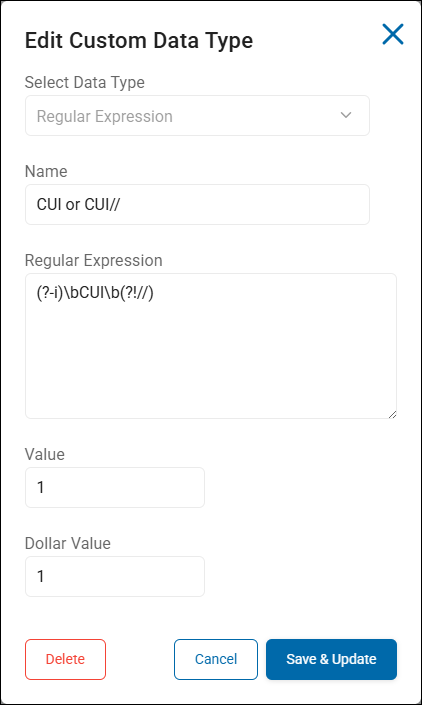
- This Regular Expression is a high-precision "negative lookahead" pattern designed to find the standalone acronym CUI while specifically excluding standard CUI markings that use double slashes (like
CUI//SP-PROPIN). - In Spirion Sensitive Data Platform, this is often used to find "informal" or "improperly marked" Controlled Unclassified Information that might otherwise be missed by standard marking detectors.
Breakdown of the RegEx
(?-i)(Case-Sensitive Mode): This tells the engine to be case-sensitive. It matches "CUI" but not "cui" or "Cui". This is important because "cui" could be a fragment of a word (like "cuing"), whereas "CUI" in uppercase is almost always the regulatory acronym.\b(Word Boundary): This ensures that "CUI" is a whole word. It prevents matching "CUI" inside other words like "SCUIpper" or "RECUIT".CUI(The Literal Match): The specific text the engine is looking for.\b(Second Word Boundary): Closes the word match.(?!//)(Negative Lookahead): This is the "logic" of the regular expression. It says: "Match 'CUI' only if it is NOT immediately followed by two forward slashes (//)."
Why use this in Spirion Sensitive Data Platform?
This regular expression is a "cleanup" or "gap-fill" detector.
- Finding Improper Markings: Official CUI is supposed to be marked with slashes (for example,
CUI//Category). If a user simply types "This document contains CUI" without the slashes, a standard "Marking" detector might miss it. This regular expression catches those instances. - Reducing Noise: By excluding
CUI//, you prevent this specific rule from double-triggering on documents that are already correctly marked and likely already caught by your primary CUI marking rules. - Contextual SDDs: You can use this in a Sensitive Data Definition (SDD) to find high-risk files:
- Logic:
[Regex: (?-i)\bCUI\b(?!//)] NEAR [AnyFind: Social Security Number] - Result: This finds files that mention "CUI" informally and also contain an SSN, which is a high-risk data handling violation.
- Logic:
Basic RegEx Summary
- This regular expression finds the word CUI (case-sensitive) only when it is not part of a formal marking string like
CUI//. - It is an excellent tool for finding "shadow" CUI or data that has been improperly labeled by end-users.
Example: Advanced CUI RegEx
- This example advanced CUI regular expression is named "CUI"
(?-i)\b(?:CUI//(?=[A-Z0-9/\-,() ]|$)|CUI\b)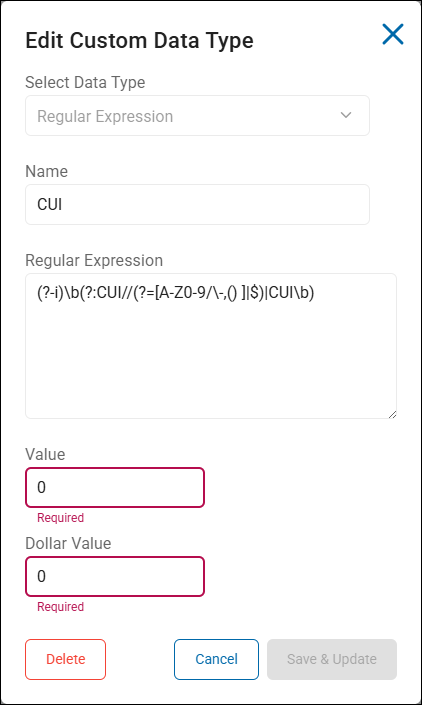
- This Regular Expression is a sophisticated "dual-mode" detector designed to find both formally marked and informally mentioned Controlled Unclassified Information (CUI).
- It is highly optimized for the Spirion Sensitive Data Platform to ensure high accuracy while minimizing "false positives" from common words that might contain those letters.
Breakdown of the Regex:
(?-i)(Case-Sensitive): It looks only for uppercase CUI. It ignores "cui" or "Cui".\b(Word Boundary): This ensures the match starts at the beginning of a word.(?: ... | ... )(Non-Capturing Group with OR logic): This enables the regular expression to look for 2 different patterns:- Pattern A:
CUI//(?=[A-Z0-9/\-,() ]|$) - Matches
CUI//only if it is followed by a valid CUI character (Uppercase letters, numbers, slashes, hyphens, commas, parentheses, or spaces) or the end of the line. - This uses a Positive Lookahead
(?=...)to ensure the slashes are actually part of a marking and not just random punctuation.
- Matches
- Pattern B:
CUI\b - Matches the standalone word
CUI(for example, "This file is CUI").
- Matches the standalone word
- Pattern A:
What does this Expression Catch?
This regular expression is designed to be a "catch-all" for various ways controlled unclassified information (CUI) appears in documents:
1. Formal Banner Markings (Top/Bottom of Page)
- Example:
CUI//SP-PROPIN - Example:
CUI//BASIC - Example:
CUI//FEDCON
2. Multi-Category Markings
- Example:
CUI//SP-PROPIN/SP-PRVCY - Example:
CUI//(LISTED CATEGORIES)
3. Informal Mentions (In-text)
- Example: "This document contains CUI and must be protected."
- Example: "Please review the attached CUI file."
4. Improperly Formatted Markings
- Example:
CUI//(Matches the prefix even if the user forgot to add the category).
Why this is effective in Spirion:
- Prevents False Positives: Because of the
(?-i)and\b, it will not match words like "recuit," "scuipper," or "circuit." - Validates the "Slashes": By using the lookahead
(?=[A-Z0-9/\-,() ]|$), it ensures thatCUI//is followed by characters typically found in NARA-approved CUI categories, rather than random symbols. - Comprehensive Coverage: By combining the "Formal" (
CUI//) and "Informal" (CUI) patterns into one regex, you only need one Custom Data Type in Spirion to cover almost all CUI naming conventions.
Recommended Action
- Map this RegEx to a "CUI" Classification Label in a Spirion Playbook.
- This ensures that any file containing these strings is automatically marked and governed according to your CMMC or NIST 800-171 policies.
Example: CUI - Category Marking
- This example CUI regular expression is named "CUI - Category Marking"
AIV|ADPO|CRITAN|ARCHR|FSEC|BUDG|FUND|CVI|CHLD|CCI|CONTRACT|SUB|CTI|CHRI|CEII|LDNA|EXPT|JURY|TAX|FISA|FISAB|FNC|INTEL|NUC|PRVCY|PROCURE|PROPIN|GENETIC|GEO|HLTH|HISTP|INF|PRIIG|IFNC|ID|INTL|INV|LFNC|NPSR|NNPI|SRI|PERS|PHYS|MFC|PCII|LPROT|SGI|SSI|SSEL|STAT|STUD|TSCA|DCNI|UCNI|CENS|WHSTL|WIT|WDT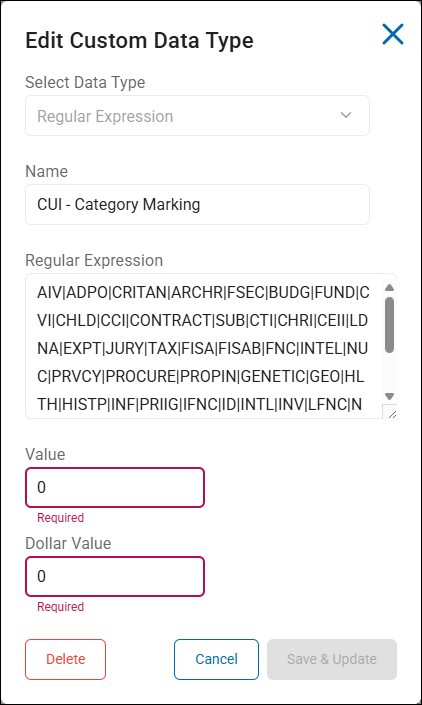
- This regular expression is a list of CUI Category Abbreviations (also known as "Short-form Designators").
- In the Spirion Sensitive Data Platform, this RegEx is used as a Custom Data Type to identify documents where Controlled Unclassified Information is referenced by its official shorthand code rather than its full name.
What the RegEx Does
- This regular expression uses Alternation (the
|symbol) to search for any one of these specific 3-to-8 letter codes. - These codes are defined by the NARA CUI Registry and are frequently used in "portion markings" (the labels placed at the start of paragraphs, for example,
(CUI//CTI)).
Key Abbreviations Caught
- CTI: Controlled Technical Information (One of the most common defense categories).
- In the context of CUI (Controlled Unclassified Information) CTI is one of the most critical categories for defense contractors and research institutions.
- How it appears in documents:
- When using the Spirion Sensitive Data Platform to find this data, you typically see it in "portion markings" or "banner markings" like this:
- CUI//CTI
- (CUI//CTI)
- Why CTI is important:
- Definition: It refers to technical information with a military or space application that is subject to controls on the access, use, reproduction, modification, performance, display, release, disclosure, or dissemination.
- Regulatory Link: CTI is the primary category of data governed by DFARS 252.204-7012, which requires contractors to provide "adequate security" (NIST SP 800-171) for all CTI residing on their internal networks.
- Spirion Strategy: Because CTI is so high-risk, many Spirion users create a specific Playbook just for this code. If `CTI` is detected, the playbook might automatically Quarantine the file or apply a MIP Label that restricts access to only "US Persons."
- EXPT: Export Controlled.
- HLTH: Health Information.
- PRVCY: Privacy Information.
- PROPIN: Proprietary Business Information.
- NNPI: Naval Nuclear Propulsion Information.
- SGI: Safeguards Information.
- SSI: Sensitive Security Information.
- TAX: Federal Taxpayer Information.
Why this is critical for Spirion Users:
Official CUI guidelines often require "Portion Marking."
A document might not say "Controlled Technical Information" in the text, but every paragraph might start with (CUI//CTI).
- If you search only for the full name, you will miss these documents.
- This regular expression ensures you catch the shorthand markings used by government contractors and agencies.
Recommended Implementation in Spirion:
- The "Portion Marking" SDD (High Accuracy):
- To avoid false positives (since "TAX" or "ID" are common words), combine this regex with the CUI prefix in a Sensitive Data Definition (SDD).
- Logic:
[Keyword: "CUI//"] NEAR WITH DISTANCE (0) [Regex: (AIV|ADPO|CTI|...)] - Why: This ensures you only match when the abbreviation is part of a formal CUI string, like
CUI//CTI.
- Logic:
- Playbook Action:
- If this regular expression triggers, the file is automatically classified as "CUI" or "CUI-Specified" and potentially moved to a secure enclave (like a GovCloud environment or a restricted file share).
Summary:
This regular expression is the "Shorthand Dictionary" for CUI.
It enables Spirion to recognize technical and regulatory codes that would be invisible to a standard PII or "Full Name" search.
Example: CUI - Banner Marking: Specified Authorities
- This example is named "CUI - Banner Marking: Specified Authorities"
CUI//SP-AIV|CUI//SP-ADPO|CUI//SP-CRITAN|CUI//SP-ARCHR|CUI//SP-FSEC|CUI//SP-BUDG|CUI//SP-FUND|CUI//SP-CVI|CUI//SP-CHLD|CUI//SP-CCI|CUI//SP-CONTRACT|CUI//SP-SUB|CUI//SP-CTI|CUI//SP-CHRI|CUI//SP-CEII|CUI//SP-LDNA|CUI//SP-EXPT|CUI//SP-JURY|CUI//SP-TAX|CUI//SP-FISA|CUI//SP-FISAB|CUI//SP-FNC|CUI//SP-INTEL|CUI//SP-NUC|CUI//SP-PRVCY|CUI//SP-PROCURE|CUI//SP-PROPIN|CUI//SP-GENETIC|CUI//SP-GEO|CUI//SP-HLTH|CUI//SP-HISTP|CUI//SP-INF|CUI//SP-PRIIG|CUI//SP-IFNC|CUI//SP-ID|CUI//SP-INTL|CUI//SP-INV|CUI//SP-LFNC|CUI//SP-NPSR|CUI//SP-NNPI|CUI//SP-SRI|CUI//SP-PERS|CUI//SP-PHYS|CUI//SP-MFC|CUI//SP-PCII|CUI//SP-LPROT|CUI//SP-SGI|CUI//SP-SSI|CUI//SP-SSEL|CUI//SP-STAT|CUI//SP-STUD|CUI//SP-TSCA|CUI//SP-DCNI|CUI//SP-UCNI|CUI//SP-CENS|CUI//SP-WHSTL|CUI//SP-WIT|CUI//SP-WDT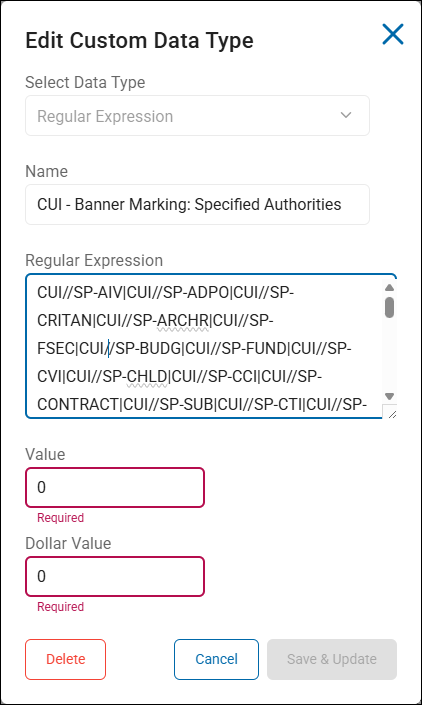
This Regular Expression is a comprehensive list of CUI Specified (SP-) Markings.
In the Spirion Sensitive Data Platform, this regular expression is used as a Custom Data Type to identify documents that contain "Specified" Controlled Unclassified Information.
What the Regex Does
It uses Alternation (|) to search for the formal prefix CUI//SP- followed by a specific category abbreviation.
- The "SP-" stands for Specified.
In the CUI framework, "Specified" categories are higher-stakes than "Basic" CUI because they have specific handling instructions or dissemination controls mandated by a specific law, regulation, or government-wide policy.
Key "Specified" Categories Caught
CUI//SP-CTI: Specified Controlled Technical Information (High-risk defense data).CUI//SP-EXPT: Specified Export Controlled data.CUI//SP-TAX: Specified Taxpayer Information.CUI//SP-PROPIN: Specified Proprietary Business Information.CUI//SP-PRVCY: Specified Privacy Information.
Why this is important for Spirion Users
While "Basic" CUI requires standard protection, CUI Specified often triggers much stricter remediation requirements.
- Higher Risk Level: If Spirion finds
CUI//SP-CTI, it indicates a potential DFARS or CMMC compliance violation if that file is stored on an unencrypted or public-facing drive. - Playbook Differentiation: Many organizations use this regular expression to trigger a "High Severity" Playbook.
- Basic CUI: Might just get a label and a notification.
- Specified CUI (this regex): Might be automatically Quarantined or Encrypted immediately because the legal requirements for "Specified" data are more rigid.
Implementation Tip
- Because this regular expression includes the full
CUI//SP-prefix, it is extremely accurate and has a very low false-positive rate. - You can safely use this in an Automatic Playbook to apply persistent classification labels (like a "CUI Specified" MIP label) across your environment.
Summary
This regular expression is your "High-Priority CUI" detector.
It specifically targets the regulated data categories that carry the most significant legal and financial penalties if mishandled.
Example: CUI - Organizational Index Grouping
- This example is named "CUI - Organizational Index Grouping"
Law Enforcement|Legal|Intelligence|Critical Infrastructure|Natural and Cultural Resources|Immigration|Financial|Privacy|Defense|Proprietary Business Information|Export Control|Tax|Nuclear|Procurement and Acquisition|Provisional|International Agreements|Patent|Statistical|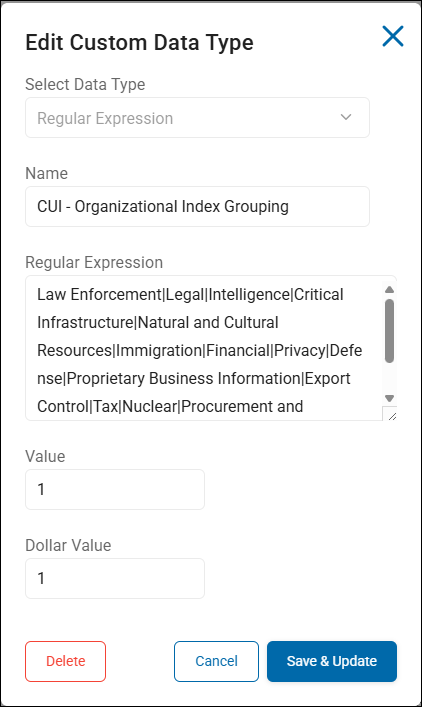
This Regular Expression is a list of the CUI Organizational Index Groupings (also known as CUI "High-Level Categories").
In the Spirion Sensitive Data Platform, this regular expression is used as a Custom Data Type to identify documents that reference the broad categories of Controlled Unclassified Information as defined by the National Archives (NARA).
What the Regex Does:
It uses Alternation (|) to search for any of the 18 primary groups that the U.S. Government uses to organize sensitive data. These are the "buckets" that all specific CUI categories (like ITAR or CTI) fall into.
Key Groupings Included:
- Defense: The group containing CTI and other military-related data.
- Export Control: The group containing ITAR and EAR data.
- Privacy: The group containing PII and health information.
- Financial: The group containing bank secrecy and taxpayer data.
- Critical Infrastructure: The group containing energy and water assessment data.
- Law Enforcement: The group containing witness protection and informant data.
Why this is useful in Spirion
This regex is typically used for Broad Discovery and Governance Reporting.
- Identifying "Data Enclaves": You can use this regular expression to find which departments are handling specific types of sensitive data.
- For example, if the "Marketing" file share is triggering matches for
DefenseorExport Control, it indicates a potential governance gap.
- For example, if the "Marketing" file share is triggering matches for
- Governance Dashboarding: In the Spirion Governance Dashboard (SDV3), you can use these matches to show leadership how your sensitive data is distributed across these 18 legal categories.
- Policy Alignment: Many organizations align their internal data handling policies to these NARA groups. This regular expression enables you to automate the labeling of files to match those internal policies.
Implementation Strategy
Because some of these terms (like "Financial" or "Legal") are common words, using this RegEx by itself may cause "false positives."
To increase accuracy in Spirion:
- Use a Sensitive Data Definition (SDD): Combine this regular expression with a requirement that the word
"CUI"or"Controlled"must also be present in the document. - Logic:
[Regex: CUI Groups] NEAR [Keyword: "CUI"]
- Logic:
- Targeted Scanning: Apply this regex specifically to departments that are likely to handle this data (for example, Legal, Engineering, Finance) rather than scanning the entire enterprise with it.
Summary
This regular expression is a "Top-Down" detector.
It helps you categorize your data into the 18 official CUI groups, making it easier to report on compliance posture to government auditors.
Example: CUI - CUI Category
- This example is named "CUI - CUI Category"
Accident Investigation|Administrative Proceedings|Agriculture|Ammonium Nitrate|Archaeological Resources|Asylee|Bank Secrecy|Battered Spouse or Child|Budget|Campaign Funds|Chemical-terrorism Vulnerability Information|Child Pornography|Child Victim/Witness|Collective Bargaining|Committed Person|Communications|Comptroller General|Consumer Complaint Information|Contract Use|Controlled Substances|Controlled Technical Information|Criminal History Records Information|Critical Energy Infrastructure Information|Death Records|DNA|DoD Critical Infrastructure Security Information|Electronic Funds Transfer|Emergency Management|Entity Registration Information|Export Controlled|Export Controlled Research|Federal Grand Jury|Federal Housing Finance Non-Public Information|Federal Taxpayer Information|Financial Supervision Information|Foreign Intelligence Surveillance Act|Foreign Intelligence Surveillance Act Business Records|General Critical Infrastructure Information|General Financial Information|General Intelligence|General aw Enforcement|General Nuclear|General Privacy|General Procurement and Acquisition|General Proprietary Business Information|Genetic Information|Geodetic Product Information|Health Information|Historic Properties|Homeland Security Agreement Information|Homeland Security Enforcement Information|Informant|Information Systems Vulnerability Information|Information Systems Vulnerability Information - Homeland|Inspector General Protected|Intelligence Financial Records|Internal Data|International Agreement Information|International Agreement Information - Homeland|International Financial Institutions|Inventions|Investigation|Investment Survey|Juvenile|Law Enforcement Financial Records|Legal Privilege|Legislative Materials|Mergers|Military Personnel Records|National Park System Resources|National Security Letter|NATO Restricted|NATO Unclassified|Naval Nuclear Propulsion Information|Net Worth|Nuclear Recommendation Material|Nuclear Security-Related Information|Ocean Common Carrier and Marine Terminal Operator Agreement|Ocean Common Carrier Service Contracts|Operations Security|Operations Security Information|Patent Applications|Pen Register/Trap & Trace|Permanent Resident Status|Personnel Records|Personnel Security Information|Pesticide Producer Survey|Physical Security|Physical Security - Homeland|Presentence Report|Prior Arrest|Privacy Information|Proprietary Manufacturer|Proprietary Postal|Protected Critical Infrastructure Information|Protective Order|Railroad Safety Analysis Records|Retirement|Reward|Safeguards Information|SAFETY Act Information|Secrecy Orders|Sensitive Personally Identifiable Information|Sensitive Security Information|Sex Crime Victim|Small Business Research and Technology|Source Selection|Statistical Information|Status Adjustment|Student Records|Tax Convention|Taxpayer Advocate Information|Temporary Protected Status|Terrorist Screening|Toxic Substances|Unclassified Controlled Nuclear Information - Defense|Unclassified Controlled Nuclear Information - Energy|US Census|Victim|Victims of Human Traffickig|Visas|Water Assessments|Whistleblower Identity|Witness Protection|Written Determinations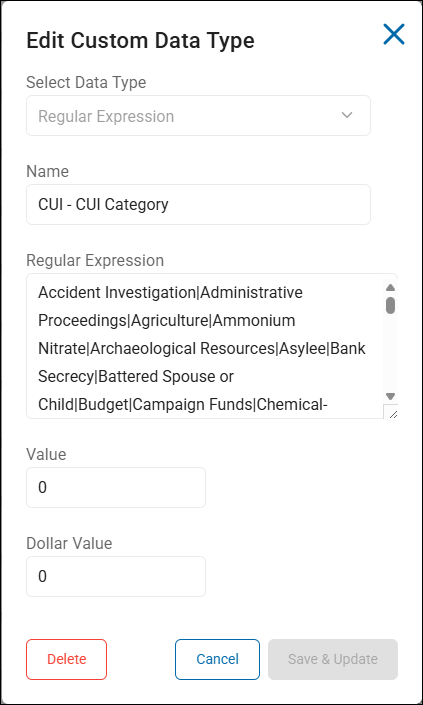
This Regular Expression is a comprehensive list of CUI Category Full Names.
In the Spirion Sensitive Data Platform, this RegEx is used as a Custom Data Type to identify documents where Controlled Unclassified Information is referenced by its official long-form name rather than an abbreviation or a marking.
What the RegEx Does
- This regular expression uses Alternation (
|) to search for any of the official category names defined in the NARA CUI Registry. - This includes over 100 specific types of data, ranging from "Controlled Technical Information" to "Whistleblower Identity."
Key Categories Caught
- Defense & Tech:
Controlled Technical Information,DoD Critical Infrastructure Security Information,Naval Nuclear Propulsion Information. - Privacy & Health:
Health Information,Genetic Information,Sensitive Personally Identifiable Information. - Legal & Law Enforcement:
Federal Grand Jury,Witness Protection,Criminal History Records Information. - Financial:
Federal Taxpayer Information,Bank Secrecy,General Financial Information.
Why this is critical for Spirion Users
While most CUI discovery focuses on "Markings" (like CUI//CTI), this regex is designed for "Unmarked CUI Discovery."
- Finding Legacy Data: Older documents created before CUI marking standards were fully implemented may contain the full category name but lack the formal
CUI//prefix. - Identifying "Shadow" CUI: Employees often describe the data they are working with (for example, "I'm sending over the Source Selection documents") without applying the required regulatory markings. This regex catches those instances.
- Policy Training: You can use the results from this regex to identify users who are handling sensitive data categories but failing to mark them correctly, allowing for targeted security training.
Implementation Strategy in Spirion
Because many of these terms (like "Budget," "Retirement," or "Investigation") are common business words, this RegEx has a high risk of false positives if used alone.
To increase accuracy, use a Sensitive Data Definition (SDD):
- Logic:
[Regex: CUI Full Names] NEAR WITH DISTANCE (100) [Keyword: "Controlled" OR "CUI" OR "NARA"] - Benefit: This ensures that the word "Budget" is only flagged if it appears in a regulatory context, rather than a standard departmental budget spreadsheet.
Summary
This regular expression acts as the "Master Dictionary" for CUI.
It enables Spirion to look past the formal labels and identify the actual subject matter of the data, ensuring that even improperly marked regulated information is discovered and protected.