How to View the Upload Status of Scan Results
Use this topic to view the upload status of scan results. Note that much of the information here is not commonly used by end users. The information available here is most useful to Spirion Support and when troubleshooting.
Overview
The topics below provide a bried introduction to the Results Upload Status page.
What is the Results Upload Status Page Used for?
- The Results Upload Status page is a pipeline health and operational monitoring interface in the Spirion Sensitive Data Platform.
- It exists because scanning and result delivery are decoupled stages — an Agent completes a scan locally but the resulting data must then be packaged and shipped (via the Shipper/IFS process) across the network boundary to the server-side ingestion services before it appears in the console for reporting.
- This page bridges that gap.
Why Would an Administrator Open this Page?
- "Where are my results?" — A scan shows as complete on the agent side, but findings haven't appeared in the console yet.
- This page shows exactly where in the upload pipeline that data is (Preprocessed, Working, Done, Failed, etc.). - To Troubleshoot Upload Failures — Red/failed rows indicate Agents whose results are stuck due to network boundary issues (proxy, firewall, TLS inspection), shipper queue bottlenecks, or file corruption. The page pinpoints the Agent, the upload type, and the state of the upload.
- To Verify Agent Activity — Confirms that deployed agents are actively completing scans and successfully delivering data back to the console, particularly after deploying to new endpoints or updating agent versions.
What other Value does this Page Provide?
- Operational transparency — Shows the status of every upload in the pipeline between the Spirion Agent and Spirion Sensitive Data Platform
- Pipeline diagnostics — Isolates whether a gap in reporting is due to the Agent, the network, or the server-side import process
- Data integrity assurance — Confirms no scan findings are silently lost in transit — every upload is tracked to completion or failure
- Targeted remediation — Enables admins to act on specific failed uploads rather than re-running entire scans
Overview Summary
This page is the administrator's view into "did the data actually make it from the endpoint to the database?" — without it, you'd only know a scan ran but have no visibility into whether the results were successfully persisted for reporting.
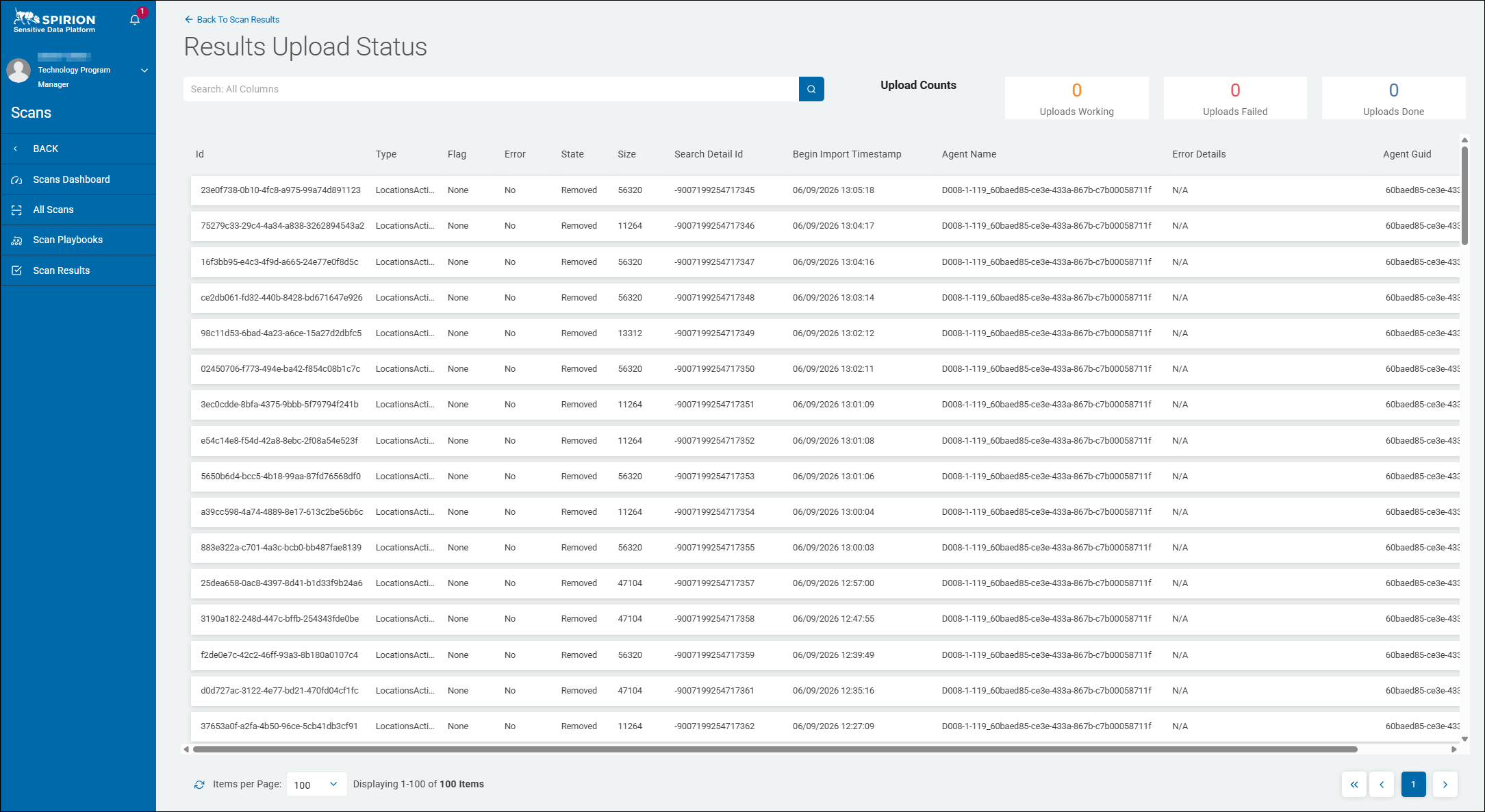
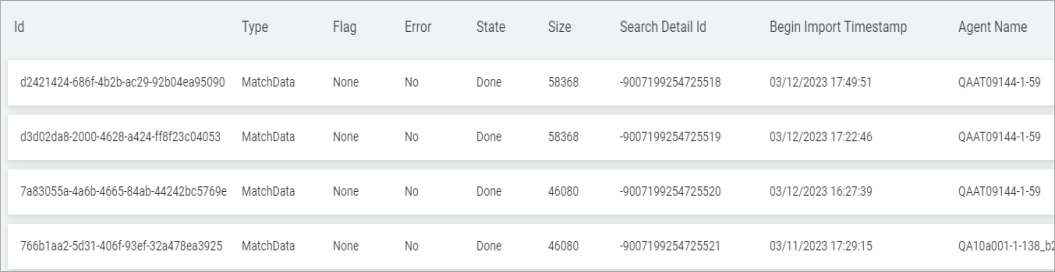
Example Results Upload Status Page
How to View the Upload Status of Scan Results
To view the detailed status of all your scans and the total Uploads Count:
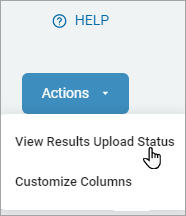
- In the top right of the screen, click Actions.
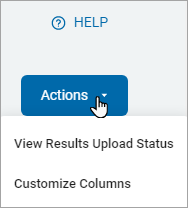
- Click View Results Upload Status from the drop-down list.
- The results are displayed in a list sorted by column:
- Id
- A standard RFC 4122 UUID (version 4), auto-generated by the system for each upload transaction.
- This uniquely identifies a specific upload transaction within the system.
- Values follow standard UUID format (
xxxxxxxx-xxxx-xxxx-xxxx-xxxxxxxxxxxx) - Values are always in the format.
- These are non-repeating and non-sequential — every upload record has a unique value. Not user-configurable.
- Example: 23e0f738-0b10-4fc8-a975-99a74d891123
- Type
- Indicates the category or nature of the data being uploaded.
- Possible values include:
GatherData— GatherData is a distinct upload type for system/environment telemetry — specifically theSystemInformation.xmlpayload that carries Spirion Agent stats, weights, and configuration metadata back to the console.- It is not a search results upload; it is a diagnostics/inventory upload.
LocationsActions— This upload type represents a database file sent from an endpoint to the console containing records of actions that were performed on matched data locations — for example, shred, encrypt, quarantine, or ignore operations applied to sensitive files.- It is distinct from a search results upload (which contains match data) or an analysis upload (which contains Discovery Team analysis data).
- The console must receive this upload to update its records with the remediation outcomes that occurred on the endpoint.
- This is consistent with Spirion's broader model where the Spirion Agent supports multiple distinct database types — Search, SavedResults, LiveMode, AnalysisSearch — each representing a different category of data being reported back to the console.
- LocationActions is a member of this family, representing the action/remediation record upload path.
Locations— Raw location discovery results from a scan.- It represents an upload containing location-only data — essentially a file/path inventory — without full match content.
- This would correspond to a scan run in a mode that enumerates locations but does not perform deep identity matching, or is the initial discovery pass before match extraction occurs.
MatchData— Individual sensitive data match records (SSNs, CCNs, etc.)Preprocessed— This state indicates the upload file has been received by the console and successfully passed the initial validation/preprocessing stage, but has not yet been fully imported into the database.- The server-side import code explicitly has a
PreprocessUploadthat opens the uploaded file, validates its structure and encryption, and prepares it for full processing. "Preprocessed" as a status means this step completed without error. - It sits between "received" and "fully imported" — so if an upload remains in
Preprocessedfor an extended time, it may indicate the downstream import processing is queued or delayed, not that the file was lost or rejected.
- The server-side import code explicitly has a
- Flag
- An operational marker applied to a record, typically by the system or an administrator for investigation or triage purposes.
- Possible values include:
None— No flag applied (default/normal state)Review— Flagged for manual reviewHold— Processing held pending investigationReprocess— Marked for re-ingestion
- In most normal operational states, the value is
None. - All rows visible in the screenshot above show "None," indicating no special flag has been set on these records.
- Error
- Indicates whether an error was encountered during the upload process.
- A boolean indicator of whether the upload encountered a processing error. Possible values:
No— The upload completed without errorsYes— An error was encountered during upload processing- When the value is
Yes, the Error Details column contains a descriptive message rather thanN/A.
- When the value is
- All rows visible in the screenshot above show "No," meaning these particular upload records completed without an error condition being raised.
- State
- Reflects the current processing state of the upload record within the pipeline.
- Possible values include:
Pending— The record has been received and is queued for processingWorking— The record is actively being imported/processedDone— Processing has completed successfullyFailed— Processing encountered a terminal failureRemoved— The record has been fully processed and the staging entry has been purged/cleaned up (most common state for historical records).- This is the expected terminal state for successfully processed records after cleanup.
Cancelled— The upload was cancelled before completion
- All visible rows in the screenshot above show "Removed," which suggests these records have been processed and subsequently removed from the active upload queue or staging area — meaning their data has been consumed/ingested and the staging entry cleaned up.
- Size
- Represents the size of the upload payload, most likely in bytes.
- The size of the upload payload in bytes. This is a positive integer.
- Possible ranges vary depending on the upload type:
- Small batches (e.g., a few records): typically
1,024–15,360bytes - Medium batches:
15,360–65,536bytes - Large batches (dense scan results):
65,536bytes and above
- Small batches (e.g., a few records): typically
- There is no fixed set of discrete values — the number is determined dynamically by the content of the payload.
- A value of
0could indicate an empty or corrupted payload. - In the screenshot above visible values include the following: 56320, 11264, 13312, 47104, etc.
- These correspond to the byte size of the data batch being uploaded for that particular record.
- Search Detail Id
- A numeric identifier that links the upload record back to a specific scan detail entry.
- In the screenshot above all visible values are large negative integers (for example, -9007199254717345), which is characteristic of how Spirion internally references scan detail records — the negative range likely reflects a specific ID generation scheme or database sequence used by the platform.
- Begin Import Timestamp
- The date and time at which the import/upload process began for that record.
- Values are in
MM/DD/YYYY HH:MM:SSformat - Example: 06/09/2026 13:05:18
- This enables tracking of when each batch entered the upload pipeline.
- Agent Name
- The identifier of the Spirion Agent that generated and submitted the upload.
- In the image above all visible rows show the same agent:
D008-1-119_60baed85-ce3e-433a-867b-c7b00058711f, which follows a naming convention combining a device/host identifier with a UUID suffix. - This ties each upload back to a specific scanning agent deployed in the environment.
- Error Details
- Provides descriptive information about any error that occurred during the upload.
- In the image above, all visible rows show
N/A, consistent with the Error column showingNo— meaning no error details are applicable for these records.
- Agent Guid
- The globally unique identifier (GUID) of the Spirion Agent, separate from the human-readable Agent Name.
- This column stores the UUID portion of the Agent's identity, enabling precise Agent-level correlation even if Agent names change or overlap.
- The Upload Counts section at the top of the page shows the counts of the following:
- Uploads Working — Currently active uploads (value: 0 in the image below)
- Uploads Failed — Uploads that encountered a failure (value: 0 in the image below)
- Uploads Done — Uploads successfully completed (value: 201 in the image below)

- These counters reflect the real-time state of the upload pipeline at the time the page was captured.
- Click Back To Scan Results to go back to the Scan Results page.