
Working with Agents - Overview
To learn what an Agent is and what it does, see What is an Agent?
- You manage your various Agents on the "Agent Management" page in Spirion Sensitive Data Platform.
- Your environment may come to employ dozens of Spirion Agents each scanning your environment for sensitive data (PII or SPI).
- Some Agents may be responsible for scanning Mac laptops, while others are responsible for scanning SQL databases, File Servers, G-mail accounts, or OneDrive accounts.
Agent Management Page
- The Agent Management page is the "Fleet Command" center for your Spirion worker environment.
- It provides a real-time view of the health, connectivity, and configuration of every Agent registered to your console.
The Role of the Agent Management Page
This page is where you supervise your "field operators." Its primary roles include:
- Health Monitoring: Ensuring that Agents are online and communicating with the console.
- Lifecycle Management: Tracking which Agents are active, which are new (pending registration), and which have gone offline.
- Configuration & Tagging: Organizing your Agents into logical groups (e.g., by region or capability) so they can be assigned to scans efficiently.
- Troubleshooting: Identifying connectivity or service issues before they impact your scheduled scans.
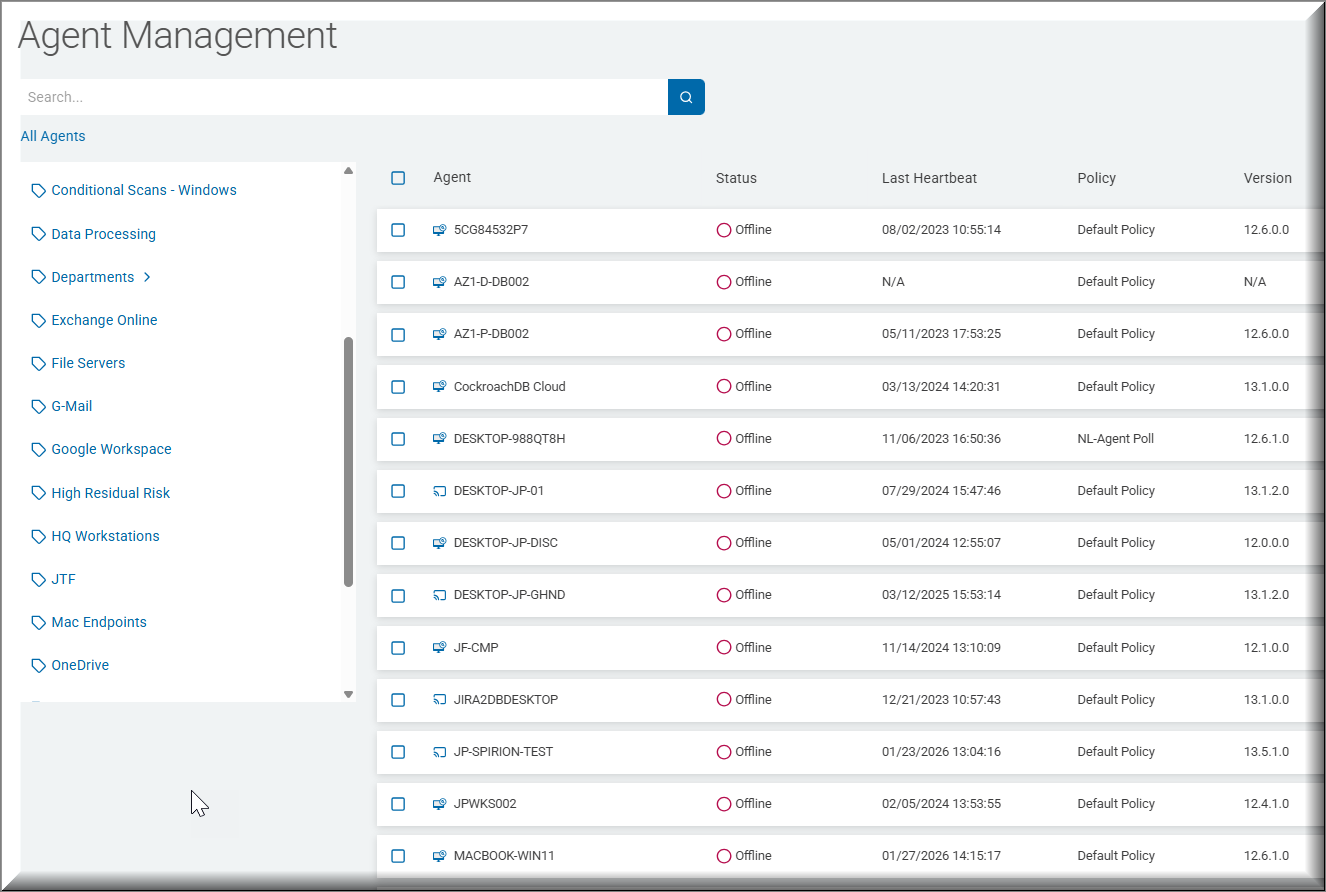
What the Information in the Table Does for You
The table on this page is your primary diagnostic tool.
The table below describes how to interpret the key columns:
Column / Information | What it Does for You |
|---|---|
Agent Name / Hostname | Identification: Tells you exactly which machine the Agent is installed on. This is critical when you need to log in to a specific server to collect logs or perform maintenance. |
Status (Online/Offline) | Triage: The most important column. If an Agent is "Offline," it cannot receive new scan instructions or ship results. A "Red" status here is your immediate signal to investigate the host machine. |
Last Heartbeat / Last Seen | Connectivity Check: Shows the last time the Endpoint Service (EPS) successfully checked in with the console. If this timestamp is more than a few minutes old, it may indicate a network or proxy issue. |
Agent Version | Maintenance: Helps you identify Agents that need an update. Running mismatched versions across your fleet can lead to inconsistent scan results or performance issues. |
Agent Tags | Orchestration: Shows the logical groups the Agent belongs to (for example, |
Operating System | Compatibility: Confirms the host environment (Windows, macOS, Linux). This is useful for ensuring you are assigning the right tasks to the right platforms (for example, not assigning a Windows-specific task to a Linux Agent). |
Agent Status
The following is a detailed breakdown of each Agent status displayed on the Agent Management page, with descriptions and practical examples:
Agent Ready
- Description: The Agent process is online, registered with the console, sending fresh heartbeats (within the ~5-minute freshness window), and passing all readiness checks (valid private IP, loaded policy, and registered endpoint ID). It is in a clean operational state and standing by to accept new scan assignments.
- Example: Agent
WARP-T02is registered in the pool and healthy, waiting on standby to be selected for the next scheduled or ad-hoc scan job.
Error
- Description: The Agent has encountered a critical runtime exception, configuration flaw, or authentication/communication failure (for example, invalid/mismatched Agent tokens, corrupt
agent.cfgfiles, or network listener failures). - Agents in an Error state cannot accept or execute tasks until the underlying service, configuration, or token issue is resolved.
- Example: An Agent reinstalled on an endpoint fails to authenticate with the central controller due to an invalid network token or corrupted configuration file, causing the console to flag the Agent in an Error state.
Offline
- Description: The Agent is registered with the console but is currently unreachable or inactive.
- This status is triggered when:
- The Agent process on the host machine has stopped
- Network connectivity between the host and management console is severed
- The Agent’s periodic heartbeat has expired (aged beyond the freshness window, typically ~5 minutes).
- Offline Agents cannot accept or execute new scan assignments until connectivity or the endpoint service is restored.
- Example: A Target endpoint virtual machine (VM) is powered off for maintenance, or its endpoint service crashes, causing the console to stop receiving heartbeat signals and flag the Agent as Offline.
Discovery
- Description: The Agent is actively executing the discovery phase of a scan operation.
- In this state, it crawls and enumerates configured target environments (such as local file systems, network shares, databases, or cloud repositories) to index files and build the job queue prior to deep content matching or data extraction by search Agents.
- Example: A designated discovery agent is traversing a multi-terabyte network share to enumerate directories and construct the Target file list for search worker Agents to process.
Updating
- Description: This status is triggered when the Agent is currently downloading or applying (from the management console) a:
- Software update
- Policy package
- Definition patch
- Configuration change
- While in this state, routine scan execution is temporarily held or queued until the update process completes and the Agent re-initializes.
- If the Agent remains in "Updating" status too long, that suggests a stalled update or communication issue
- Example: An administrator deploys an upgraded Agent package across the enterprise. Agent
WARP-T01transitions to Updating while installing the new software binaries before returning to an active state.
Monitoring
- Description: The Agent is online, healthy, and actively running continuous background checks, file-watcher tasks, or real-time policy monitoring on the endpoint rather than performing a full, bulk data scan.
- Example: An Agent configured with continuous endpoint file activity watcher rules is actively monitoring directory modifications in real time to enforce data protection policies.
Idle
- Description: The Agent process is running normally, healthy, and consistently sending heartbeats to the console, but it is not actively scanning.
- It is fully ready and available to be selected for upcoming scheduled or ad-hoc discovery and sensitive data scan tasks.
- This is the “ready and waiting” state.
- This is the status you see before assigning a scan.
- Agent registration is valid and complete
- If a scan is expected but the Agent remains Idle, the problem may be with targeting, scheduling, policy assignment, or scan dispatch rather than Agent health
- Example: Agent
WARP-Q02completed its scheduled scan 15 minutes ago, transmitted its summary payload back to the console, and is now sitting in an Idle state awaiting its next job.
Scanning
- Description: The Agent is actively executing a discovery scan or sensitive data search across configured Targets (such as local file systems, network shares, or cloud storage) based on its assigned scan policy.
- During this time, it processes Target locations, identifies matching data (for example, PII, PCI, or classified metadata), and streams scan progress and results back to the console.
- Scan-related CPU, disk, network, or temp-file activity may be visible locally.
- Eventually the Agent transitions out of "Scanning" status to another state, such as "Idle".
- Example: An Agent is actively searching through
C:\Finance\2026\Reportsto identify unencrypted credit card numbers and sensitive document patterns.
Recommendations: The "Pre-Flight" Health Check
Before you start a large discovery project, use the Agent Management page to perform a "Pre-Flight" check:
- Filter by Tag: View only the Agents assigned to your upcoming project.
- Check Heartbeats: Ensure all Agents have checked in within the last 5 minutes.
- Verify Versions: Confirm that all Agents in the group are running the same version to ensure consistent detection logic.
Summary
- The Agent Management page is your "Fleet Health Dashboard."
- By monitoring the table's status and heartbeat columns, you can ensure that your worker fleet is ready to execute the discovery and remediation tasks defined in your playbooks.
- If the Data Assets and Targets page is your "Mission Map," this page is your "Crew Roster."
Additional Tools for Agents
It's important to remember:
- You can create Tags to group your various Agents.
- Tags are a collection of Targets (data sources such as box, OneDrive, SharePoint, etc.) or Agents.
- Policies control the behavior of Agents.