
How to Follow Data Through the Search Pipeline
Use this topic to follow data through the search pipeline from the client environment to the server environment.
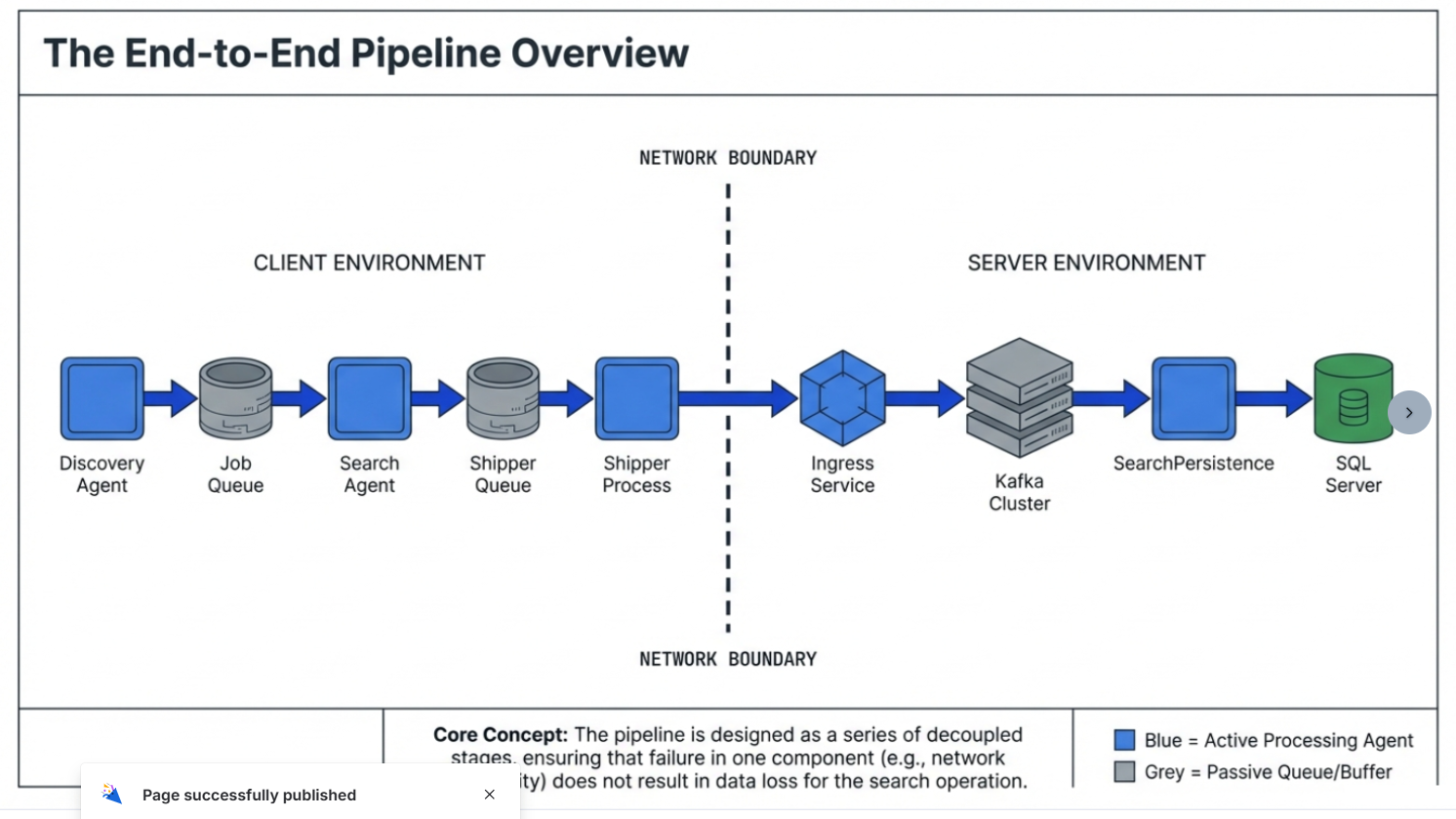
Before you start
- Is this a single-agent scan or a distributed scan?
- Distributed: One endpoint is the “discovery host” and others are “search workers.”
- What is the scan ID / scan start time?
- Helps find the right section of logs and the correct per-scan queue table (
search_queue_<scanId>).
- Helps find the right section of logs and the correct per-scan queue table (
Step 1: Was it discovered (was work created)?
Goal: Confirm the “to-do list” was created in the Job Queue.
What Logs to Check
- On the discovery host, review identityfinderCMD.exe (IDF/SystemSearch) logs for evidence it: created the per-scan queue table, and inserted jobs as Pending.
Step 2: Was it scanned (did a search agent pick up the work)?
Goal: Confirm search workers are claiming and processing jobs.
What Logs to Check
- On one or more search agents, review identityfinderCMD.exe logs for ‘read the queue’ messages and LOCATION SEARCHED events
Step 3: Were results staged for shipping (did results enter the Shipper Queue)?
Goal: Confirm results were written to shipper_queue locally.
What Logs to Check
- On the endpoint doing the searching, review identityfinderCMD.exe logs for evidence it published results into the shipper queue (results are staged before jobs are considered fully done).
Step 4: Were results shipped (did the Shipper send them to Ingress)?
Goal: Confirm the IDFMessagingSvc.exe (IFS/Shipper) is draining shipper_queue and posting to Ingress.
What Logs to Check
- Review IDFMessagingSvc.exe IFS logs for successful POST to Ingress (HTTP success) and retries/failures if Ingress is unreachable.
Step 5: Server side: did Ingress stream it to Kafka?
Goal: Ingress received the shipped payload and streamed it to Kafka.
What Logs to Check
- Review Ingress service logs (match up timestamps). Confirm you see batches are received and produced/streamed to Kafka.
Step 6 — Server side: did SearchPersistence consume from Kafka and write SQL Server?
Goal: SearchPersistence consumed the message from Kafka and uploaded/wrote it into SQL Server.
What Logs to Check
- Search SearchPersistence logs for the CorrelationID also found in the IFS log.
Quick “where is it stuck?” cheat sheet
- Not discovered → Discovery logs never show targets → issue in Discovery stage.
- Discovered but not scanned → job queue created, but workers never claim → worker connectivity/queue access/timing issue.
- Scanned but no results staged → search completes, but no shipper queue inserts → result staging/publishing issue.
- Staged but not delivered → shipper queue grows, IFS shows failures → shipping/connectivity issue.
- Delivered but not visible in UI → IFS shipped OK, but Ingress/SearchPersistence missing CorrelationID → server-side ingestion/persistence issue.
What to Collect for Escalation
- identityfinderCMD IDF logs (discovery + search)
- IDFMessagingSvc IFS logs (shipper) with CorrelationIDs
- Ingress logs around the same time window
- SearchPersistence logs around the same time window with CorrelationIDs
- Scan start time + timezone, scanId, and whether distributed scan