
What is a Distributed Scan?
Local Targets versus Non-local Targets
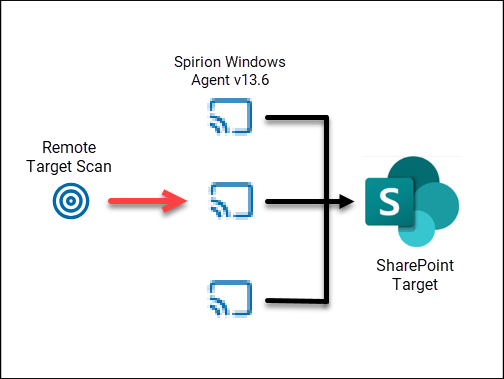
When you assign more than one Agent to a scan with a remote Target, Spirion Sensitive Data Platform treats the scan as a distributed scan and spreads the workload across the assigned Agents. Non-local Targets, in this case, include file shares, databases, cloud repositories, e-mail sources, and any other scan types.
Note: When scanning remote Targets, all Spirion Agents must be the same version and type (Windows or Legacy/Mac/Linux)
Scans of local Targets work differently. If you create a scan of Local Targets with multiple Agents assigned, each Agent scans its own local system, such as a laptop or desktop.
Note: When scanning local Targets, Spirion Agents must be the same type (Windows or Legacy/Mac/Linux), but can be different versions (for example, 13.4, 13.4.1, 13.5, 13.6).
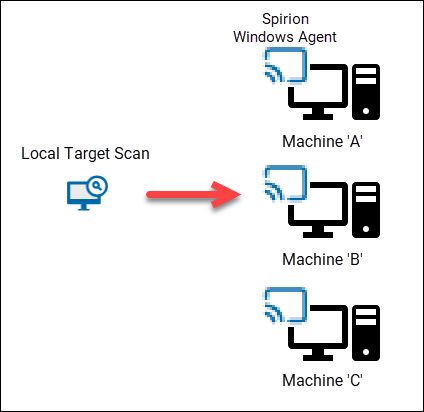
For example, let's assume an educational institution such as a college or school scans faculty laptops.
- They create one sensitive data scan, and add the laptops as individual Targets (in this case the Agent acts as a Target as each laptop contains their own dedicated local Spirion Agent).
- When the scan is performed each laptop Agent scans the laptop it is installed on.
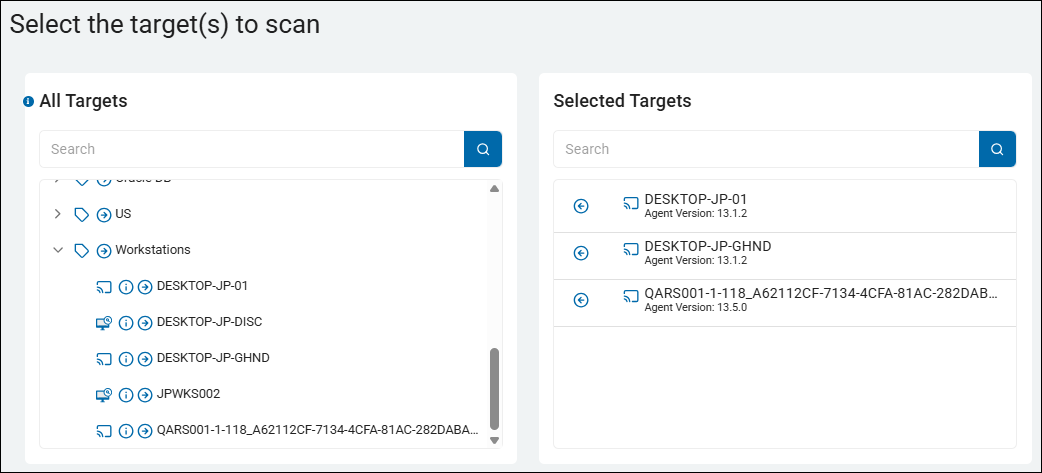
- In the example shown below a sensitive data scan is set to scan Local Target types.
- The Targets are Agents on 3 different workstations
- Each Agent on each workstation will scan the local workstation it is installed on
- Target scanning is done in parallel
For Advanced Users
The following topics are useful for advanced users but are not necessary for common use scenarios of Spirion Sensitive Data Platform.
Single Agent Scan Behavior
If you assign a single agent to a scan, the Agent performs both discovery and search for the scan.
Practically: it does this concurrently as two threads inside the same IdentityFinderCMD.exe process:
- A Discovery thread (builds/feeds the work)
- A Search thread (consumes/executes the work)
The scan starts, discovery begins enumerating, and search begins processing as soon as work items become available.
You’ll often see the scan progress even while discovery is still running (because search doesn’t need to wait for discovery to finish everything).
Distributed Scan Behavior of a Non-local Target
For any scan of a non-local Target, Spirion distributes the workload conceptually like this:
- Exactly 1 Discovery Agent
- This Agent owns enumeration and work creation for the scan scope
- (1 or more) Search Agents
- Each of the search Agents pulls/receives work items and performs the actual search/classification of the Target
This is the model that enables scale: discovery stays coordinated (one “planner”), while search fans out (many “workers”).
You’ll see one agent acting as the coordinator (discovery-heavy activity), while other agents show more sustained search execution.
Adding more search agents generally increases throughput (up to the limits of the Target, network, and any throttling).
Possible Issues and Fixes
If discovery is healthy but search agents are missing required access or account permissions, you can end up with “planned work” that can’t be executed.
- The fix is typically permissions or placement, not adding more Agents.
Multiple Agents, Scan of Local Target (important exception)
A local scan is different.
If you assign more than one Agent to a local scan:
- Each assigned Agent, also acting as a Target, executes the same scan on its machine
- Each endpoint (Target, such as a laptop, for example) runs both of the following:
- Its own Discovery thread (for its own local scope)
- Its own Search thread
- Results are not merged at the endpoint; they are accumulated at the end of the pipeline as separate endpoint scan results
Summary
- Assigning multiple agents to the scan of a local Target does not split one machine’s work across agents.
- It performs the scan “in parallel” across multiple endpoints—because each agent is scanning its own local system.
- You’ll see findings roll up as results from multiple endpoints, each representing that endpoint’s local data.
- If you intended “one endpoint only,” assign only the agent installed on that endpoint.
Practical Guidance (how to choose)
- For a first pilot: assign 1 Agent and keep the scope small (fast feedback, simpler troubleshooting).
- For scans of non-local Targets at scale: use 1 discovery agent + multiple search agents (fan-out).
- For local scans across many endpoints: assign multiple agents intentionally, knowing each one runs the same designated local scan on its own host.
Execution (discovery/search runs)
A scan becomes queued work; the search engine claims work and processes it.
Expected Behavior - Scanning
Jobs progress; you can see timestamps moving in the scan/job view.
Shipping and Ingestion (results appear in console)
Results are staged locally, then shipped to SaaS, then ingested and persisted.
Expected Behavior - Results
Findings appear in the console soon after the scan begins producing results.
Health checklist (beginner “pre-flight”)
Use this checklist before you assume “Spirion is broken”:
Pre-flight: Agent is Alive
- Agent shows up in the console
- “Last seen / heartbeat” is recent
- Agent is not disabled or in an error state
Pre-flight: Agent can reach SaaS
- No known proxy/VPN restrictions blocking outbound connectivity
- DNS resolution works consistently
- TLS inspection/proxy behavior is understood (common enterprise gotcha)
Pre-flight: Agent has access to the target you want to scan
- Correct credentials/permissions exist (target-dependent)
- Agent has the appropriate network access