
What is a Tag?
Tags are an important part of Spirion Sensitive Data Platform. Tags are used to organize Targets, Agents for reporting, policy management, Roles-Based Access Control, and other operations within the console.
A Tag is a kind of container or logical grouping which holds a group of Targets and/or Agents.
Overview
A Tag is a manual or dynamic group (1 or more) of Targets/Assets. A Tag can also be a container for 1 or more Agents.
- Targets are any data location Sensitive Data Platform can scan, such as Marketing laptops, cloud Assets such as SharePoint, or Amazon S3, or databases such as HR databases) for the purpose of scanning those Targets for sensitive information (credit card numbers, social security numbers, medical insurance subscriber IDs, etc.).
- An Asset is a location, local, or remote (such as cloud-based), that contains Targets (a Target is any data location inside an Asset that Sensitive Data Platform can scan).
- Agents are applications installed to a local machine, such as a workstation, or remote virtual machine, that scans and evaluate locations such as OneDrive, box, SharePoint, etc. for sensitive data. Agents can act as Targets (a single workstation scanning itself).
- Tags are not hashtags! A hashtag is a metadata tag operator that is prefaced by the hash symbol, #.
- Classifications are not Tags.
What are Tags Used for?
Tags are used to organize Targets and/or Agents for reporting, policy management, Roles-Based Access Control, and other operations within the console.
Tag Types (Targets/Assets)
You can select the Targets for your Tag manually, or you can define the conditions that determine which Targets your Tag will contain.
There are three types of Tags (two conditional and one manual):
- IP Range: Conditional Tag which includes Agents and Targets based on a range of IP addresses you enter.
- Manual: Manual Tag which includes Agents and Targets manually added by you to your Tag.
- Conditional: Conditional Tag which includes Agents and Targets captured by a set of user-defined parameters.
Tag Management (Targets/Assets)
Tags can be created, viewed, searched for and managed on the Tag Management screen, under Data Asset Inventory in the left navigation:
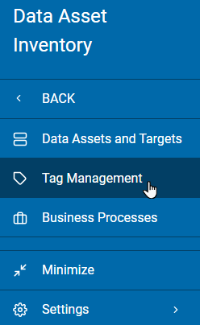
- For examples and more information, see Tag Management.
Tag Management (Agents)
Agent Tags are managed from the Agent Management page.