
Spirion Sensitive Data Platform v13.6: Architecture, Security, and Data Flow
Spirion's Data Discovery and Classification Approach
Scalability & Performance
Spirion Sensitive Data Platform supports local-Agent, remote, and hybrid scanning models. Agents are deployed to workstations, laptops, servers, and other endpoints, making effective use of local compute and the high-bandwidth, low-contention storage buses connecting local disks to the machine the Agent runs on.
For remote or cloud Targets that don't have an Agent installed directly (e.g., a database, website, SharePoint site, or cloud storage account), scanning is performed by an Agent assigned to that Target rather than by software installed on the Target itself.
Only scan results — not the underlying content — are returned to the Spirion Sensitive Data Platform Console's results pipeline, which reduces network bandwidth and storage overhead.
Architecture: Spirion Sensitive Data Platform (SDP)
Agents
An Spirion Sensitive Data Platform Agent is typically installed on physical or virtual endpoints (laptops, desktops, servers) and performs the actual scan.
The Console controls Agent activity via policies and scans; the Agent also provides limited local functionality if Sensitive Data Watcher/endpoint-level features are enabled.
Data Assets & Targets
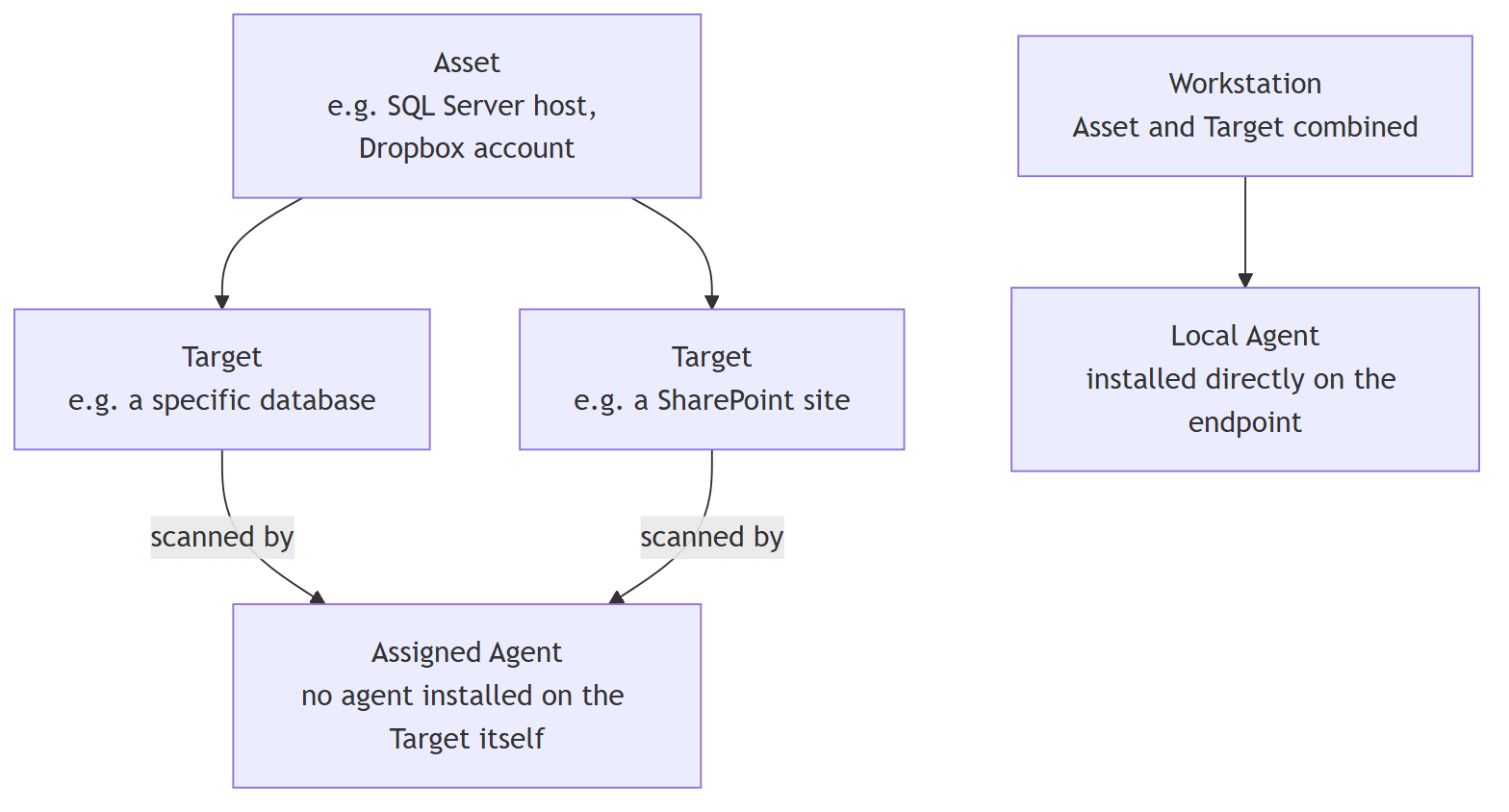
Spirion Sensitive Data Platform organizes scannable locations as Assets (a location, physical or cloud, that contains one or more Targets — for example, a SQL Server host, a Dropbox account) and Targets (the actual items SDP scans within an Asset — for example, a specific database, a SharePoint site, a workstation).
A workstation Target typically has its own Agent installed; a remote or cloud Target may be scanned by an Agent without anything installed on the Target itself.
Distributed Scanning
For large-volume Targets, Spirion Sensitive Data Platform can distribute a single scan across multiple Agents rather than relying on one Agent alone.
One Agent takes a Discovery/Coordinator role — enumerating locations and dividing the work into chunks — while other Agents take a Search/Worker role, pulling chunks from a local job queue and scanning them in parallel.
This reduces the time to complete large scans and allows the workload to be distributed based on available Agent capacity.

Advantages of Spirion Sensitive Data Platform's distributed scanning model include:
- Parallelized scanning: Multiple Agents scan portions of a single large-volume Target concurrently, rather than one Agent working through it serially.
- Result delivery pipeline: Matches found by Agents are shipped and queued (via the shipping/ingestion pipeline) into the SQL results database, where they become available for review and playbook action — this happens continuously as agents complete work, not only at the end of a scan.
- Status/health reporting: Console users can monitor per-Agent and per-scan progress and status.
- Encrypted transfers: Scan payloads are encrypted in transit between Agents and the Console/services layer.
Main Spirion Sensitive Data Platform Components
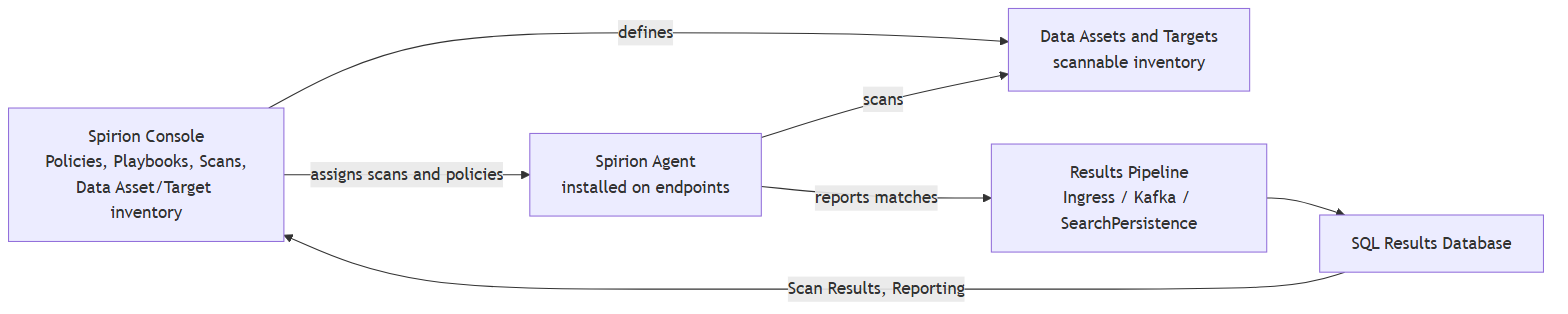
- Spirion Console — Central management and control interface; defines Scans, Playbooks, Policies, and the Data Asset/Target inventory.
- Spirion Agent — Installed on endpoints; performs scans and remediation actions; can act in a Discovery/Coordinator or Search/Worker role during a distributed scan.
- Data Assets & Targets — The inventory model describing what can be scanned; a Target may or may not have its own Agent.
- Scan Results Pipeline & Database — The services layer that receives, queues, and imports Agent-reported matches into the SQL results database, from which Scan Results, Playbooks, and reporting/dashboards are driven.
Agents & Distributed Scanning
Unlike Spirion's legacy Sensitive Data Manager (SDM) product — which defines persistent, admin-configured "Discovery Teams" — Spirion Sensitive Data Platform forms the scanning team dynamically from the Agents assigned to a given scan.
There is no separate, standing Discovery Team object to configure in Spirion Sensitive Data Platform.
Advantages of this model:
- Fault tolerance: If a Worker Agent stops responding, its assigned chunk of work can be reassigned so the scan still completes.
- Speed multiplier: Adding more Worker Agents to a distributed scan increases throughput.
- Flexibility: Agents can be reassigned to different scans and Targets as needed, rather than being locked into a fixed team.
Remote or Cloud Targets
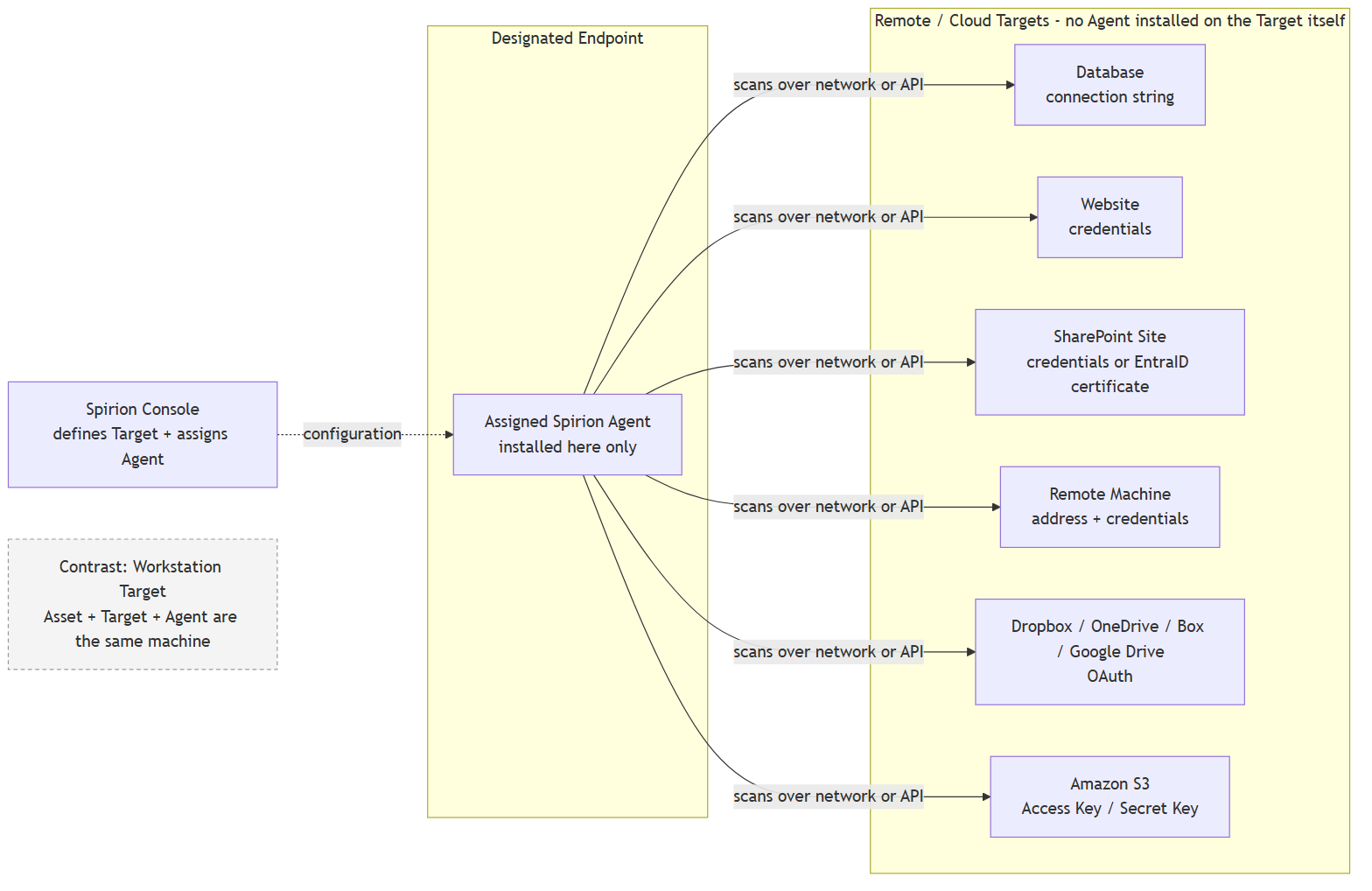
In Spirion Sensitive Data Platform (SDP), remote systems and cloud data stores—such as relational databases, SharePoint sites, cloud storage, web applications, or network file shares—do not require Agent software installed directly on them.
Instead, scanning is executed Agentlessly over the network by a dedicated Assigned Agent or Agent Pool running on a separate worker host.
📐 SDP Agentless/Remote Target Architecture Diagram
🔄 End-to-End Operational Workflow
- Target Registration & Credentials:
- Administrators register remote target endpoints in the Spirion Sensitive Data Platform Console (for example, database connection string, AWS S3 bucket ARN, or SharePoint tenant URL) along with stored credentials or OAuth 2.0 tokens.
- An Agent Pool (or specific assigned Agent) is linked to the target.
- Job Dispatch:
- The Sensitive Data Platform SaaS Control Plane issues a scan job configuration containing Target location details, credentials, thread caps, and policy rules to an active worker Agent in the assigned Agent Pool.
- Remote Network Connection (Zero Footprint on Target):
- The worker agent initializes native protocol drivers (for example, JDBC/ODBC for databases, Graph/EWS API for Microsoft 365, HTTPS/S3 SDK for cloud storage, SMB for remote shares).
- No software, Agents, or services are installed on the remote Target host.
- Data Streaming & On-Agent Analysis:
- Data is streamed back across the network to the assigned worker machine.
- All CPU-intensive work (pattern matching, regular expressions, validation checks, and OCR image scanning) occurs strictly on the worker Agent machine, preventing performance impact on the Target database or cloud service.
- Resilient Local Queuing & Shipping:
- Discovered sensitive data matches are processed locally and packaged into the worker agent's Shipper Queue (backed by local PostgreSQL + pgBouncer).
- The Shipper Queue streams the encrypted result metadata to the SDP Ingress Pipeline via secure HTTPS API connections.
Spirion Sensitive Data Platform Overall Security Architecture and Data Flow
Security design follows an "encryption first" and "authenticate everything" approach.

What Does Spirion Encrypt?
The current Spirion Sensitive Data Platform (SDP) database encryption model relies on full-database Transparent Data Encryption (TDE) at the database engine and cloud storage layer, in contrast to the field/column-level application encryption used by the legacy Sensitive Data Manager (SDM) Console.
Spirion encrypts the following:
- Transport channel
- HTTPS
- SMTPS using TLS
- Payload data while in motion
- AES-256
- RSA-4096
- Storage of data
- Spirion Sensitive Data Platform (SDP) database encryption model relies on full-database Transparent Data Encryption (TDE) at the database engine and cloud storage layer, in contrast to the field/column-level application encryption used by the legacy Sensitive Data Manager (SDM) Console.
Key Technical Comparison: SDP vs. SDM
Feature / Aspect | Spirion SDP (Sensitive Data Platform) | Legacy Sensitive Data Manager (SDM) Console |
|---|---|---|
Encryption Model | Full-Database TDE (Transparent Data Encryption) | Field/Column-Level Application Encryption |
Encryption Layer | Database Engine / Storage Tier (for example, Azure SQL Managed Instance TDE) | Application Layer (SDM Console Service / CAT) |
Scope of Encryption | Entire database at rest: data files, log files, temp tables, and automated backups | Selected sensitive columns/tables in the SQL database |
Key Management | Managed transparently by the database service (with support for Customer-Managed Keys / BYOK via Key Vault) | Managed via local keys and Console Administrator Tool ( |
Performance & Indexing | Native hardware/engine acceleration; full SQL indexing and query optimization on stored data | Column-level decryption overhead on application read; restricts full-text indexing on encrypted fields |
SDP Encryption Architecture Details
- At-Rest Infrastructure Encryption (Azure SQL / Managed DB):
- SDP database instances (such as Azure SQL Managed Instance or self-hosted SQL/PostgreSQL instances) enforce AES-256 Transparent Data Encryption (TDE).
- Pages are encrypted before being written to disk and decrypted as they are read into memory buffers, ensuring that physical storage media, backups, and log files are encrypted without requiring application code changes.
- Secrets & Credentials in Transport/Vaults:
- Application secrets, service connection strings, and integration tokens in Spirion Sensitive Data Platform are stored in dedicated key management/vault stores (such as Azure Key Vault) or encrypted env configs, rather than being stored in custom-encrypted database table columns.
- In-Transit Security:
- All database connections between Spirion Sensitive Data Platform microservices/Agents and the database enforce TLS 1.2+ encrypted connections with mandatory SSL certificate validation (
Encrypt=True).
- All database connections between Spirion Sensitive Data Platform microservices/Agents and the database enforce TLS 1.2+ encrypted connections with mandatory SSL certificate validation (
What Does Spirion Authenticate?
Spirion authenticates the following:
- All outside requests for data
- All outside providers of data
- All internal service-to-service communication
Spirion Sensitive Data Platform Integration Security on Cloud Stores
Authentication to cloud and remote Targets varies by type:
- OAuth-based: Dropbox, OneDrive for Business, Google Drive, and Box use OAuth-style authorization flows.
- Key-based: Amazon S3 Targets authenticate using an Access Key ID and Secret Access Key, not OAuth.
- Credential or certificate-based: SharePoint Online supports username/password authentication or certificate-based authentication via a registered EntraID application.
Key Differences between SDP v13.6+ and pre-v13.6
Several fundamental architectural components, terminology standards, and backend data pipeline designs have changed in SDP v13.6+.
Terminology Differences
Terminology: "Spirion Nodes" → "Agents" & "Agent Pools"
- Diagram: Refers to endpoints and scan workers as "Spirion Nodes" and node groupings as "Spirion Discovery Teams".
- SDP v13.6+: The platform strictly uses Discovery Agents and Search Agents, which are organized into Agent Pools (Teams) for environment routing and dynamic load balancing.
Architecture Differences
Agent Queuing Architecture: PostgreSQL + pgBouncer (New in v13.6)
- SDP v13.6+: Release 13.6 introduced a major architectural change: all Agents now utilize a local PostgreSQL database with pgBouncer running on the host machine to replace legacy Erlang/RabbitMQ messaging.
- This powers two local queues:
- Job Queue: Holds granular "to-do" items generated by the Discovery Agent.
- Shipper Queue: Holds packaged scan results locally so network drops do not require restarting scans.
Analytics & Database Stack: "Microsoft SQL Analysis Services"
- SDP v13.6+: Analysis Services (SSAS) multidimensional cubes are no longer part of the platform architecture. SDP SaaS uses a centralized cloud control plane with built-in dashboarding, tag-based access control, and RESTful reporting APIs.
End-to-End Ingestion Pipeline
- SDP v13.6+: Uses a decoupled, asynchronous streaming pipeline to guarantee data durability:
{Search Agent} → {Shipper Queue} → {Ingress Service} → {Kafka Stream} → {SearchPersistence} → {SQL Persistence}
Comparison Summary
Architecture Feature | Legacy (pre-v13.6) | Spirion Sensitive Data Platform v13.6+ Standard |
|---|---|---|
Worker Unit | Spirion Nodes | Search / Discovery Agents |
Worker Grouping | Spirion Discovery Team | Agent Pools (Teams) |
Local Queuing | RabbitMQ / Unmanaged | Local PostgreSQL + pgBouncer |
Ingestion Stream | Direct REST API to DB | Shipper → Ingress → Kafka → SearchPersistence |
Analytics Engine | MS SQL Analysis Services (SSAS) | SaaS Console & RESTful API Pipeline |