
Example: CUI and ITAR Classification Scan Playbook
Before you start note that archTIS provides a prebuilt CUI-focused Custom Data Type developed by the archTIS team to help organizations identify likely CUI markings, categories, abbreviations, and related indicators across supported content sources. For more information see Controlled Unclassified Information Discovery Package in the Spirion marketplace.
Classification Labels Used in this Tutorial
Classifications such as: Confidential, Critical, ePHI, CUI, etc. are used in Spirion Sensitive Data Platform to track, and remediate the sensitive data discovered in your organization. While classifying data can be considered remediation, users often go a step further and quarantine, redact, or delete (shred) the data.
Spirion Sensitive Data Platform stores its classifications under "Settings > Global Classifications."
- USER ACCESS: To view and manage Classifications your user account must be a member of a role with the permission "Manage Administrative Settings."
- Note: Creating Classifications is typically reserved for Admin users as classification names and types must be strictly controlled.
In this tutorial when a scan is performed and your Spirion Agent(s) encounter sensitive data in a file that meets the criteria established in your playbook, the file is labeled by Spirion as "CUI" or, if appropriate, "ITAR."
- These classifications DO NOT exist in Spirion Sensitive Data Platform, by default.
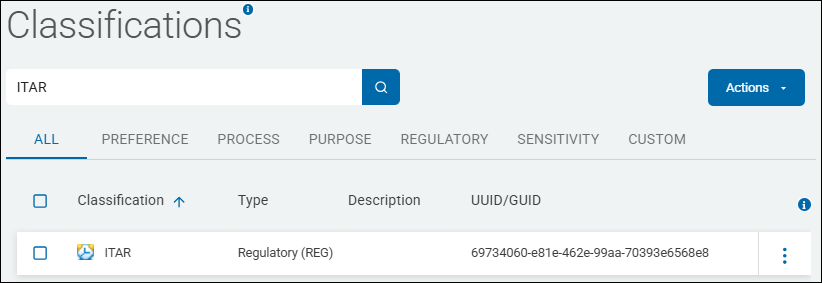
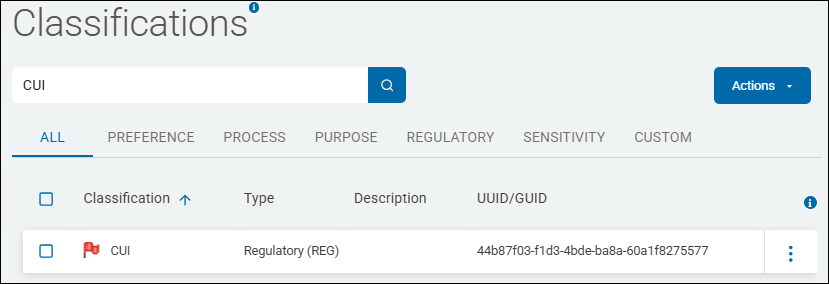
- Both of these classification labels have been created in SDP on the Classifications page.
- See the examples below.
Data Types Used in this Tutorial
The sensitive data types used in this tutorial include the following:
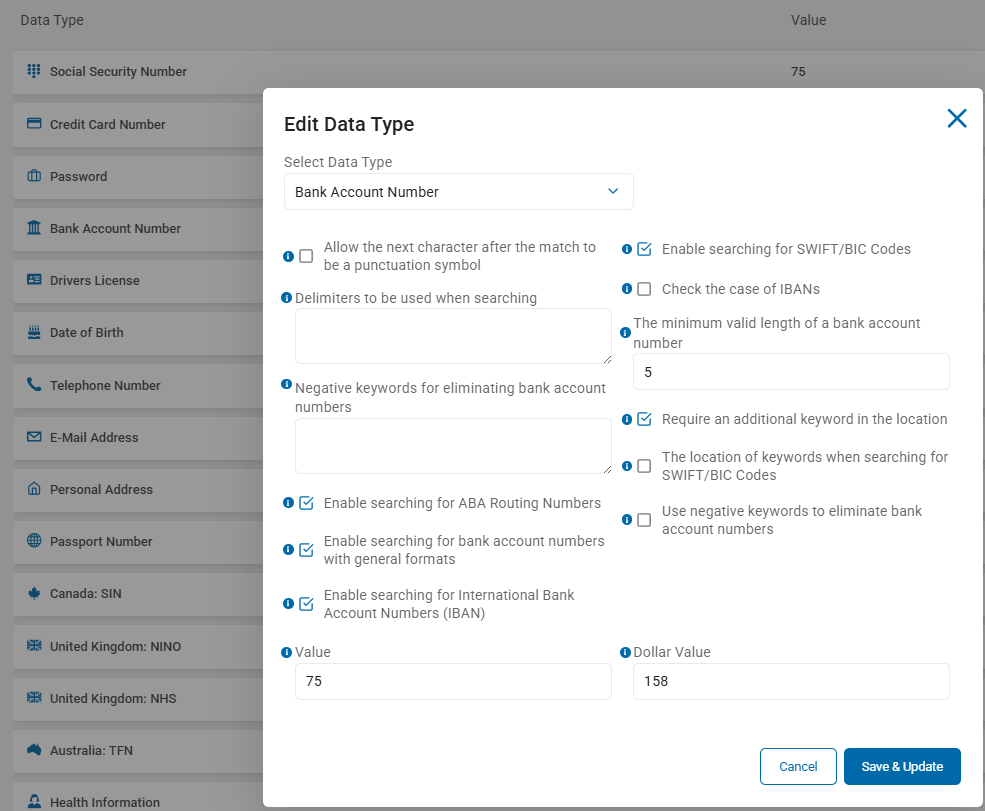
- Bank Account Number
- This is a Spirion data type (AnyFind), provided out-of-the-box.
- Note: Admin users can edit Spirion AnyFind data types and tailor them to fit their needs. See the screenshot below.
- CUI - CUI Category (custom data type)
- This is a custom data type, created by end users
- This Regular Expression is a comprehensive list of CUI (Controlled Unclassified Information) Categories.
- This is used to identify documents that contain official CUI markings or references to specific regulated data classes defined by the National Archives (NARA).
- This RegEx uses Alternation (the
|symbol, which means "OR") to search for any one of the 180+ specific categories of information that the U.S. Government mandates must be protected. If a document contains any of these phrases, Spirion flags it as a match. - The RegEx covers the full spectrum of CUI, including the following:
- Defense & Aerospace:
Controlled Technical Information,Export Controlled,Naval Nuclear Propulsion Information,Operations Security. - Legal & Law Enforcement:
Criminal History Records Information,Federal Grand Jury,Witness Protection,Investigation. - Privacy & Health:
Health Information,Sensitive Personally Identifiable Information,Genetic Information,Personnel Records. - Financial:
Bank Secrecy,Federal Taxpayer Information,Budget,Electronic Funds Transfer. - Infrastructure:
Critical Energy Infrastructure Information,Water Assessments,Emergency Management.
- Defense & Aerospace:
- Why this is useful:
- This regular expression enables you to automate the discovery of CUI across your entire environment (File Shares, M365, Endpoints) without having to manually search for each category.
- It is a foundational tool for organizations needing to comply with NIST SP 800-171 or CMMC (Cybersecurity Maturity Model Certification).
Accident Investigation|Administrative Proceedings|Agriculture|Ammonium Nitrate|Archaeological Resources|Asylee|Bank Secrecy|Battered Spouse or Child|Budget|Campaign Funds|Chemical-terrorism Vulnerability Information|Child Pornography|Child Victim/Witness|Collective Bargaining|Committed Person|Communications|Comptroller General|Consumer Complaint Information|Contract Use|Controlled Substances|Controlled Technical Information|Criminal History Records Information|Critical Energy Infrastructure Information|Death Records|DNA|DoD Critical Infrastructure Security Information|Electronic Funds Transfer|Emergency Management|Entity Registration Information|Export Controlled|Export Controlled Research|Federal Grand Jury|Federal Housing Finance Non-Public Information|Federal Taxpayer Information|Financial Supervision Information|Foreign Intelligence Surveillance Act|Foreign Intelligence Surveillance Act Business Records|General Critical Infrastructure Information|General Financial Information|General Intelligence|General aw Enforcement|General Nuclear|General Privacy|General Procurement and Acquisition|General Proprietary Business Information|Genetic Information|Geodetic Product Information|Health Information|Historic Properties|Homeland Security Agreement Information|Homeland Security Enforcement Information|Informant|Information Systems Vulnerability Information|Information Systems Vulnerability Information - Homeland|Inspector General Protected|Intelligence Financial Records|Internal Data|International Agreement Information|International Agreement Information - Homeland|International Financial Institutions|Inventions|Investigation|Investment Survey|Juvenile|Law Enforcement Financial Records|Legal Privilege|Legislative Materials|Mergers|Military Personnel Records|National Park System Resources|National Security Letter|NATO Restricted|NATO Unclassified|Naval Nuclear Propulsion Information|Net Worth|Nuclear Recommendation Material|Nuclear Security-Related Information|Ocean Common Carrier and Marine Terminal Operator Agreement|Ocean Common Carrier Service Contracts|Operations Security|Operations Security Information|Patent Applications|Pen Register/Trap & Trace|Permanent Resident Status|Personnel Records|Personnel Security Information|Pesticide Producer Survey|Physical Security|Physical Security - Homeland|Presentence Report|Prior Arrest|Privacy Information|Proprietary Manufacturer|Proprietary Postal|Protected Critical Infrastructure Information|Protective Order|Railroad Safety Analysis Records|Retirement|Reward|Safeguards Information|SAFETY Act Information|Secrecy Orders|Sensitive Personally Identifiable Information|Sensitive Security Information|Sex Crime Victim|Small Business Research and Technology|Source Selection|Statistical Information|Status Adjustment|Student Records|Tax Convention|Taxpayer Advocate Information|Temporary Protected Status|Terrorist Screening|Toxic Substances|Unclassified Controlled Nuclear Information - Defense|Unclassified Controlled Nuclear Information - Energy|US Census|Victim|Victims of Human Traffickig|Visas|Water Assessments|Whistleblower Identity|Witness Protection|Written Determinations
- Social Security Number
- This is a Spirion data type (AnyFind), provided out-of-the-box.
Tracking via Spirion Sensitive Data Platform Dashboards
The Classifications applied to the files in your organization are tracked and quantified in 2 locations in the Spirion Sensitive Data Platform user interface.
SPIglass™ Dashboard
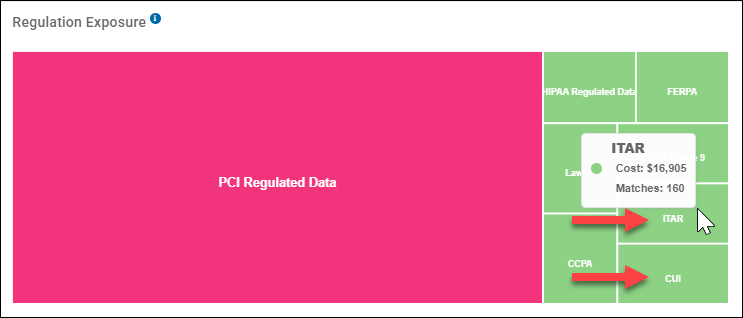
On the SPIglass™ Dashboard, in the bottom right corner, under Regulation Exposure, a tree map displays the various regulation classifications as well as additional information, such as the number of matches (files) captured by scans that contain sensitive data which qualify as the indicated Regulation, and the total dollar amount the data in these files represent.
ITAR/CUI Regulation Example
In the example below, data (files/emails) classified "ITAR" or "CUI" are captured, in green, in the bottom right part of the tree map. Mouse over a regulation box to see its values.
- ITAR
- Matches: 160 (files or emails)
- Cost: $16,905
- CUI
- Matches: 157 (files or emails) (value not shown)
- Cost: $16,588 (value not shown)
Scans Dashboard
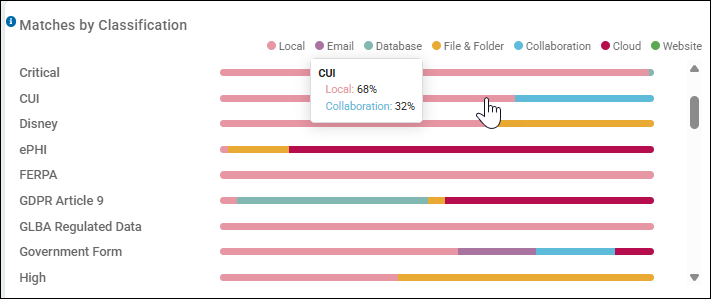
On the Scans Dashboard (default SNAPSHOT tab), in the bottom left corder, the Matches by Classification bar graph is shown.
- This graph shows you how your classified data (files) are distributed across data locations in your environment.
CUI Classification Example
In the example below, data (files/emails) classified "CUI" are distributed as follows:
- Local - 68%. These are local locations including: file servers, or the files and folders on a workstation, laptop, desktop, etc.
- Collaboration - 32%. These are collaborative cloud locations including: SharePoint, SharePoint Online, and Bitbucket.
1. Starting Condition & Initial Decision
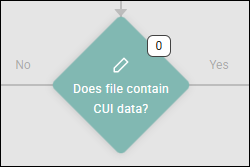
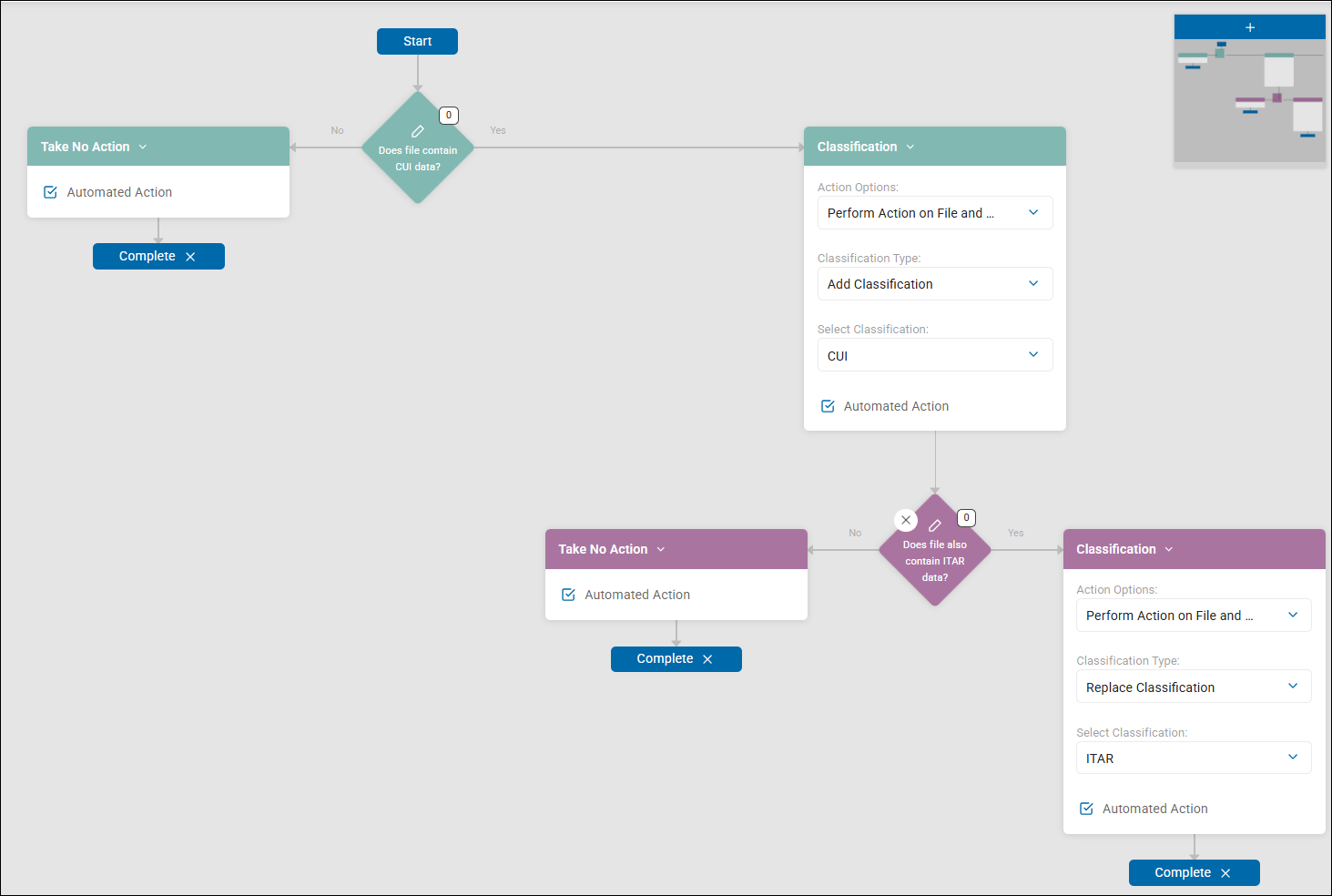
The playbook begins at the Start node and immediately hits the first decision point: "Does file contain CUI data?", which means: does the file being scanned by Spirion Sensitive Data Platform contain controlled unclassified information (CUI) as defined in the decision point.
- "No" Path: If no CUI data is detected, the playbook executes the "Take No Action" automated action and moves to Complete.
- "Yes" Path: If CUI data is found, the playbook proceeds to the first remediation step, which classifies.
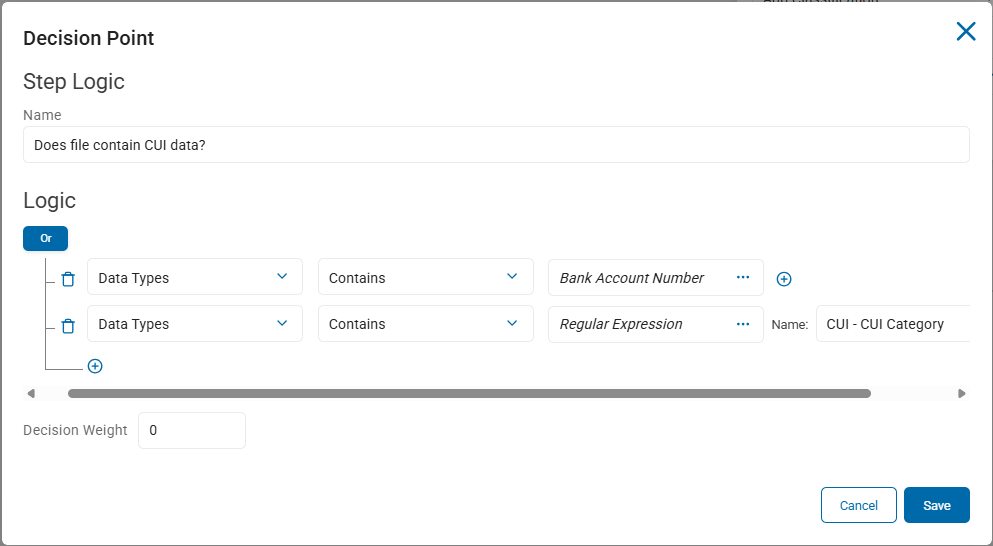
This step evaluates two conditions:
- Whether the file scanned contains a Bank Account Number data type.
- Whether the file scanned contains one of the CUI categories defined in the custom data type CUI - CUI Category, described above.
- These conditions are joined using an "Or" operator, so only one of them has to be true in order for the decision point to be satisifed and the 'Yes' path to be selected from this decision point.
2. Initial Remediation: CUI Classification
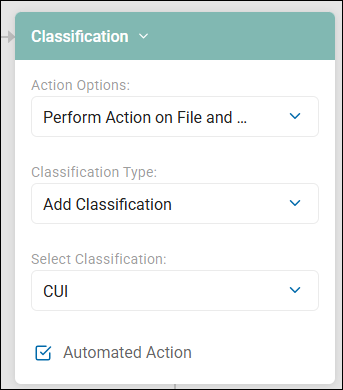
For files containing CUI, the playbook does the following:
- Action: Add Classification (labels the file containing CUI data).
- Label: "CUI"
- Scope: Applies to the file and the file metadata ("Perform Action on File and..."). This ensures the file is marked as governed CUI data before the playbook continues to check for further sensitivity.
3. Secondary Decision: ITAR Overlap
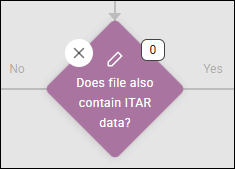
After the CUI label is applied, the playbook evaluates the file again with a second decision point: "Does file also contain ITAR data?".
- "No" Path: If the file contains CUI data but not ITAR data, the playbook executes "Take No Action" (meaning it keeps the CUI label already applied) and moves to Complete.
- "Yes" Path: If the file contains both CUI and ITAR data, the playbook moves to a higher-priority remediation step.
The Decision
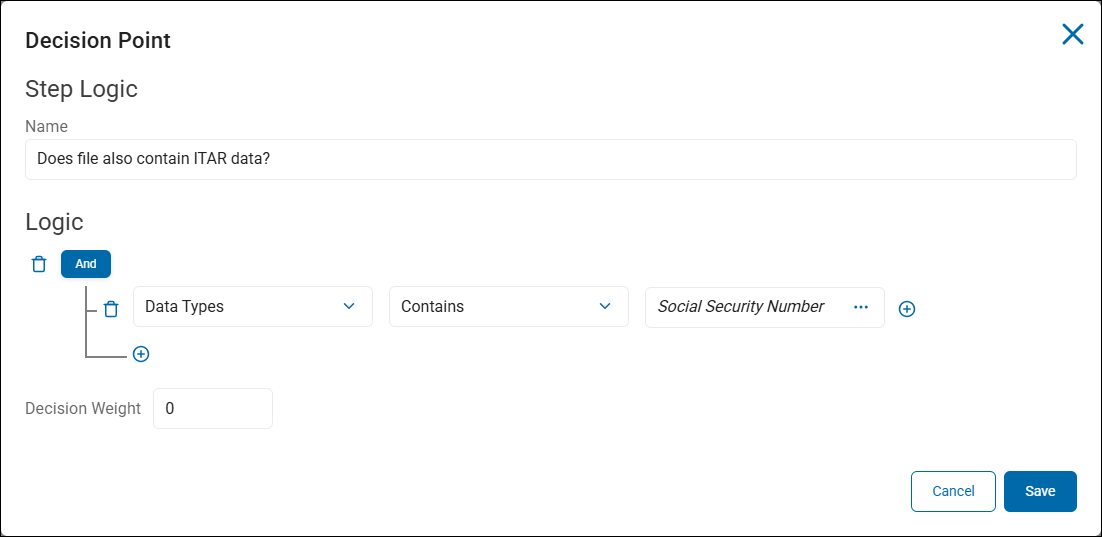
4. Final Remediation: ITAR Escalation
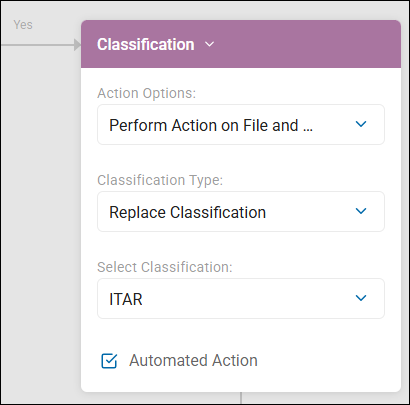
Because ITAR data often carries stricter regulatory requirements than standard CUI, the playbook escalates the classification as follows:
- Action: Replace Classification.
- Label: "ITAR"
- Logic: This step replaces the previously applied "CUI" label with the "ITAR" label, ensuring the file is governed by the most restrictive applicable standard.
- Outcome: The workflow then moves to Complete.
Summary of Flow
- Identify CUI: If found, tag the file "CUI".
- Check for ITAR: If the CUI file also contains ITAR data, upgrade the tag (replace the "CUI" classification with "ITAR".)
- Final State: The file ends up classified as either CUI (if only CUI is present) or ITAR (if both are present), ensuring the highest level of required classification is applied.