
Example: PCI Classification Scan Playbook
PCI data, or Payment Card Industry data, refers to credit and debit card information that organizations handle when processing payments. It is strictly governed by the Payment Card Industry Data Security Standard (PCI DSS), a global baseline created by major credit card companies to prevent fraud and secure transactions
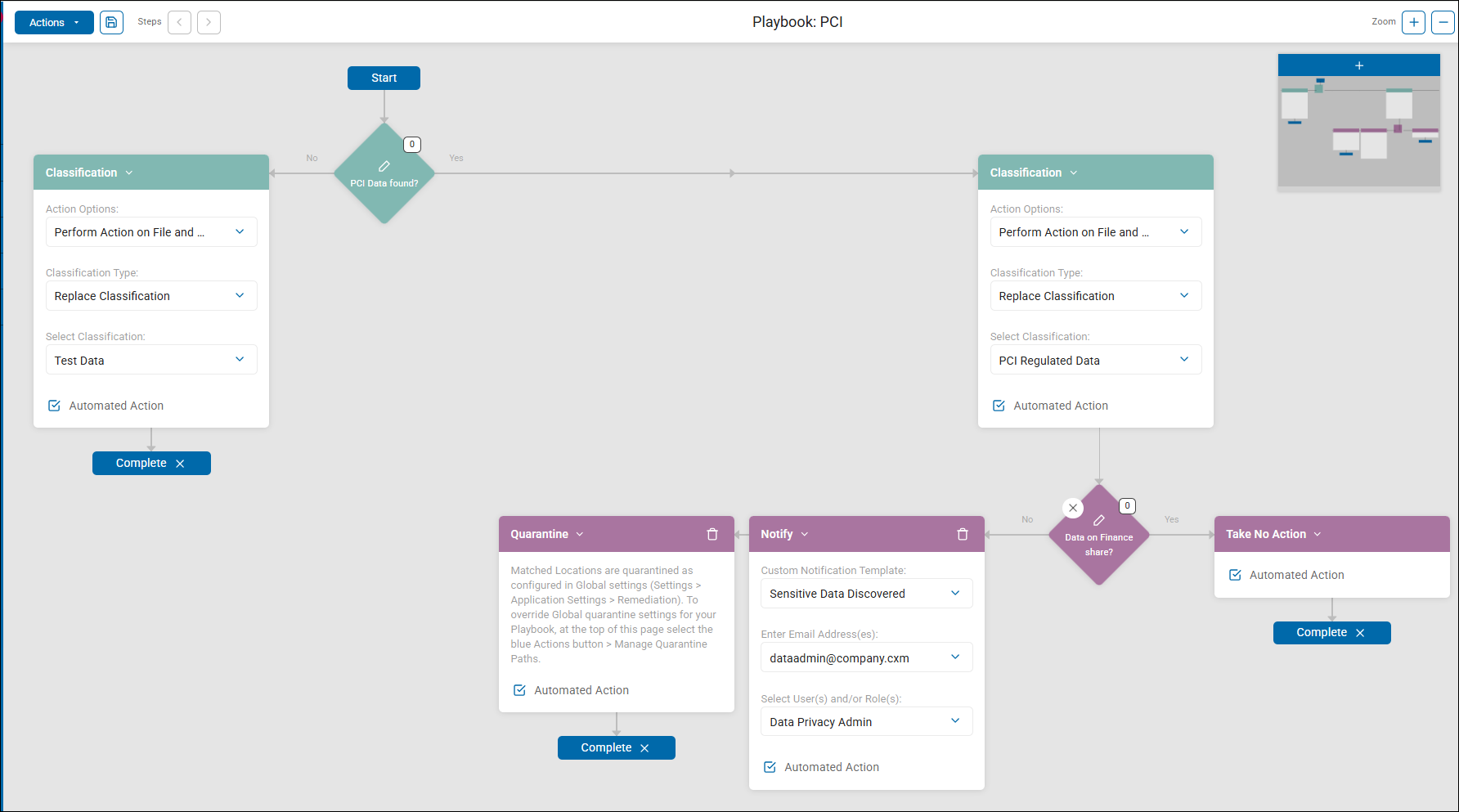
Overall Flow
Start
└─► PCI Data found?
├─ No ──► Replace Classification: "Test Data" ──► Complete
└─ Yes ──► Replace Classification: "PCI Regulated Data"
└─► Data on Finance share?
├─ Yes ──► Take No Action ──► Complete
└─ No ──► Quarantine ──► Complete
Notify ──► Complete
Decision Point 1: "PCI Data found?"
- Logic: Data Types → Contains → [Bank Account Number, Credit Card Number]
- A single rule with two AnyFind data types selected.
- Either a Bank Account Number or a Credit Card Number match anywhere in the file is sufficient to route to the Yes branch.
- Decision Weight is 0 — no scoring threshold, pure pass/fail.
If No — PCI data not found
- Action: Replace Classification → "Test Data" (Automated)
- Files with no PCI data have any existing classification replaced with "Test Data."
- This is a deliberate design signal — it suggests this playbook runs against a known population of files that are expected to contain PCI data.
- Files that don't match are explicitly flagged as test/non-PCI content, not left unlabelled.
→ Complete
If Yes — PCI data found
- Action: Replace Classification → "PCI Regulated Data" (Automated)
- The file is immediately reclassified as "PCI Regulated Data," overwriting any prior classification.
- This happens before any further routing decisions are made — every file containing PCI data gets this label regardless of where it lives.
Decision Point 2: "Data on Finance share?"
- Logic: Location → Contains → "FinanceShare"
- Checks whether the file's path contains the string "FinanceShare."
- This distinguishes between PCI data that is authorised (residing in the designated Finance file share) versus PCI data found outside its expected location.
If Yes — PCI data IS on the Finance share
- Action: Take No Action (Automated)
- PCI data on the Finance share is considered expected and appropriately stored. No remediation is triggered.
- The file retains its "PCI Regulated Data" classification and the playbook completes.
→ Complete
If No — PCI data is NOT on the Finance share
Two actions execute in parallel, both automated:
- Action 1: Quarantine (Automated)
- Files are moved to the quarantine location defined in Settings > Application Settings > Remediation (Global quarantine settings).
- The location can be overridden per-playbook via Actions > Manage Quarantine Paths.
- Action 2: Notify (Automated)
- Custom Notification Template: Sensitive Data Discovered
- Email recipient: dataadmin@company.cxm
- Role recipient: Data Privacy Admin
Both the hardcoded email address and all users assigned to the Data Privacy Admin role receive the notification simultaneously.
→ Complete
Key Design Observations
- Replace Classification (not Add) — Every file processed gets a clean authoritative label, overwriting whatever was there before. No ambiguity in classification state.
- The "No PCI" branch actively labels files as "Test Data" — This is intentional. It implies the playbook is designed to run against a controlled dataset where all files are expected to be either PCI or test content.
- Location-aware remediation — PCI data in the right place (Finance share) is tolerated. PCI data found anywhere else is treated as a data sprawl risk requiring immediate quarantine and notification. This is sound PCI-DSS scoping logic.
- Fully automated end-to-end — No human approval gate exists anywhere in the flow. Quarantine and notification both fire without intervention, making this suitable for continuous automated enforcement.
- The "Sensitive Data Discovered" notification is a Custom Notification Template — Confirming that Custom Notifications (under Application Settings) are pre-defined reusable email templates referenced here by name, rather than having email content configured inline per playbook.