
Working with Policies - Overview
The Policies page is where you manage all your organization's policies. Policies govern how Agents, which are worker processes, scan and evaluate locations for sensitive data such as social security numbers and phone numbers.
Overview
- Policies govern how Agents, which are worker processes, scan and evaluate locations for sensitive data such as social security numbers and phone numbers.
- For a basic view of policies, see What is a Policy?
- Other individual topics contains detailed information about the settings that control how Agents operate.
- How to Create a New Policy Using the Wizard
- How to Create a Policy Using the Wizard - Agent Operations - Advanced Options
- Create a Policy Using the Create Policy Wizard - Additional Settings
- Create a Policy Using the Create Policy Wizard - Additional Settings - Advanced Options
- Create a Policy Using the Create Policy Wizard - Local Reporting Options
- Create a Policy Using the Create Policy Wizard - Local Logging Options
- Create a Policy Using the Create Policy Wizard - Local Logging - Advanced Options
- For information about Agents and how they work, see What is an Agent?
Use the following steps to access the Policies page:
- From the left side navigation menu, click Agents.
- Next, click Policies from the menu.
- The Policies page opens.
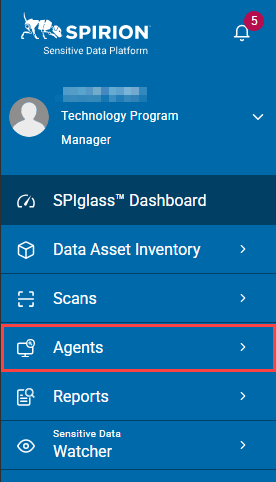
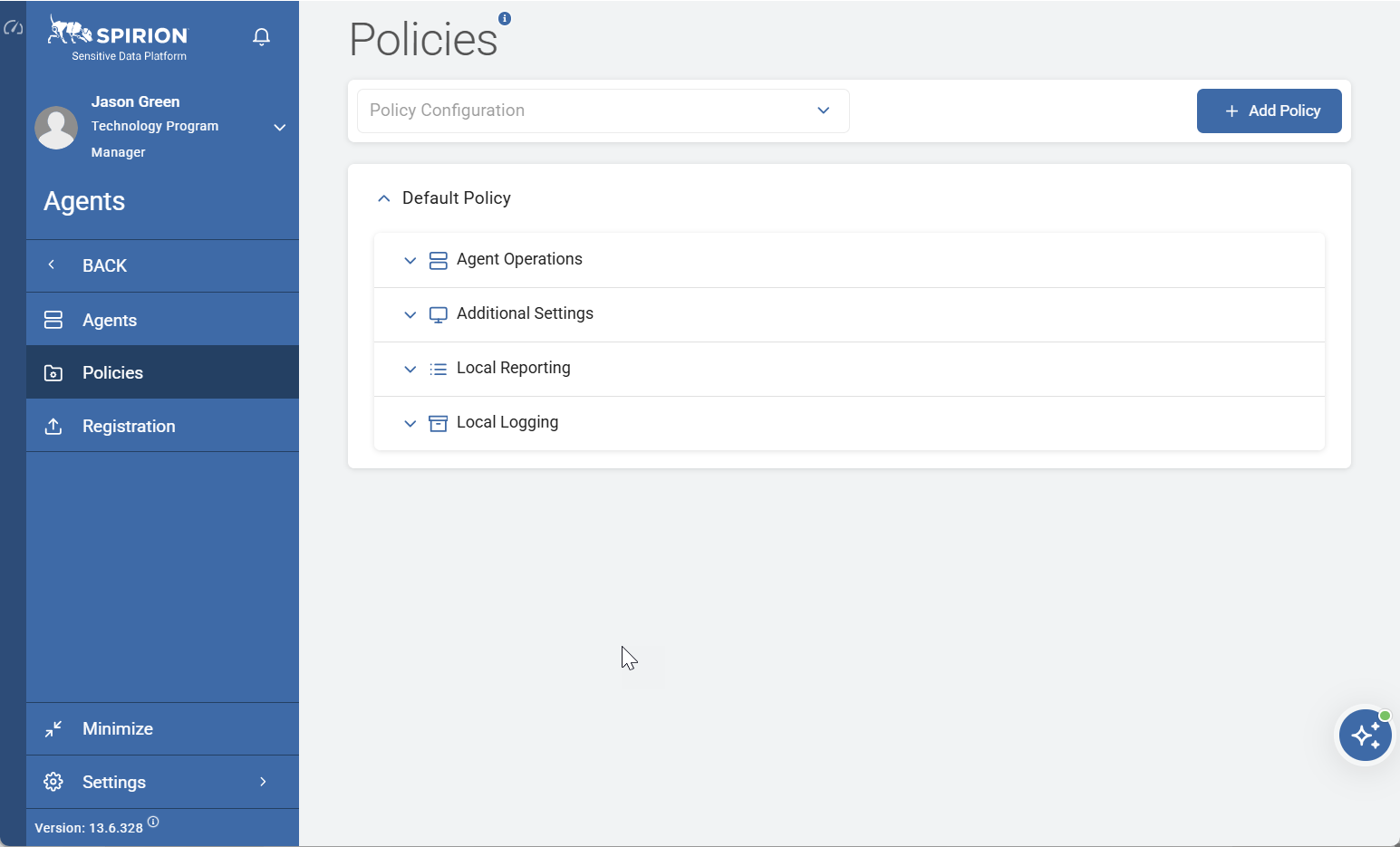
Here is a complete picture of the Agents > Policies page in Spirion Sensitive Data Platform:
Function and Purpose of Policies and the Policies Page
- The Policies page (
/agents/policies) is the central management screen for Agent Policies — named configuration profiles that control how Agents behave. - Each policy is a bundle of settings that gets pushed down to Agents at poll time
- Policies tell Agents how to operate (not what to scan)
- What to scan is configured by Scans.
- What to do when sensitive data is discovered by the scan is configured in Scan Playbooks.
Core Functions
- An administrator creates, edits, or deletes policies on the Policies page.
- When an Agent polls the console, it receives the policy assigned to it and applies those settings locally.
User Roles That Can Access the Policies Page
Only members of the following user roles can access the Policies page:
- Administrator
- Data Privacy Administrator
What an Agent Policy Controls
A policy bundles the following categories of settings:
Policy Setup Basics
- Policy Name — Unique identifier (required)
- Polling Interval — How frequently the Agent checks in with the console (integer, minutes; must be ≥ 30; no decimals)
Agent Behavior
- Log Location — Where the Agent writes its EPS log
- Log Level — Verbosity (0–6 scale, maps to Microsoft's LogLevel enum)
- Max Hard Drive Usage (% Free) — Disk threshold before Agent pauses
- Max Hard Drive Usage (GB Free) — Disk threshold before Agent pauses
- Enable Watchdog Service — Toggle (default: Yes); monitors the Agent service to ensure it's running
- Proxy Settings — Enable Proxy toggle + IP Address, Port, Username, Password (for environments requiring proxy to reach the console)
File and Folder Monitoring (Watcher-related)
- File and Folder Inclusions — Paths the Agent monitors
- File and Folder Exclusions — Paths the Agent ignores
Additional settings added over time
- Temp Shred Location — Configurable path for temporary shred operations
- Script Execute User Selection — Which user context runs playbook scripts
How Policies Are Assigned to Agents
- Policies are not assigned to Agents from the Policies page.
- Policies are assigned to Agents from the Agent Management page. See the example image below.
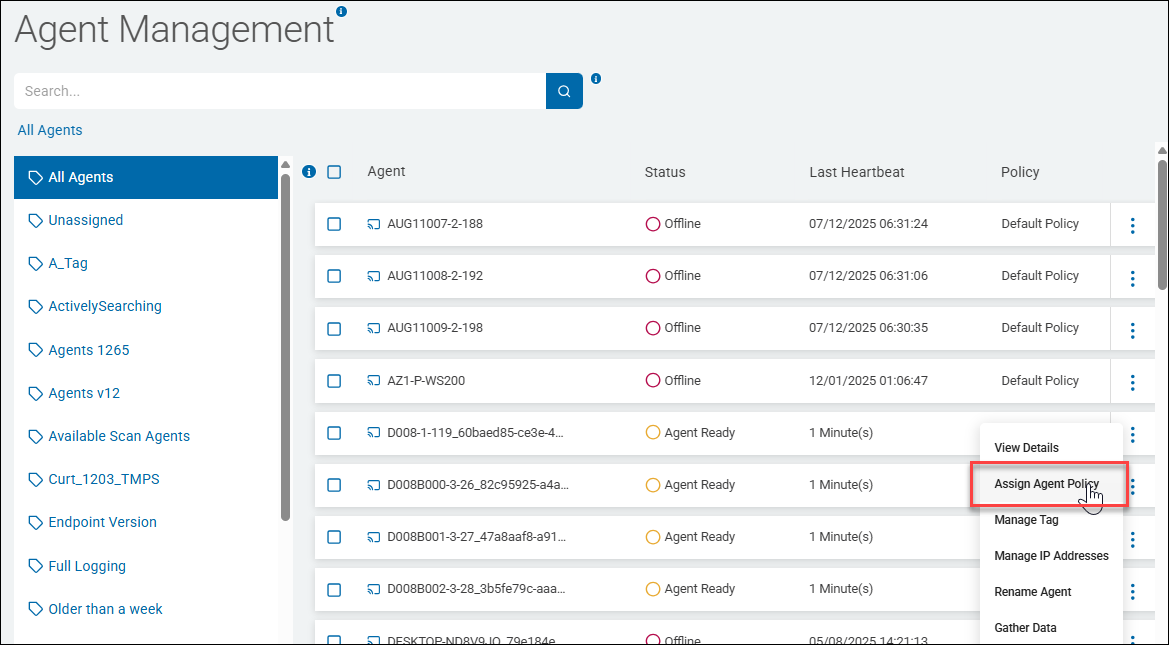
- The Policies page is for defining policies; assignment happens per-Agent or in bulk from the agent list.
- Once assigned, the policy is delivered to the Agent on its next poll via
svc-AgentController→GetClientState→ policy XML download. - The policy is serialized as an XML attachment and cached server-side.
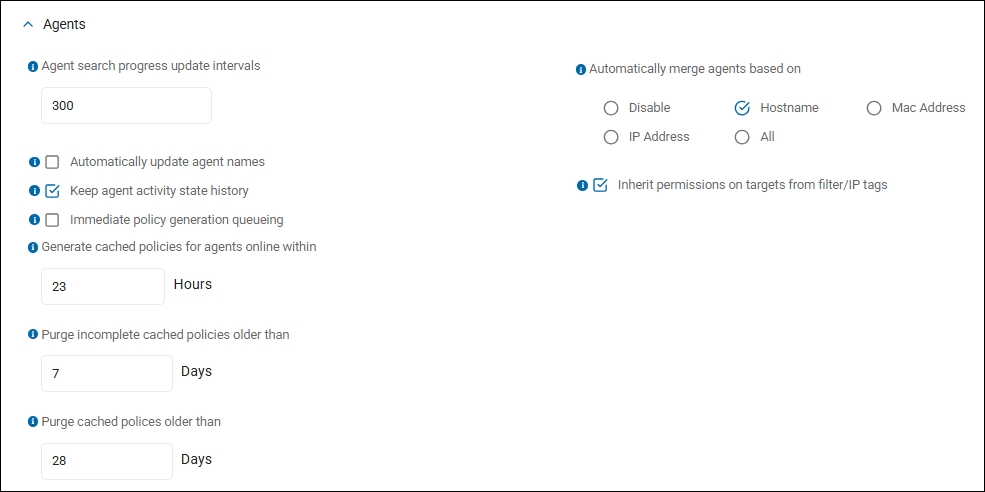
Three global settings (configurable in Settings > Scans Settings > Agents panel) control the cache lifecycle:
- Generate cached policies for agents online within — Only generate policies for Agents that polled recently. Default: 24h.
- Purge incomplete cached policies older than — Purge cached policy when Agent hasn't polled. Default: 7 days.
- Purge cached policies older than — Purge cached policy regardless of poll status. Default: 28 days.
Page Structure and UI
The page renders as a list of policies with expandable panels — each policy expander shows its settings inline.
Key UI characteristics:
- Default Policy — Every environment has a built-in default policy that cannot be deleted. Agents with no explicit assignment use this policy.
- Add Policy button — Launches the multi-step wizard (Policy Setup Basics → Agent Behavior → Monitoring → Review)
- Edit/Delete — Available per policy via context menu
Key Operational Notes
- Policy delivery is pull-based — Agents request their policy on each poll; the console doesn't push. If an Agent stops polling, it keeps its last-received policy until it reconnects.
- Policy changes take effect on next poll — Editing a policy doesn't immediately update Agents; they pick up changes at their next polling interval.
Summary
- The Agents > Policies page is the Agent configuration management hub — it defines named profiles that control Agent runtime behavior: logging, disk thresholds, watchdog, proxy, polling interval.
- Policies do not control what gets scanned (that's playbooks/scans) but rather how the Agent operates while scanning.