
How do I verify if search Agents are idling or timing out?
Use the information in this article to determine how and why distributed scan search Agents are idling or timing out.
To verify whether distributed scan search Agents are idling or timing out in SystemSearch log files, inspect the logs generated by the scan engine (identityfinderCMD.exe).
1. Log Location & Naming
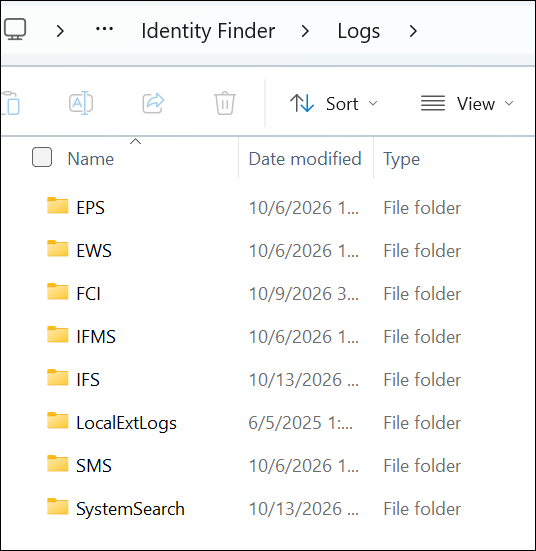
- On the Host Endpoint: %ProgramData%\Identity Finder\Logs\SystemSearch\
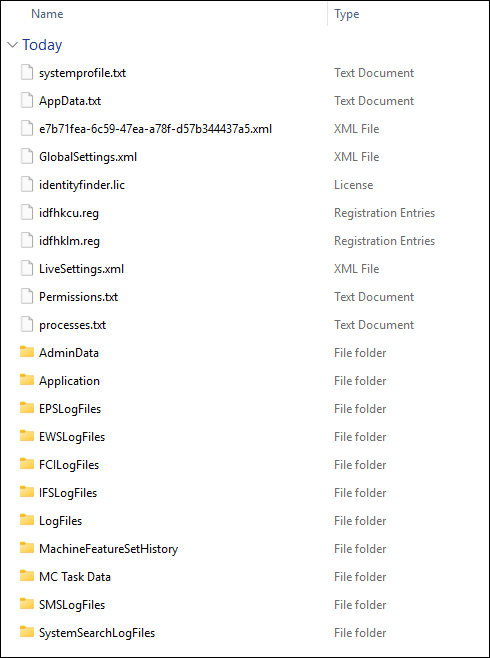
- Inside a Gather Data ZIP: [GatherData_Bundle.zip]\SystemSearchLogFiles\
- Log Filename Format: SystemSearchLogFiles_<ScanGUID_or_Date>.log
2. Key Log Signatures to Look For
There are 3 key log signatures to look for in the log directory SystemSearchLogFiles:
- Waiting/Polling Loop (Idling State)
- Queue Wait Timeout Expiration (Failure Point)
- Premature Exit and Summary Payload
A. Waiting / Polling Loop (Idling State)
- When a Search Agent is waiting for the Discovery Agent to populate the local PostgreSQL job queue, you will see repetitive retry and wait messages at regular intervals (typically every 30 seconds):
[INFO] GreyhoundAgentWorker::RunSearchAgentProcessing: Waiting for Discovery Queue / job queue tasks...
[DEBUG] PostgreSQLWrapper::_AttemptReconnection: Checking queue table for pending tasks (attempt 12/60)...
[DEBUG] No pending rows found with status 'Pending' in JobQueue_<ScanGUID>
B. Queue Wait Timeout Expiration (Failure Point)
- When the search worker reaches the configured Queue Wait Timeout without receiving new work, it logs an internal stop trigger:
[WARN] GreyhoundAgentWorker: Search Agent timed out waiting for Discovery job queue after [X] minutes.
[ERROR] TIMEOUT_WAITING_FOR_DISCOVERY_JOBQUEUE
[DEBUG] IDFVars.internalStopDetected = TRUE
C. Premature Exit & Summary Payload
- Instead of processing scan items, the Search Agent immediately generates an empty summary payload with a timeout status:
[INFO] Sending scan preamble to local shipper...
[INFO] Completion status set to: QueueWaitTimeout
[INFO] Finalizing worker scan loop - 0 items processed, 0 matches found.
[INFO] Process identityfinderCMD.exe exiting with code 0 (InternalStop: QueueWaitTimeout)
3. Step-by-Step Verification Procedure
Check Timestamp Alignment Between Discovery & Search Agents
- Open the Discovery Agent's log.
- Note the exact time it created the queue table (
JobQueue_<ScanGUID>) and wrote the first batch of rows.
- Note the exact time it created the queue table (
- Open the Search Agent's log.
- If the Search Agent started and reached its timeout before the Discovery Agent finished inserting rows, the Search Agent exited prematurely due to an insufficient wait timeout.
Verify Process Execution Duration
- Compare the timestamp of the first
Waiting for Discovery Queuelog line with theQueueWaitTimeoutexit line. - If the elapsed time matches your configured setting (for example, exactly 5 minutes or configured minutes), the Spirion Search Agent stopped because the timeout threshold was reached.
- Compare the timestamp of the first
Cross-Check Local PostgreSQL Queue Tables
- If the Search Agent timed out, querying the local agent PostgreSQL database shows jobs stuck in "Pending" with no active Processing status transitions:
SELECT status, count(*) FROM "JobQueue_<ScanGUID>" GROUP BY status;
Quick PowerShell/Command-Line Checks
- To quickly search for timeout indicators across all logs in the folder run the following commands:
# Search for queue timeout signatures
Select-String -Path "C:\ProgramData\Identity Finder\Logs\SystemSearchLogFiles\*.log" -Pattern "QueueWaitTimeout", "TIMEOUT_WAITING", "internalStopDetected"

# Check for search loop polling cycles
Select-String -Path "C:\ProgramData\Identity Finder\Logs\SystemSearchLogFiles\*.log" -Pattern "AttemptReconnection", "Waiting for Discovery Queue"